How to Create and Manage a Project in iDempiere
Creating a project is the first step in managing execution, materials, costs, and accounting in iDempiere. The project acts as the central container for phases, tasks, purchases, material issues, and invoices, ensuring all execution activities remain linked and controlled.
Process Flow Diagram

Create a New Project
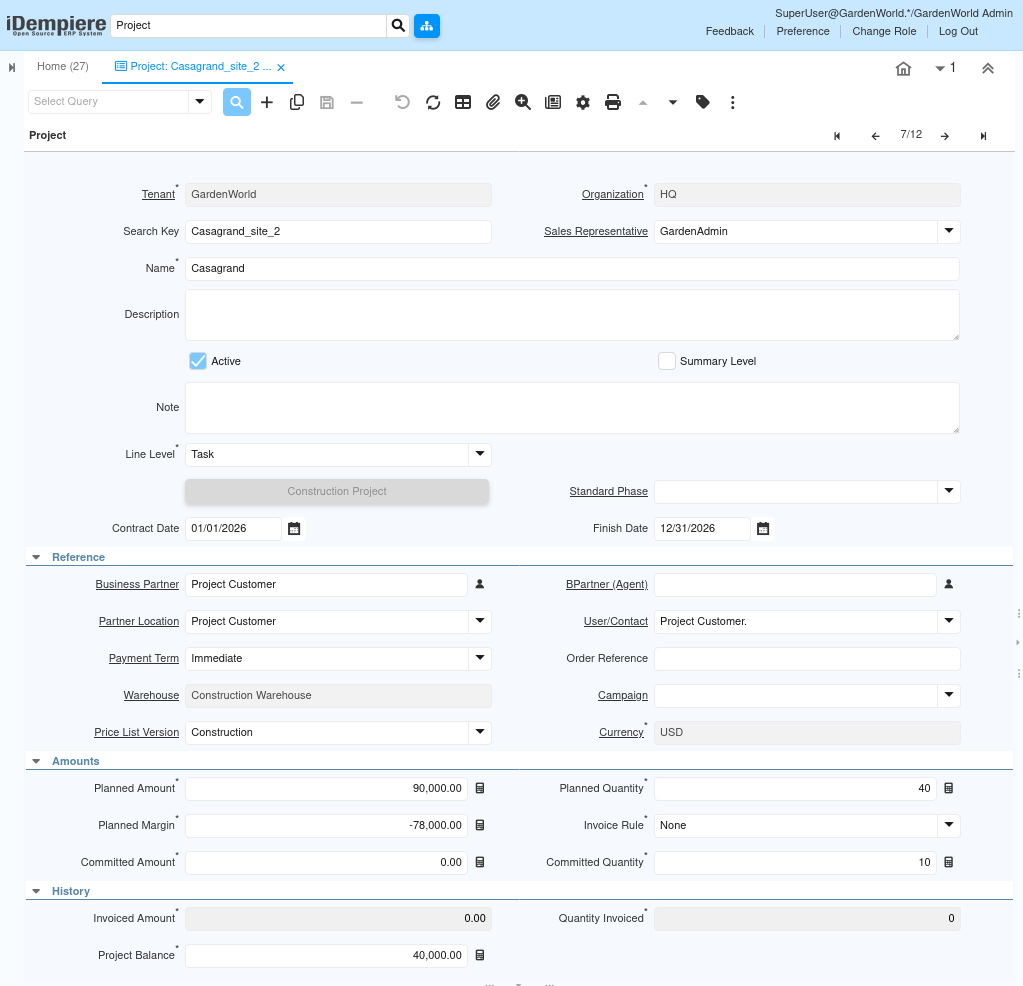
To begin, open the project screen from the Project Management module and create a new record. This screen is where the project is defined at a high level.
You start by entering a search key, which acts as a unique internal reference for the project.
The project name is a clear, readable title that will appear on screens, reports and dashboards.
The organization field defines which company unit owns the project. This is critical for security, reporting, and accounting separation.
The sales representative identifies the internal user responsible for overseeing the project.
Define Project Status and Planning Structure
Once the project is identified, you define its basic structure and status.
The active flag controls whether the project can be used in transactions. Only active projects can be linked to purchases, material issues, or invoices.
The summary level option is typically left unchecked for operational projects; it is used only when creating parent or grouping projects.
The line level field defines how detailed the project planning will be. When set to task, the project allows detailed tracking through phases, tasks, and task lines. This is the recommended setting for construction, service, and execution-based projects.
Establish the Project Timeline
Dates define the project timeline and are used throughout planning and reporting.
The contract date represents when the project agreement was finalized.
The finish date indicates the expected completion date of the project. These dates help measure delays, progress, and timeline performance later.
If phases and tasks are created with dates, they are expected to fall within this overall project timeline.

Link Business and Commercial Information
This section connects the project to customers, logistics, and pricing.
The business partner represents the customer or internal entity for whom the project is executed. The partner location specifies the correct address for billing and reporting. The payment term defines how invoices related to this project will be paid.
The warehouse determines where project materials will be received or issued from. The price list version controls how prices are calculated when products or services are added to the project. The currency defines the financial currency used for all project values. These fields ensure that purchasing, inventory, and accounting transactions behave correctly once execution begins.
Set Project-Level Financial Expectations
The amounts section captures high-level financial expectations before detailed planning.
The planned amount represents the total expected value or budget of the project. The planned margin shows the expected profit. At this stage, these values can be estimates; they are refined automatically as phases, tasks, and task lines are added.
The committed amount starts at zero and increases as purchase orders and commitments are created. This gives early visibility into how much budget is already locked.
Review Project History and Balance
The history section shows real-time financial results as the project progresses.
The invoiced amount reflects how much has already been billed. The project balance shows the remaining value based on planned versus invoiced amounts. These fields are system-calculated and help management quickly assess project health.
As transactions are processed, iDempiere automatically updates:
- Committed costs
- Invoiced amounts
- Project balance

Before proceeding to phases and tasks, ensure the search key, organization, project name, and line level are filled, as these are mandatory to create a valid project header. The record was saved once the required field was completed.
The header is not just setup—it defines how the entire project lifecycle will function in iDempiere.
With the project header completed, the project is fully prepared for the next stages of execution. At this point, a project type can be applied to automatically generate the required phases, tasks, and task lines, enabling a structured execution model. The project is now capable of supporting procurement, inventory movements, and accounting transactions seamlessly, while also providing accurate visibility into project costs and progress throughout the lifecycle.