How Does Charge Type is Used in iDempiere
In iDempiere, a Charge Type is used to control how non-product amounts are treated in accounting such as positive amounts or negative amounts. Charges are typically used for expenses, fees, penalties, or service-related amounts where inventory tracking is not required.
Process Flow

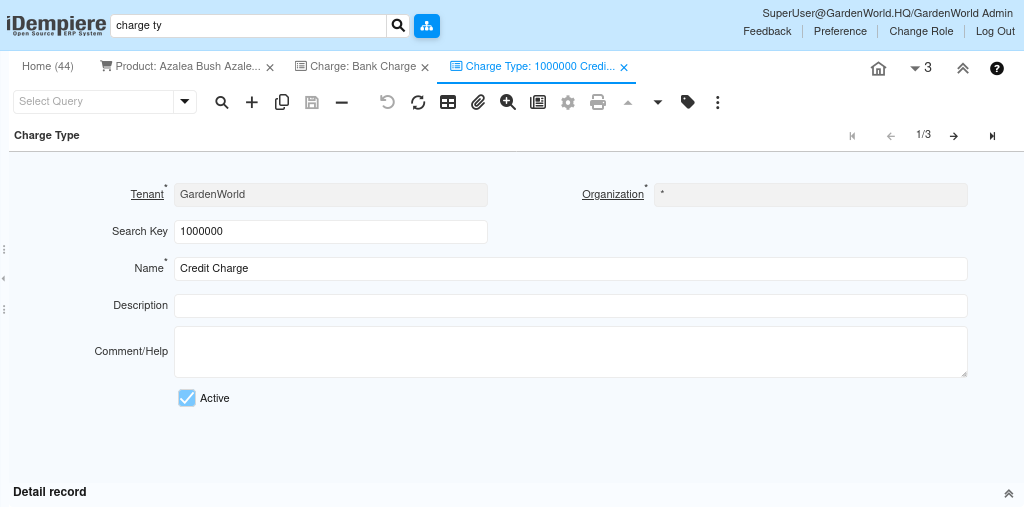
How to Create a Charge Type in iDempiere
- Navigate to the Charge Type window
- Create a new record
- Enter basic details
- Enter a meaningful Name for the Charge Type (for example: Invoice Adjustment).
- Add a Description if needed for clarity.
- Ensure the Charge Type is marked as Active.
- Save the record
How to Configure Charge Type by Doc Type in iDempiere
- Open the Charge Type you created.
- Go to the “Charge Type by Doc Type” tab.
- Create a new Charge Type by Doc Type record.
- Select the Document Type.
- Define amount behavior (Allow Positive or Allow Negative).
- Save the record.

During transaction processing, when a user selects a Charge on a document line, iDempiere looks at the associated Charge Type to understand how the amount should be accounted for, whether positive or negative. Since charges are not linked to products, they do not affect inventory quantities, storage, or valuation.
By using Charge Types, organizations can standardize how different kinds of non-inventory transactions are classified and posted, ensuring consistent accounting treatment and clearer financial reporting across the system.