How Discount Schema Works in iDempiere
To apply controlled discounts during sales and purchasing transactions, iDempiere uses a Discount Schema. A Discount Schema defines how discounts are calculated and applied to product prices based on predefined rules.
Process Flow

Purpose of the Discount Schema
The Discount Schema acts as a pricing rule that
- Applies discounts uniformly across products or categories
- Supports both simple and quantity-based discounting
- Reduces manual price adjustments during transactions
The discount logic is driven by the Discount Type selected in the schema.
Defining the Discount Type
The Discount Type determines how the discount is calculated. iDempiere supports two discount types:
- Flat Percent
- Breaks
Each type follows a different pricing approach.
Flat Percent Discount Type
When Flat Percent is selected
- A Flat Discount % field becomes available
- The defined percentage is applied to total value of the order.
- The discount applies regardless of product quantity.
An additional option allows
- B.Partner Flat Discount – when enabled, the system uses the discount percentage defined at the Business Partner master instead of the value entered in the Discount Schema
This approach is commonly used when a single discount rate applies across all products or customers.

Breaks Discount Type
When Breaks is selected
- A Quantity Based option is enabled
- A new tab called Discount Breaks becomes available
This allows discounts to vary based on ordered quantity or defined thresholds.

Configuring Discount Breaks
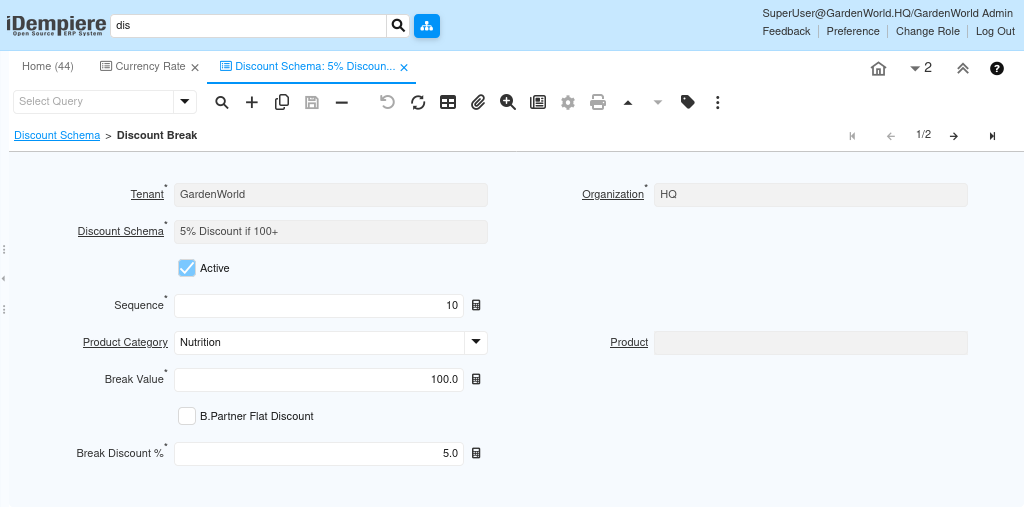
Within the Discount Breaks tab, users can define detailed discount rules.
Each Discount Break can include
- Product Category – specifies which products the rule applies to
Note: If a product category is not specified user can define discount for a single product.
- Break Value – defines the quantity threshold if Quantity based option is enabled or defines value.
- Break Percentage – discount applied once the break value is reached
- Flat Percentage – fixed discount applied for the break
- Business Partner Flat Percentage – when enabled, the discount is derived from the Business Partner master
These rules allow granular control over pricing and support volume-based discount strategies.
Assigning the Discount Schema to a Business partner or Partner Group
The Discount Schema becomes active only when it is assigned to a Business partner or Partner Group.
Once assigned
- All transactions using that Price List automatically apply the discount logic
- Users are not required to manually calculate or enter discounts
How the Discount Schema Is Applied in Transactions
During transaction processing
- The system identifies the Price List used
- The associated Discount Schema is evaluated
- Based on the Discount Type and rules, the applicable discount is applied
- The final price is calculated automatically
By using Discount Schemas, organizations can standardize pricing rules, support both flat and quantity-based discounts, and reduce manual pricing errors. Assigning the Discount Schema to a Business partner and Partner Group ensures discounts are applied consistently and automatically across all relevant transactions in iDempiere.