How Matched Purchase Orders Work in iDempiere
Matched purchase orders ensure that vendors are paid only for materials that were actually ordered and received. This process enforces three-way control between the purchase order, material receipt, and vendor invoice.
Process Flow Diagram
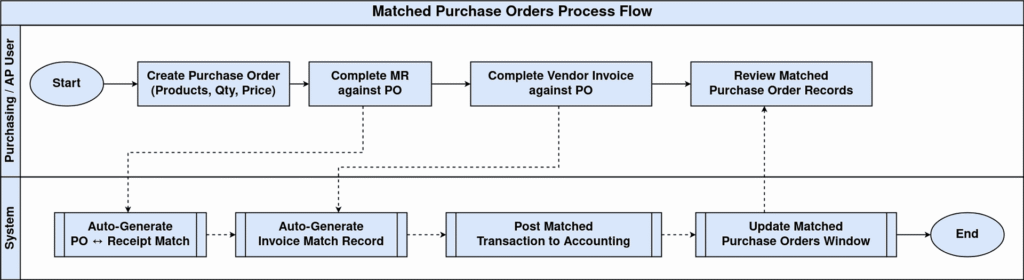
Purchase Order Creation
The foundation begins with creating a purchase order specifying products, quantities, and agreed prices. This PO document establishes the contractual baseline that governs all subsequent receipts, invoicing, and payment activities.
Material Receipt Completion
When materials arrive, they are recorded against the specific purchase order through material receipt transactions. iDempiere automatically generates PO-Receipt matching records upon receipt completion, confirming physical delivery quantities against the original order.
Vendor Invoice Completion
Vendors submit invoices referencing the purchase order or receipt, which are entered into the system. Upon invoice completion, iDempiere creates comprehensive invoice matching records that validate invoice quantities and prices against both the PO and actual receipts.
Automatic Matching Records
iDempiere maintains detailed matching records including PO ↔ Receipt matches and PO/Receipt ↔ Invoice matches. These complete records appear in the matched purchase orders window, representing the full three-way match verification process.
Verification & Accounting Control
Finance teams review these matched records to identify discrepancies such as over-billing, quantity mismatches, or price variances. Only properly matched transactions proceed to accounting postings, ensuring payment accuracy and financial integrity.
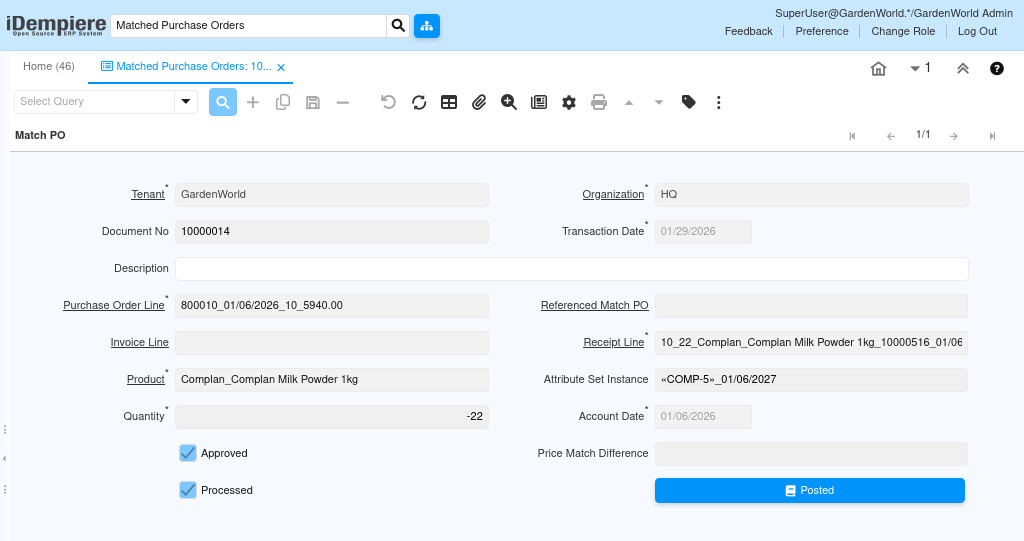
Matched purchase orders in iDempiere provide a controlled, auditable, and accounting-driven process that ensures every invoice is backed by a valid purchase order and confirmed material receipt.