How Sales Order Creation from RFQ Works in iDempiere
The sales order from RFQ converts a sourcing decision into a customer-facing transaction. It ensures that quoted and procured items are sold consistently to the intended customer, preserving pricing, references, and traceability without re-entering data.
Role of RFQ in Sales Order Creation
An RFQ in iDempiere can act as a bridge between purchase and sales. In your flow, the RFQ captures demand from a customer (Nutrition Retailer), sourcing happens from vendors (ATN), and once procurement is aligned, the same RFQ is used to generate the sales order.
This avoids disconnected sales creation and ensures that:
- The customer identity is preserved
- The commercial intent defined in RFQ is respected
- Sales and purchase flows remain linked for audit and analysis
Sales Order Creation Logic
Once the RFQ is active and relevant responses are processed, the system allows creation of a sales order directly from the RFQ using the process action.
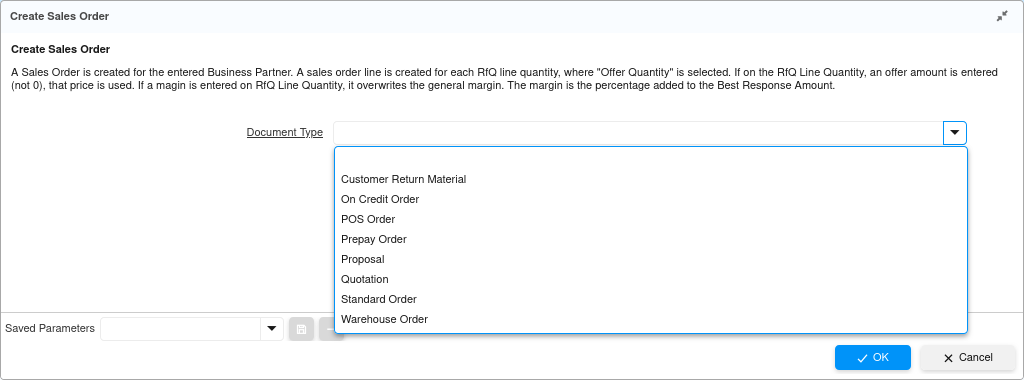
At this stage, the user selects:
- Document Type: Typically Standard Order
- Confirms the creation process
The system then generates a new sales order in draft status.
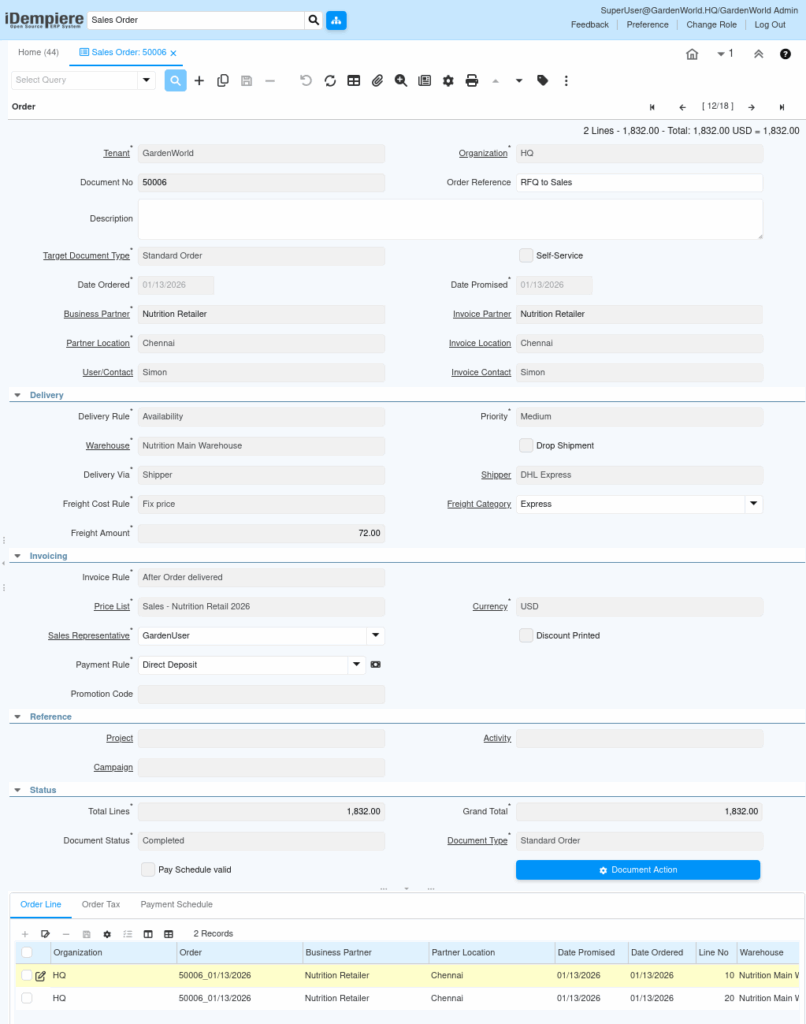
Header Inheritance and Auto-Filled Data
The created sales order automatically inherits critical data from the RFQ header and business context.
Key behaviors:
- Business Partner is taken from the RFQ business partner section
In your case, this becomes the Customer (Nutrition Retailer), not the supplier. - Partner Location and Contact are defaulted from the customer master
- Currency, Sales Representative, Organization follow RFQ context
- Order Reference clearly indicates linkage back to RFQ
This ensures that the sales order is commercially aligned without manual re-selection.
Sales Order Line Handling
Unlike purchase order creation, sales order lines are not auto-created from RFQ lines.
This is intentional.
Reason:
- RFQ lines represent requested or quoted quantities
- Sales orders represent actual selling commitments
As a result:
- The sales order is created with empty lines
- The user manually enters:
- Product
- Quantity
- UOM
- Price (from Sales Price List or negotiated)
- Freight or additional charges if applicable
This design allows commercial flexibility before committing the sale.
Completion and Downstream Sales Flow
Once lines are entered and verified, the Sales Order is completed. From this point, standard sales logistics apply.
Typical downstream flow:
- Customer Shipment
Goods are picked from the warehouse where stock was received via purchase order. - Shipment Confirmation
Includes pick, QA, and customer confirmation steps if configured. - Sales Invoice
Generated based on invoice rule (e.g., after delivery). - Customer Payment
Recorded according to payment rule and terms.
Each step remains fully traceable back to the original RFQ.
Purpose and Outcome
This mechanism exists to close the loop between sourcing and selling.
Business outcomes:
- Eliminates duplicate data entry
- Preserves demand-to-supply traceability
- Ensures correct customer, pricing context, and ownership
- Supports audit, margin analysis, and lifecycle reporting
In practice, the RFQ becomes the commercial anchor, connecting vendor selection, purchasing, inventory, and final customer sales into one controlled workflow.