How Invoice Batch works in iDempiere
The Invoice Batch window in iDempiere allows users to enter multiple invoices together in a structured batch and then create the actual invoice documents in a single processing step. This feature is especially useful for businesses that need to handle bulk invoice entry — for example, when recording expense invoices for many vendors at once.
Process Flow Diagram
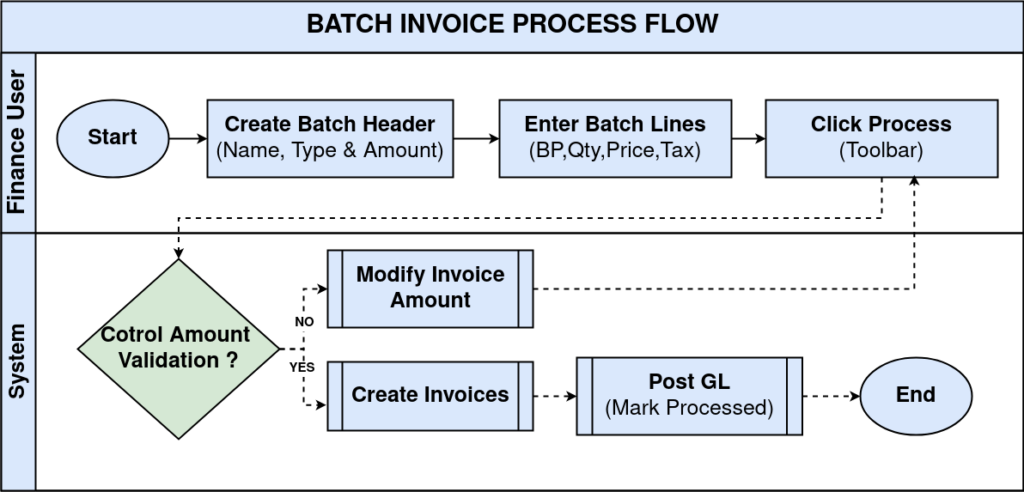
Defining Invoice Batch Header
To start using invoice batch, you first fill in the batch header. Here, you specify:
- A name for the batch
- A document number (or let the system generate one)
- A document date
- Whether the batch is for sales invoices (AR) or vendor invoices (AP)
- The currency and conversion type
- An optional control amount to enforce that the total must match a specified figure before processing
These header fields control how the individual invoice documents will be created during batch processing.

Entering Invoice Batch Lines
Once the batch header is defined, you move to the batch line tab to enter multiple invoice lines. Each line represents a future invoice document and includes:
- Document type (determines how the invoice behaves)
- Document number (can be auto-generated or manually entered)
- Invoice date and accounting date
- The business partner (customer or vendor)
- Quantity, price, tax, and charges
- Optional project or activity codes to help match expenses or revenue by context
iDempiere uses this detailed information to build proper invoice documents when the batch is processed.

Processing Invoice Batches
After all lines are entered, you click the create invoices or process button. At this point:
- iDempiere reads the batch and creates individual invoice documents
- Each line becomes its own invoice based on the selected document type
- System numbering, tax rules, and accounting dates are applied
- The batch record is marked as processed
This step effectively turns a group of draft invoice lines into real posted invoice records in the ERP.

Invoice Batch Accounting Generation
Once individual invoices are created from the batch, iDempiere handles general ledger postings (per accounting schema), tax calculations, and payables/receivables integration. Batch-recorded fields ensure accounting and reporting match manually entered invoices exactly.
In iDempiere, the invoice batch is a structured way to enter and create multiple invoices at once. You define a batch header, enter lines representing individual invoices, and then process the batch to generate real invoices with full accounting and tax implications. This improves efficiency for high-volume invoice processing and keeps records consistent and auditable.