How Verify Document Types Works in iDempiere
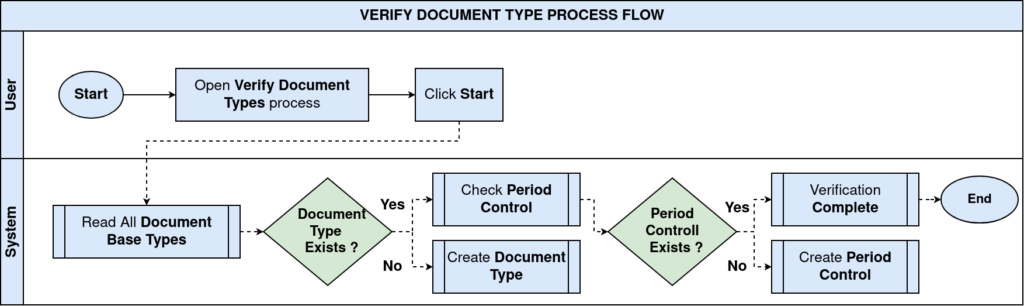
Verify Document Types is a system verification and setup utility that ensures core document control configuration is complete and consistent across the application.
Its role is to:
- Ensure that every document base type has a corresponding document type
- Ensure that period control records exist for those document types
This process does not create business transactions.
It validates and completes system configuration prerequisites required for documents to be processed safely.
Process Flow
What Verify Document Types Represents
Verify document types acts as a configuration integrity checker.
It ensures that iDempiere has:
- A valid document type definition for every functional document category
- A corresponding period control setup so documents can be controlled by accounting periods.
Without this verification, documents may exist in the system conceptually but cannot be processed or controlled correctly.
Ensuring a Document Type for Every Document Base Type
The first function of Verify Document Types is:
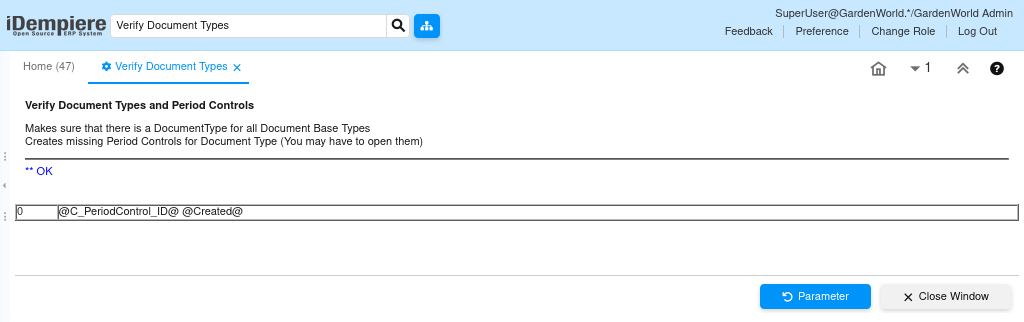
“Makes sure that there is a document type for all document base types”, it means iDempiere checks all predefined document base types, and it verifies that each one has at least one corresponding document type. If the document base type is missing a document type, the system creates it automatically.
Creating Missing Period Controls for Document Types
The second function of Verify document types is:
“Creates missing period controls for document type (you may have to open them)”
After confirming document types exist, iDempiere:
- Checks whether period control records exist for each document type.
- Automatically creates missing period control entries.
- Newly created period controls may be closed by default.
- Users must manually open them before documents can be processed.