How RFQ Unanswered Report Works in iDempiere
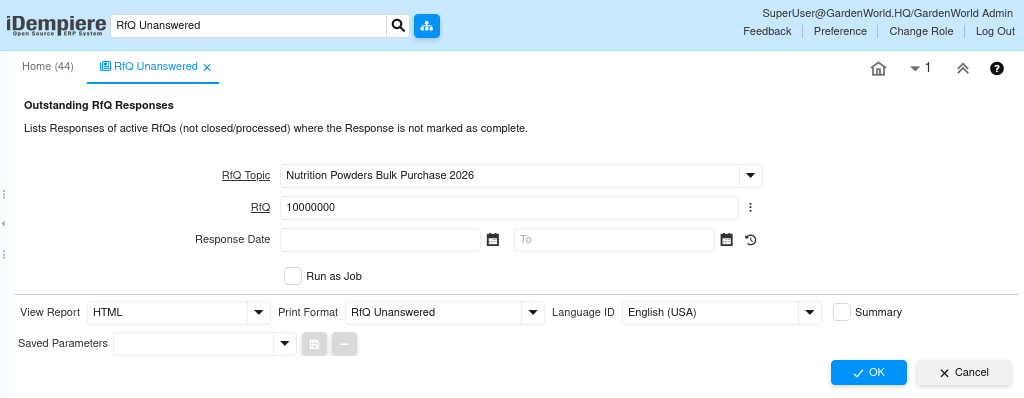
The RFQ Unanswered Report provides clear visibility into vendors who have not yet responded to an active RFQ. It acts as a control and follow-up tool, helping procurement teams identify response gaps before deadlines are missed or sourcing decisions are delayed.
Purpose and Role in RFQ Lifecycle
This report exists to protect the RFQ process from silent failures. In real procurement cycles, vendors may miss emails, delay internal approvals, or ignore RFQs. Without visibility, buyers assume lack of interest too late.
The RFQ unanswered Report highlights which suppliers are pending, enabling timely reminders, replacements, or escalation.
Transaction and Configuration Flow
Once an RFQ is created and invitations are sent, the system expects responses from invited vendors. Each vendor is tracked independently.
If a vendor does not mark their RFQ response as complete, the system treats it as unanswered and includes it in this report.
The report evaluates only:
- Active RFQs
- RFQs not closed or processed
- Vendors whose responses are not completed
Key Data Interpreted by the Report
The report consolidates operational and commercial context so buyers can act quickly.
It shows:
- Business Partner and Location
- RFQ and RFQ Topic
- RFQ Type (All quantities / Selected lines)
- Response Date (if any)
- Responses Accepted flag
- Sales Representative and User
- Work Start date

Business Usage and Outcomes
Procurement teams use this report during active sourcing windows to maintain momentum.
Common use cases:
- Following up with non-responsive suppliers
- Re-inviting or replacing vendors
- Assessing RFQ reach and engagement quality
- Avoiding delays in response ranking and order creation
The RFQ Unanswered Report ensures no RFQ stalls silently.
It enables proactive follow-ups, better supplier coverage, and on-time RFQ closure—leading to faster purchasing decisions and reduced sourcing risk.