How Payment Selection Works in iDempiere
The Payment Selection process in iDempiere is used to collect, review, filter, and approve outstanding vendor invoices (or customer open items if used for AR) before generating actual payment documents. It acts as a controlled intermediate step between open payables and the final payment creation.
The screen is divided into three functional areas
- Payment Selection Header – overall criteria and execution control
- Create From function – filtering and loading open invoices
- Payment Selection Lines & Prepared Payments – reviewing and finalizing payments
Together, these components allow the finance team to execute payment runs efficiently and securely.
Payment Selection Header for defining the payment run
The Header section is used to define the context of the payment run. It specifies the name, bank account, payment date, total amount, and approval status. This information determines how payments will be executed and from which account they will be issued.
The header defines
- The Bank Account from which funds will be paid
- The Payment Date that determines due date comparisons and discount eligibility
- Whether the run is Approved, allowing payments to be generated
- Total Amount, which summarizes the amount targeted for payment
- One Payment Per Invoice, which controls whether the system groups payments or keeps them separate
The header acts as the control point for the entire payment process. Nothing can be generated until the header is correctly configured.
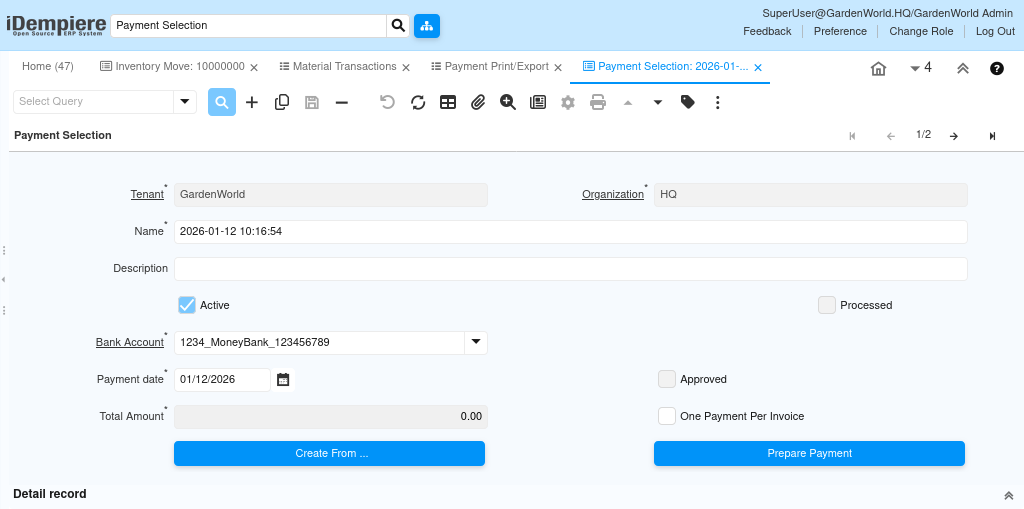
Create From button for selecting which invoices are eligible for payment
The Create From function is used to load open invoices or payment schedule lines based on a set of filters. This step determines which payables will appear in the Payment Selection Lines tab.
The filtering options help the finance team:
- Choose specific Business Partners or Business Partner Groups
- Limit to open items that offer discounts
- Include only due or overdue invoices
- Filter by due date threshold
- Optionally include invoices in dispute
- Restrict based on Payment Rule.
- Include only open items with positive balances
Using these filters, iDempiere gathers all unpaid or partially paid items that satisfy the selection criteria. This ensures that the payment run reflects only the invoices that truly require settlement.
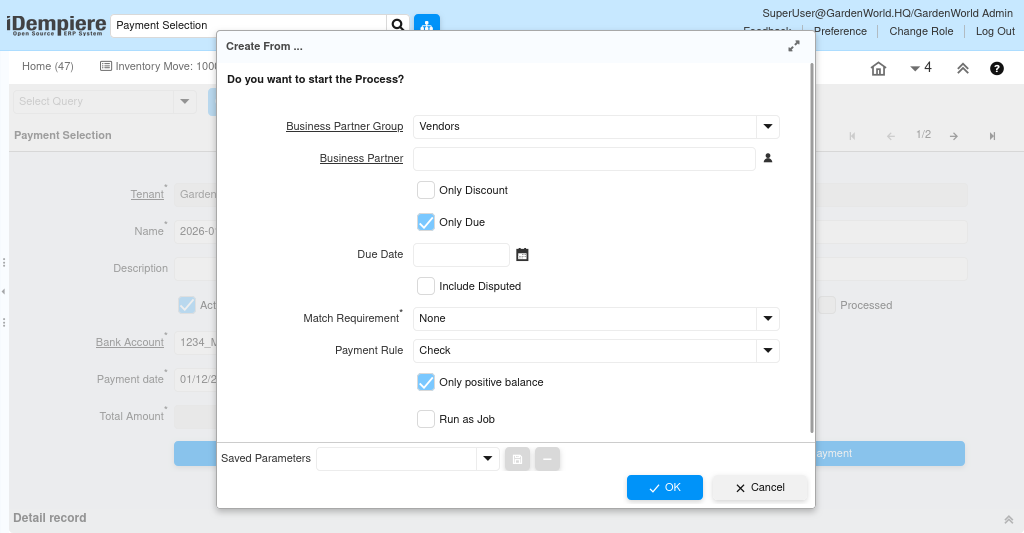
Payment Selection Lines for reviewing and adjusting payable items
Once invoices are loaded, the Payment Selection tab displays each open payable item as a separate line. This is where users review which invoices should be paid and how much should be paid.
Each line allows the user to review or modify the Invoice the Open Amount, showing outstanding balance, the Payment Amount, which can be full or partial any Discount Amount applicable based on payment rules, any Write-off Amount permitted by financial policy, any remaining Difference, which reflects rounding or mismatch values
The Payment Rule can be chosen per line if needed, allowing mixed modes of payment within the same batch.

Prepared Payments for previewing the payment documents
After selection lines are finalized, the Prepared Payments tab shows how the system will group and structure payments. It acts as a preview before actual payment documents are created.
This tab displays
- The Business Partner for each payment
- The Payment Rule to be used
- The Payment Amount, including discounts and write-offs
- Whether the record is a Receipt or true vendor payment
- The Document No if a payment has already been generated
- The Printed status for checks or remittance advice
If the “One Payment Per Invoice” option is not enabled, multiple invoices will be grouped into a single payment here.
Payment Selection in iDempiere provides a structured, controlled method for managing payments. The header sets the payment context, the Create From filters load eligible invoices, and the Payment Selection Lines allow review and adjustment. The Prepared Payments tab previews how payments will be generated. This ensures that payments are executed accurately, approved correctly, and fully traceable.