How Accounting Schema Works in iDempiere
An Accounting Schema is the foundational configuration that tells iDempiere how financial transactions should be recognized, recorded, and posted to the General Ledger (GL). It defines the rules, structure, elements, and default accounts that control accounting entries across your business.
An Accounting Schema allows you to define:
- The accounting principles you follow (e.g., accrual vs cash)
- The default GL accounts used when transactions are posted
- How product costs are calculated and accounted
- Whether commitments and cost reservations are tracked
- The currency and period control for accounting postings
- Which accounting dimensions (segments) are in the account structure
- Default accounts for receivables, payables, inventory, revenue, expenses and more.
Process Flow

Accounting Schema Setup
In the Accounting Schema main tab, you configure:
- Name & Description: A unique label to identify the schema
- GAAP: The accounting principles used
- Accrual or Cash Basis: Revenue recognition method
- Costing Method (Standard / Average / FIFO / LIFO)
- Cost Type (e.g., Current / Planned / Future)
- Currency for accounting
- Automatic Period Control and posting limits
These settings guide how financial records behave across the system.

Account Schema Elements
This tab defines the dimensions used in account combinations, such as:
- Business Partner
- Product
- Project
- Activity
- Location
- Campaign
Each dimension adds context to accounting entries so you can analyze financial results by department, product line, project, region, etc.
General Ledger Settings
Here you define how the schema handles:
- Currency balancing
- Suspense accounts
- Intercompany accounts
- Purchase Price Variance
- Commitment offsets
These settings ensure postings are balanced and compliant under all scenarios.

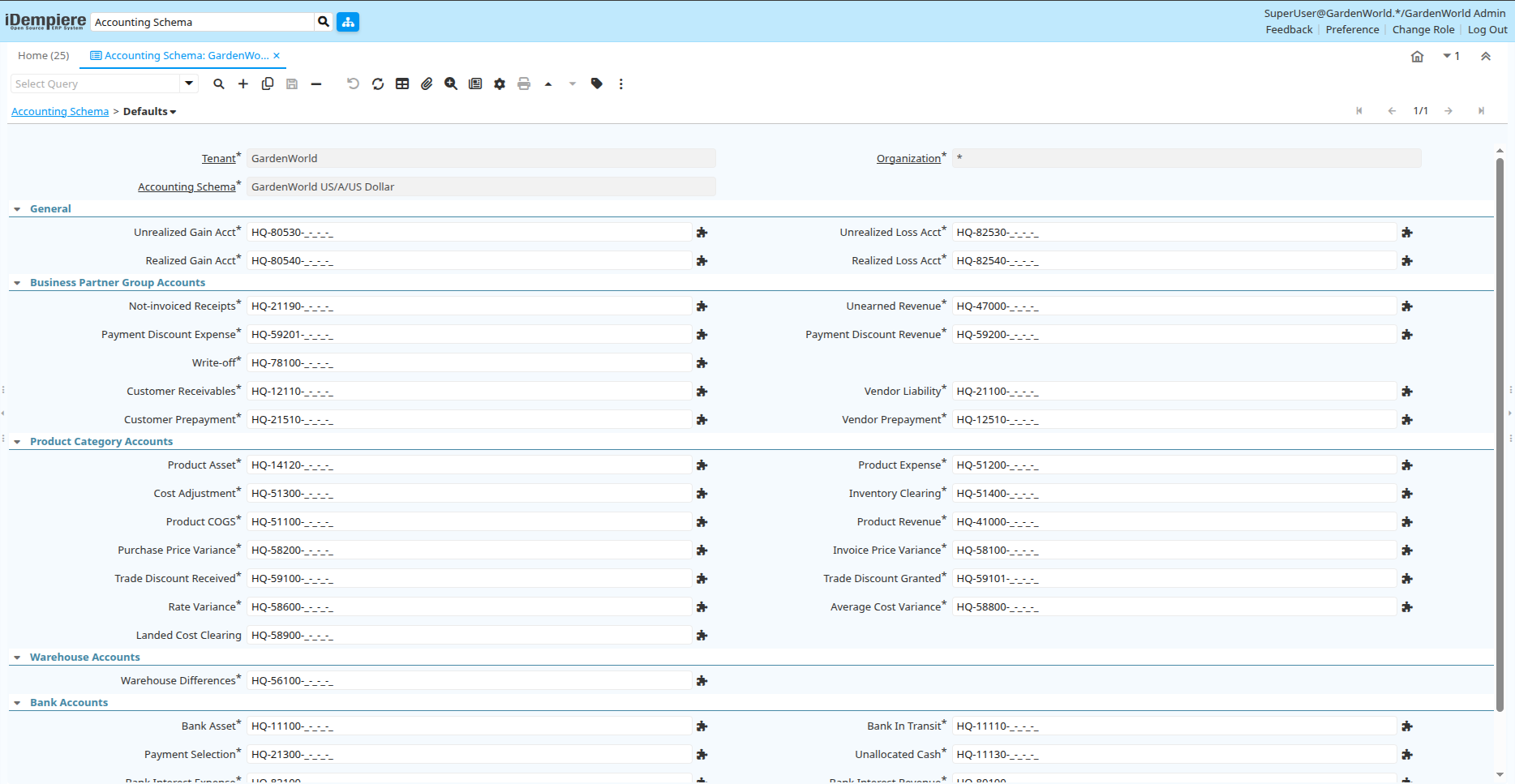
Defaults for Posting
The Defaults tab stores default GL accounts that iDempiere applies automatically when you create or complete transactions. Examples include:
- Customer Receivables
- Vendor Liabilities
- Inventory Asset
- Cost of Goods Sold
- Revenue
- Unearned Revenue
- Work In Progress (WIP)
- Project Asset
This ensures every business event is posted to the correct ledger account.
How Accounting Schema Is Used Every Day
Every time after the creation of:
- Customer invoices
- Vendor bills
- Payments
- Material receipts
- Project costing
- Inventory movements
- Period closes
…iDempiere uses the Accounting Schema rules and default accounts you defined to automatically generate the correct journal entries.
In iDempiere, the Accounting Schema is the central configuration that defines how accounting works.It determines posting logic, cost methods, GL accounts, accounting dimensions, and period controls. Proper setup here ensures financial data is accurate, traceable, compliant, and easily reportable.