How to Create and Use Charge in iDempiere
A Charge in iDempiere represents a non-inventory cost added to a transaction. It records items like freight, bank fees, commissions, or penalties without affecting stock, ensuring accurate accounting impact while keeping transactions clean, auditable, and free from unnecessary products.
Creating a Charge
A Charge is created once and then reused across many transactions. When creating a Charge, the system focuses on clarity, accounting correctness, and reusability.
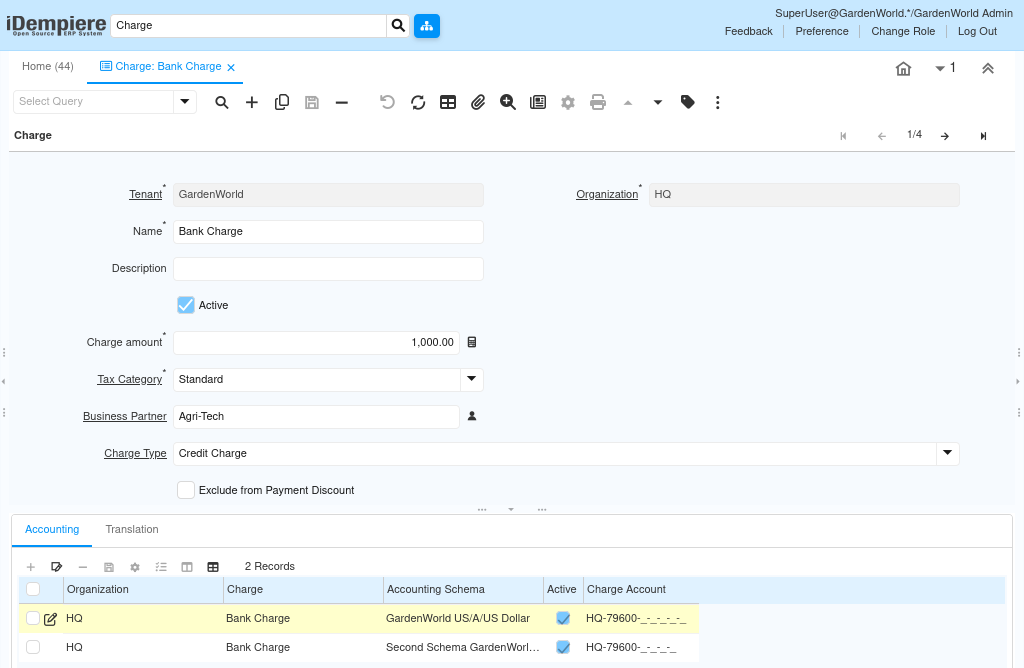
To create a Charge, the user defines a clear name that explains the purpose of the cost, such as Bank Charge or Commissions Paid. This name becomes the reference users select during transactions. The record must be Active to be usable.
The Tax Category determines whether tax applies to this charge. For example, a bank charge may use a standard tax category, while internal charges may be tax-exempt depending on business rules. The Charge Amount can be left as zero if the value varies per transaction, which is the most common and flexible setup.
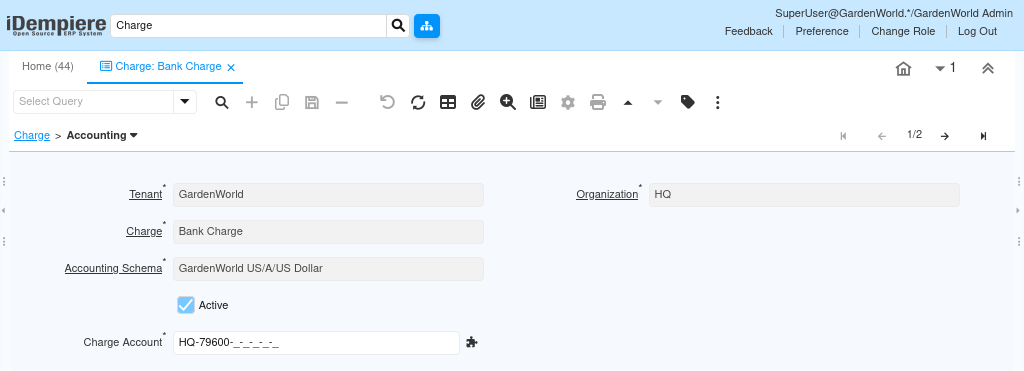
The Charge is then linked to accounting through the Accounting tab, where the system is instructed which expense account should be posted when this charge is used.
Charge Accounting Setup
Accounting is the most critical part of a charge configuration. Without it, the charge cannot post correctly. Each charge must be linked to an accounting Schema and acharge ccount. This account defines where the cost is recorded in the general ledger. For example:
- Bank charges post to a Bank Fees Expense account
- Commissions post to a Sales Commission Expense account
Once this is set, iDempiere automatically posts the charge amount to the correct account whenever the charge is used in a transaction. This removes the need for manual journal entries and ensures consistent financial reporting.
Using Charges in Transactions
After creation, Charges become selectable in many business flows. Users do not need accounting knowledge to use them — they simply select the correct charge and enter the amount.
Charges are commonly used in:
- Purchase Invoices for bank fees or service charges
- Sales Invoices for additional service costs
- Payments for deductions or adjustments
- Manual documents where extra costs must be recorded
When a Charge is applied, iDempiere automatically:
- Includes it in the document total
- Applies tax rules from the Tax Category
- Posts the amount to the configured Charge Account
No inventory is affected, and no product master data is required.
How Posting Happens
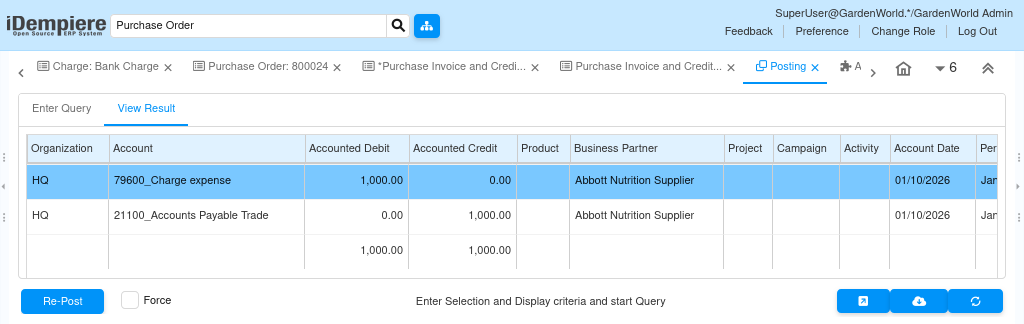
When a transaction containing a charge is completed, iDempiere posts the charge amount directly to the configured expense account under the active accounting schema.
For example, when a Bank Charge is added to a payment:
- The bank or clearing account is adjusted
- The charge amount is posted to the Bank Charges Expense account
- Tax posting is handled automatically if applicable
This ensures that financial impact is immediate, accurate, and traceable.
Key Behavior to Understand
- A charge never affects stock
- The same charge can be reused across many documents
- Amounts can be fixed or entered per transaction
- Accounting is fully automatic once configured
- Charges improve clarity without increasing product master complexity
Common Usage Patterns
- Bank charge: Applied during payment processing
- Commissions paid: Added to purchase or expense invoices
- Service fees: Used for one-time or recurring operational costs
- Adjustments: Used when costs do not belong to inventory items
These patterns allow businesses to stay flexible while maintaining clean accounting structure.
Outcome
By using charges correctly, organizations can record all operational and financial costs without polluting inventory data. Charges ensure that every cost is posted to the right account, documents remain simple for users, and financial reports reflect the true cost of doing business.
Charges act as a bridge between business operations and accounting accuracy, enabling transparent, controlled, and scalable financial management.