How Storage Works in iDempiere
Storage represents the real-time inventory position of a product in a specific locator within a warehouse. It is system-generated and updated automatically with every inventory movement, ensuring availability, reservations, and planning always reflect actual stock.
Storage as a Live Inventory Snapshot
Each Storage record is uniquely defined by a Warehouse, Locator, Product, and Attribute Set Instance (if applicable).
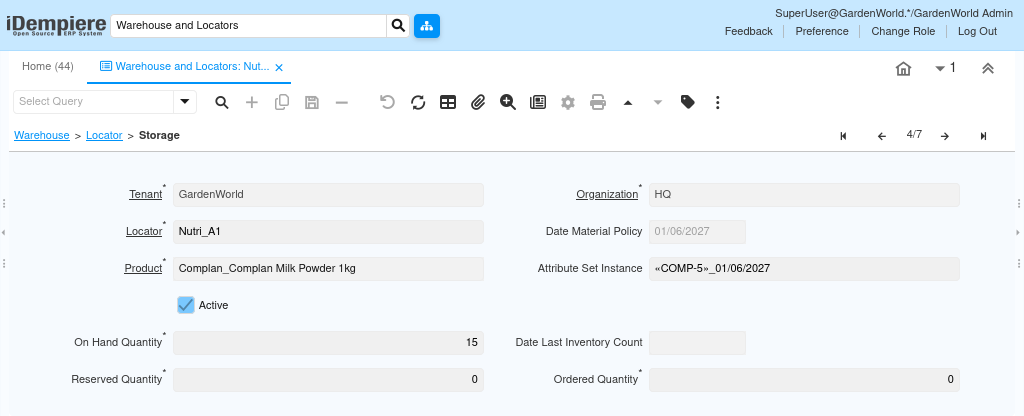
In the screenshot, the Storage record shows how Oak Tree stock physically exists in the Default HQ Locator, along with its usable and blocked quantities.
Users do not “maintain” Storage. Instead, they observe and validate it to confirm that operational transactions are functioning correctly.

How Storage Records Are Created Automatically
A storage record is created the moment inventory is introduced into a locator. This typically happens when a Material Receipt, Inventory Adjustment, or Production Receipt is completed. The system immediately records the received quantity as On Hand Quantity, without requiring any additional user action.
If the same product already exists in the same locator, the system updates the existing storage row instead of creating a duplicate. This guarantees a single, consolidated inventory view per product and location.
Understanding Quantities Shown in Storage
Storage displays inventory in a way that aligns directly with real operations.
From the screenshot, users can clearly understand:
- On Hand Quantity shows the physically available stock (20 units in this case)
- Reserved Quantity shows stock already committed to orders or projects (currently 0)
- Ordered Quantity reflects incoming stock from purchase orders (0 here)
- Date Material Policy controls which stock will be consumed first (FIFO/LIFO)
These values are system-controlled and change automatically as business transactions occur.
Material Policy and Storage Behavior
The Date Material Policy field links Storage to the product’s material policy (FIFO or LIFO).
When stock is received, this date is set automatically. When stock is issued, iDempiere uses this date to decide which inventory layer is consumed first.
This ensures accurate stock rotation and correct costing without user intervention.
Storage in Daily Operations
Storage plays a silent but critical role across all inventory activities:
- Sales and internal requests check available storage
- Reservations reduce usable quantity without reducing physical stock
- Issues and shipments deduct directly from storage
- Transfers move storage between locators
- Inventory counts reconcile storage with physical stock
Users interact with orders and movements, while Storage reflects the outcome.
Why Storage Matters for Users
Storage acts as the single source of truth for inventory. By reviewing this screen, users can instantly verify whether stock issues are due to shortages, reservations, or delayed receipts. This avoids confusion during fulfillment and prevents incorrect planning decisions.
When Storage is healthy and accurate, downstream processes like replenishment, accounting, and reporting remain stable and predictable.
Outcome
Storage converts physical stock movements into trusted system data.
It ensures inventory visibility, supports accurate fulfillment, and enables confident decision-making across purchasing, sales, and warehouse operations.
Users do not manage Storage — they rely on it.