How Ship/Receipt Confirm Works in iDempiere
The Ship / Receipt Confirm window in iDempiere is used to verify and finalize physical goods movement after a shipment or material receipt document is completed. It acts as a control checkpoint to confirm that the quantities physically shipped or received match what was planned in the system.
This window does not create shipments or receipts; It confirms them.
Confirmation Records Creation
When a Shipment (Customer Shipment) or a Material Receipt (Vendor Receipt) is completed, iDempiere automatically generates one or more confirmation records if confirmation is enabled for the document type.
These confirmation records represent a request to verify:
- What was actually shipped, or
- What was actually received
Until confirmation is processed, the movement is considered logically completed but not physically verified.
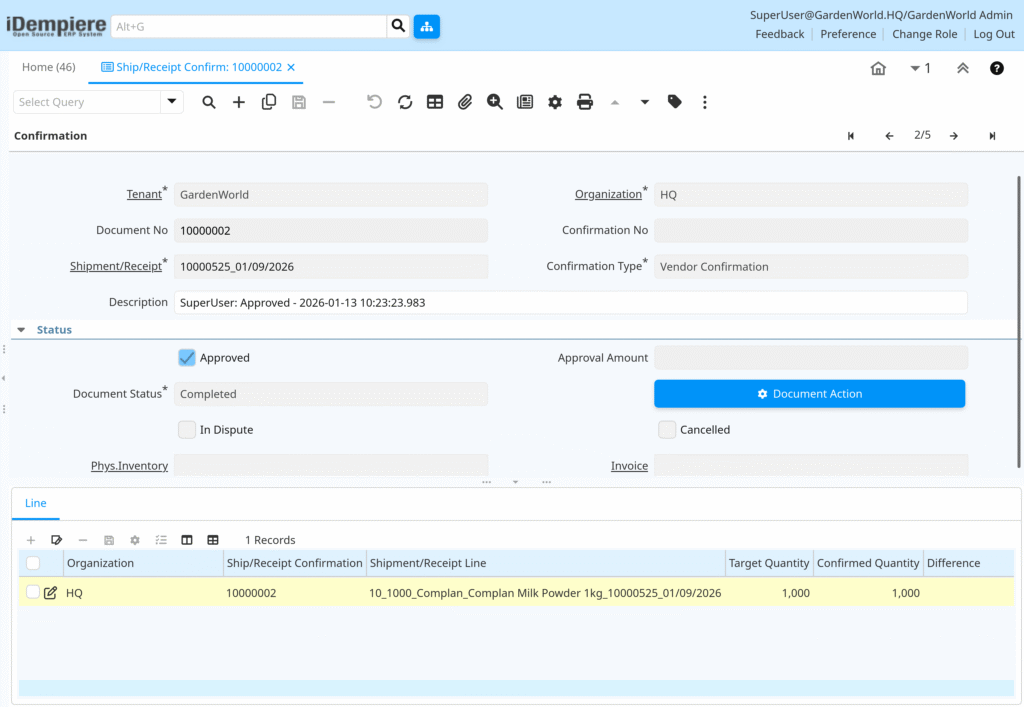
Ship/Receipt Confirm Window
The Ship / Receipt Confirm window displays:
- The related Shipment or Receipt document
- Individual confirmation lines per product
- Planned quantity vs confirmed quantity
- Difference quantity (if any)
Users review each line and confirm whether the physical movement matches the document.
This step ensures warehouse accountability before downstream processes continue.

Handle Quantity Differences
If the physically shipped or received quantity differs from the planned quantity, users can:
- Confirm a lower quantity (short shipment / short receipt)
- Confirm a higher quantity (over receipt, if allowed)
- Record scrap or damage, depending on configuration
iDempiere captures these differences explicitly instead of silently adjusting stock, which improves audit and traceability.
In iDempiere, quantity differences entered during Ship / Receipt Confirmation directly determine the final inventory quantity. The system updates stock strictly based on the confirmed quantity, ensuring that inventory reflects physical reality. Differences are recorded for traceability but do not silently adjust stock, protecting inventory accuracy and operational integrity.