How Purchase Order Creation from RFQ Works in iDempiere
The purchase order from RFQ represents the operational commitment to the selected vendor. It converts the RFQ’s sourcing decision into an enforceable order, preserving vendor choice and pricing intent, and driving receiving, invoicing, and payment without losing traceability.
Prerequisites for Purchase Order Creation
A Purchase Order can only be created from an RFQ when specific upstream conditions are satisfied.
The RFQ must be active and not closed, at least one RFQ response must be completed, and the rank responses process must be executed successfully. Ranking automatically determines the selected winner based on pricing and quantity logic defined in the RFQ. Without a selected winner, the system does not allow purchase order creation.
This ensures that procurement actions are strictly controlled and always traceable back to a competitive evaluation.
Purchase Order Creation Trigger
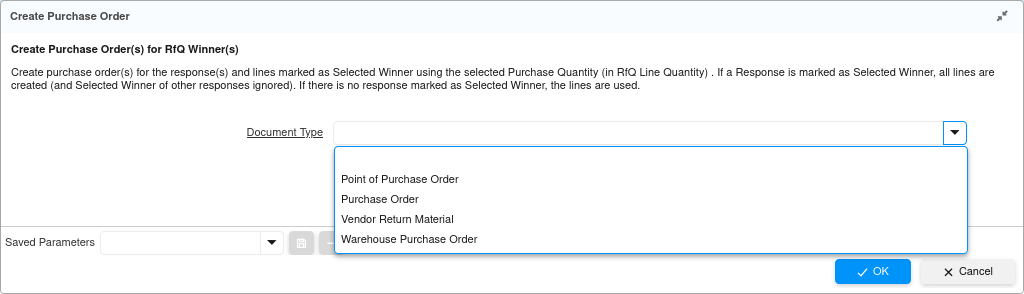
The purchase order is created using the Create Purchase Order process available from the RFQ header toolbar.
When this process is launched, the system prompts for a target document type. This choice defines the nature of the procurement document and its downstream behavior.
Common options include:
- Purchase Order – standard vendor procurement
- Warehouse Purchase Order – warehouse-driven procurement
- Point of Purchase Order – simplified purchasing
- Vendor Return Material – reverse procurement
Once confirmed, the system generates a new Purchase Order and links it directly to the RFQ.
Automatic Data Inheritance from RFQ
After creation, the purchase order header is populated automatically using data derived from the winning RFQ response, not from the RFQ itself.
The following fields are filled automatically:
- Business Partner – the selected vendor
- Partner Location – vendor location from the response
- Invoice Partner & Location – aligned with vendor defaults
- Price List – inherited from vendor configuration
- Currency – taken from the RFQ / response
- Order Reference – marked as From RFQ
- Organization, Tenant, Sales/Company Agent – derived from context
This behavior guarantees consistency and eliminates manual errors in vendor selection or commercial setup.
Draft State and Manual Line Entry
The purchase order is always created in draft status. At this point, no purchase order lines are created automatically, even though the RFQ contains lines and quantities.
This is an intentional design decision. RFQs represent intent and comparison, not execution. The buyer is expected to:
- Review the winning RFQ response
- Decide final purchase quantities
- Adjust delivery or commercial terms if needed
The user must manually enter purchase order lines based on the selected RFQ response lines.
Each PO line typically reflects:
- Product from RFQ response line
- Quantity agreed during RFQ
- Unit price from winning response
- Attribute set instance if applicable
This step acts as a final validation checkpoint before committing financially.
Completing the Purchase Order
Once PO lines are entered and reviewed, the document is completed using document action → Complete.
On completion:
- The purchase order becomes legally binding
- Quantities move to on order status
- The document becomes eligible for receiving and invoicing
- Accounting commitments are prepared for downstream posting
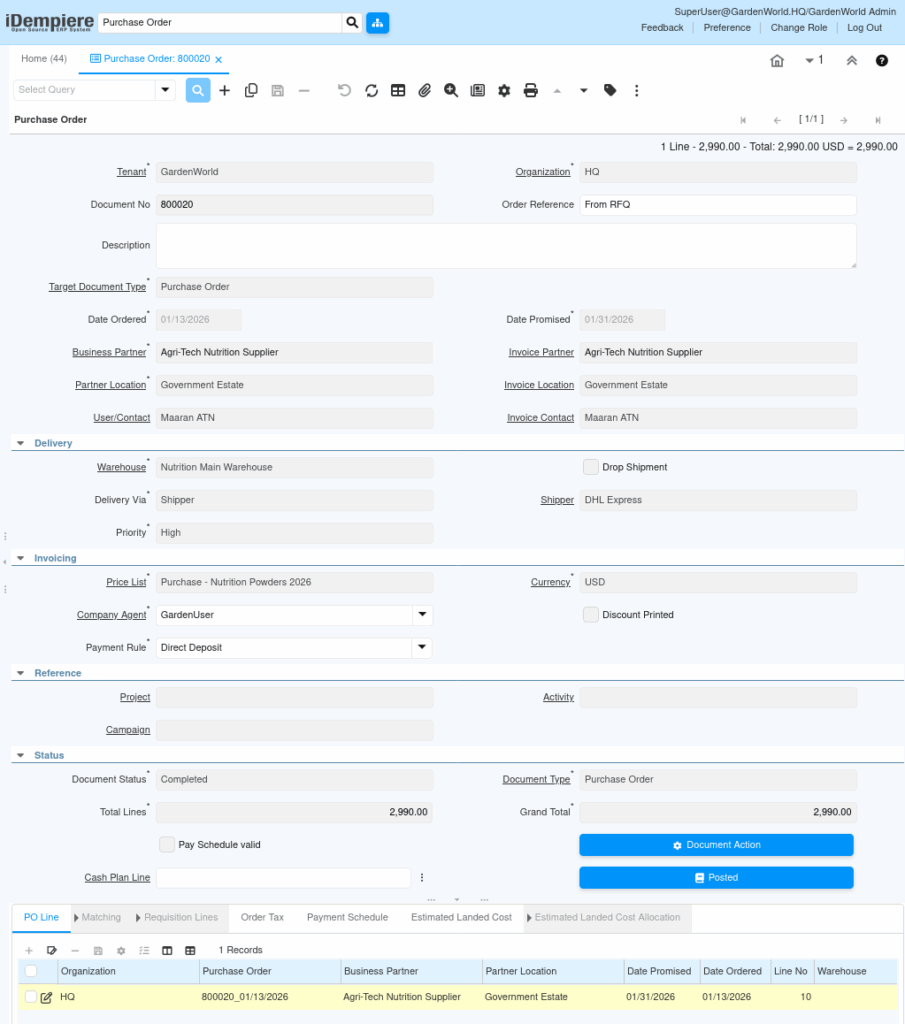
At this stage, the RFQ has fully served its purpose. All execution moves forward through standard procurement documents.
Downstream Procurement Flow
After purchase order completion, the workflow follows the standard procure-to-pay lifecycle.
The completed purchase order drives:
- Material Receipt – physical goods receipt into inventory
- Vendor Invoice – financial liability creation
- Payment – settlement based on payment terms
Each of these documents maintains traceability back to the purchase order, and indirectly back to the RFQ through the order reference.
Business Purpose and Control Outcome
Creating a purchase order from an RFQ enforces disciplined procurement. It ensures that purchasing decisions are backed by competitive evaluation, not ad-hoc vendor selection.
This flow delivers:
- Transparent vendor selection
- Audit-ready procurement trail
- Reduced pricing disputes
- Strong linkage between sourcing and execution
- Clear separation between evaluation (RFQ) and commitment (PO)
The purchase order created from an RFQ becomes the single operational contract that bridges strategic sourcing with day-to-day procurement execution in iDempiere.