How Tax Rate Works in iDempiere
The Tax Rate window in iDempiere is used to define tax rules and percentages that apply to transactions such as sales, purchases, and invoices. It lets you set up specific tax rates that determine how much tax to charge based on product, location, and transaction type. This setup is essential for correct tax calculation, compliance, and reporting across financial and procurement processes.
Tax Record Creation
iDempiere’s Tax window main tab, define Name/Description, Tax Category(VAT/GST grouping), Rate (e.g., 18%), Valid From Date, and Active status—creating rules automatically applied to transactions.
Tax Geographic Applicability
iDempiere allows configuring tax rates to apply selectively to specific countries or regions (states/provinces), ensuring transactions automatically follow location-based tax rules without manual adjustments. This geographic targeting prevents over/under-taxing by matching rates to customer/vendor locations during order/invoice creation.
Tax Special Conditions
iDempiere’s tax configuration includes special fields to handle unique scenarios: SO Tax Exempt applies specific rates for tax-exempt business partners, Requires Tax Certificate mandates documentation for exemptions, Document Level controls whether taxes calculate per line item or entire invoice, and Sales Tax flag distinguishes sales from purchase taxes ensuring compliance and accurate application across diverse transaction types.

Tax Transaction Usage
Tax Rates are defined in iDempiere, they automatically apply during key processes like creating sales orders, entering purchase orders, generating invoices, and completing payments—with the system matching the transaction’s tax category to calculate precise amounts based on line totals for seamless compliance.
Tax Accounting Integration
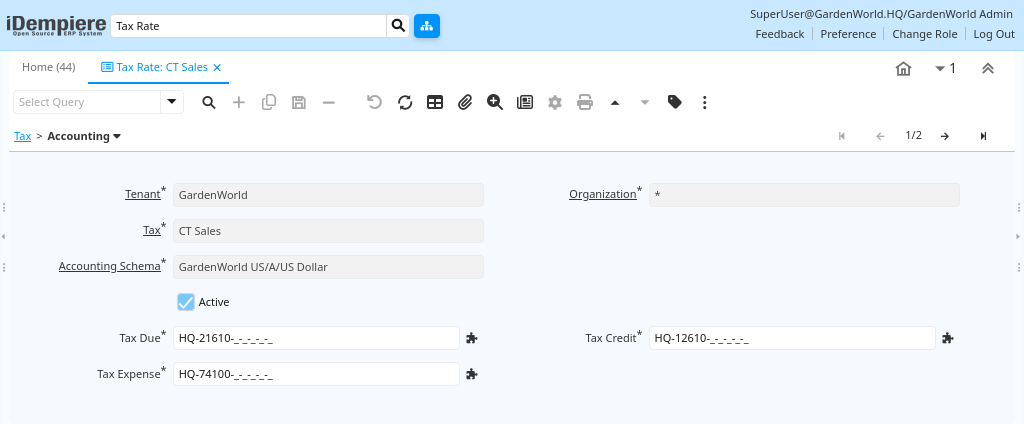
In the Accounting tab, you define how the tax posts in the General Ledger:
- Tax Due – Account where tax owed is recorded
- Tax Credit – Account for reclaimable tax
- Tax Expense – Account for non-reclaimable tax
This ensures tax amounts flow correctly into financial reports and comply with accounting rules.
The Tax Rate in iDempiere lets you define, manage, and apply tax percentages and rules across transactions. It ensures correct tax calculation, location-based application, exemptions, and financial posting — all crucial for accurate accounting and compliance in sales and purchasing.