How to configure a product to generate production from project
To generate production directly from a project, the product must be correctly configured as a manufactured item with an active Bill of Materials (BOM).
This configuration enables integration between Project Management and Manufacturing, allowing users to convert planned project quantities into production orders automatically.
Creating a Manufactured Product in Product Master
The first step is to create a product in the Product Master. This product represents the finished item that will be produced as part of the project execution. A properly defined product ensures accurate production planning, inventory updates, and project cost tracking.
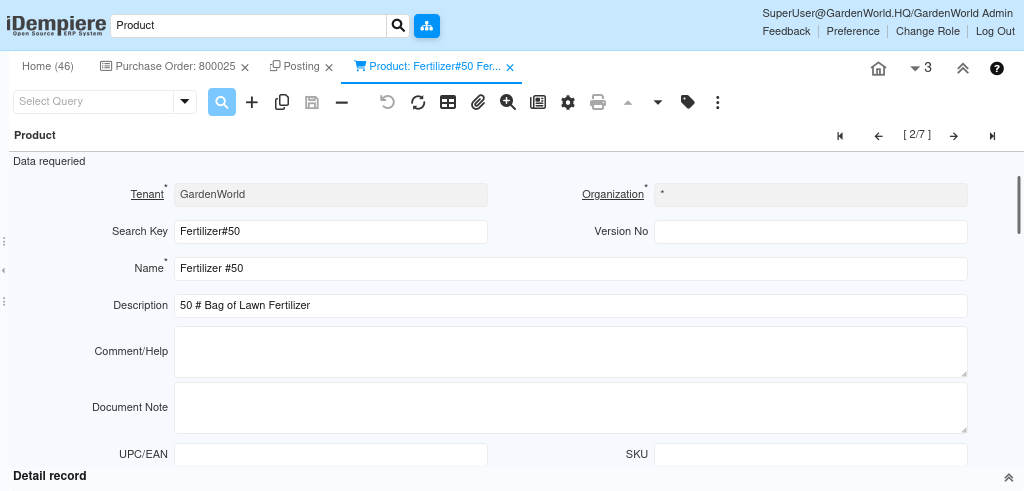
Entering Details in Product Master
Once the product is created, it must be configured with manufacturing-specific attributes.
Configuration includes
- Assigning the correct Product Category (for example, Raw Materials or Finished Goods)
- Selecting the applicable Tax Category
- Defining the Unit of Measure used for production
- Maintaining weight and volume for logistics and costing (if required)
- Enabling the Manufactured option to indicate in-house production
- Enabling the Bill of Materials (BOM) option to allow component definition
Defining the Bill of Materials and Components for Production
After enabling the BOM option, the Bill of Materials tab becomes available. The BOM defines the list of components and quantities required to manufacture the finished product. This structure is automatically used when production is generated from a project.
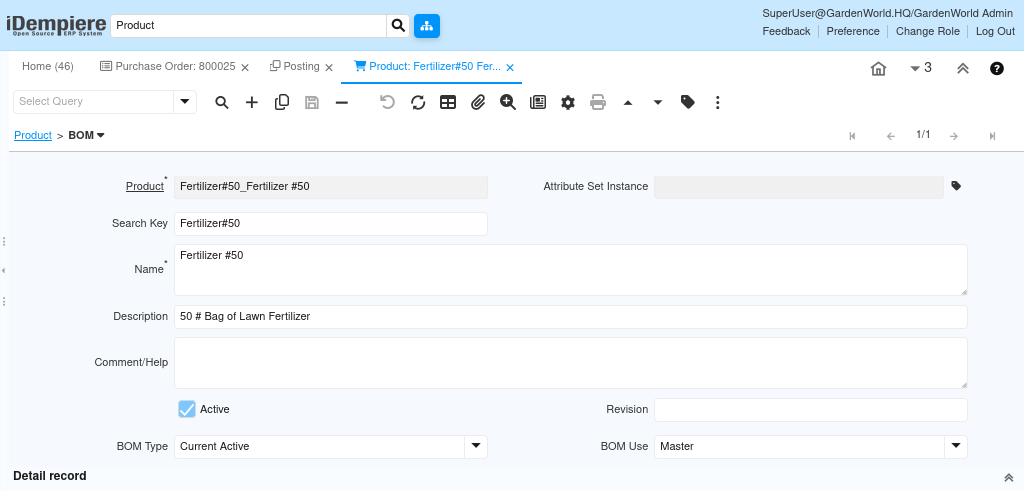
BOM configuration
- Create a new BOM for the product
- Set BOM Type as Current Active
- Set BOM Use as Master
- Define all required component products
- Specify the exact quantity of each component needed per unit
- Validate the BOM structure to ensure accuracy
A validated BOM ensures correct material consumption and inventory postings during production.

This setup allows products to be used in production. Materials are consumed based on the defined Bill of Materials, ensuring precise inventory updates and reliable project-wise material usage.