How Inventory Move Works in iDempiere
The Inventory Move window in iDempiere records the transfer of stock between different warehouses or locators within the same organization. Instead of affecting quantities through receipts or shipments, this document moves existing inventory internally from one place to another.
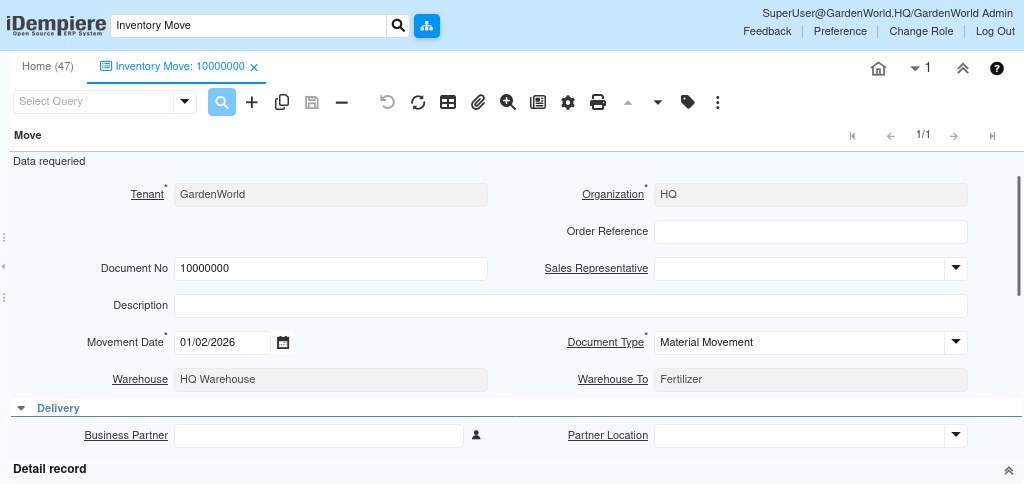
Document Details Displayed
At the top of the Inventory Move document, the system displays the core identification and contextual fields that define the purpose and origin of the movement
- Sales Representative and Description
- The representative or user responsible for the movement, along with any additional notes or explanation describing why the movement is being performed.
- Movement Date and Document Type
- The date determines when the transfer affects inventory and costing, while the document type controls numbering, workflow, and posting rules.

How Warehouse and Logistics Information Works
The header defines the source and destination of the internal transfer
- Warehouse and Warehouse To
- These indicate from which warehouse the stock is being removed and to which warehouse it is being delivered.
- Delivery, Business Partner, Partner Location
- These fields are optional and used when transfers are linked to a partner, such as inter-company scenarios or consignment-related movements.
- Shipper, User/Contact, Delivery Via, Delivery Rule, Priority, Freight Cost Rule
- These fields describe how the movement will be transported, who is involved, the method of delivery, and any logistics preferences. They provide context for handling, urgency, and freight management but do not alter the material calculations.
Workflow and Approval Controls
The Inventory Move header includes workflow and tracking fields that determine the document’s status and approval route
- Status shows whether the document is drafted, completed, or voided.
- Approved indicates managerial approval when approval routing is configured.
- Approval Amount helps enforce approval limits tied to the user’s role.
- In Transit marks that goods have left the source warehouse but have not yet been received at the destination.
- Date Received records when the receiving warehouse acknowledges the transfer and finalizes the movement.