How GL Journal Works in iDempiere
A GL Journal in iDempiere is the core financial document used to record manual accounting entries directly into the general ledger.
Each journal contains a header that defines the accounting context, and multiple lines that specify debit and credit entries. Once completed and posted, the journal updates the organization’s financial accounts, ensuring the ledger accurately reflects all financial events for the period.
Journal Header Structure
The GL journal header captures the overall identity and accounting rules for the journal. It includes details such as:
- Document No, Description, and Document Type:
The document number uniquely identifies the journal, while the description provides context. The document type controls workflow, posting behavior, and numbering logic. - Accounting Date and Document Date:
The accounting date determines the period in which the journal will be posted, while the document date provides reference for the transaction timeline. - GL Category:
This classifies the journal (e.g., adjustment, accrual, reclassification) and is helpful for reporting and audit purposes. - Posting Type:
Defines whether the journal is a standard entry, an actual transaction, a statistical entry, or an adjustment. This influences how the posting appears in financial reports. - Currency:
For multi-currency environments, the header determines the base currency in which the journal will record its amounts.
These header fields establish the accounting context but do not contain financial values themselves.
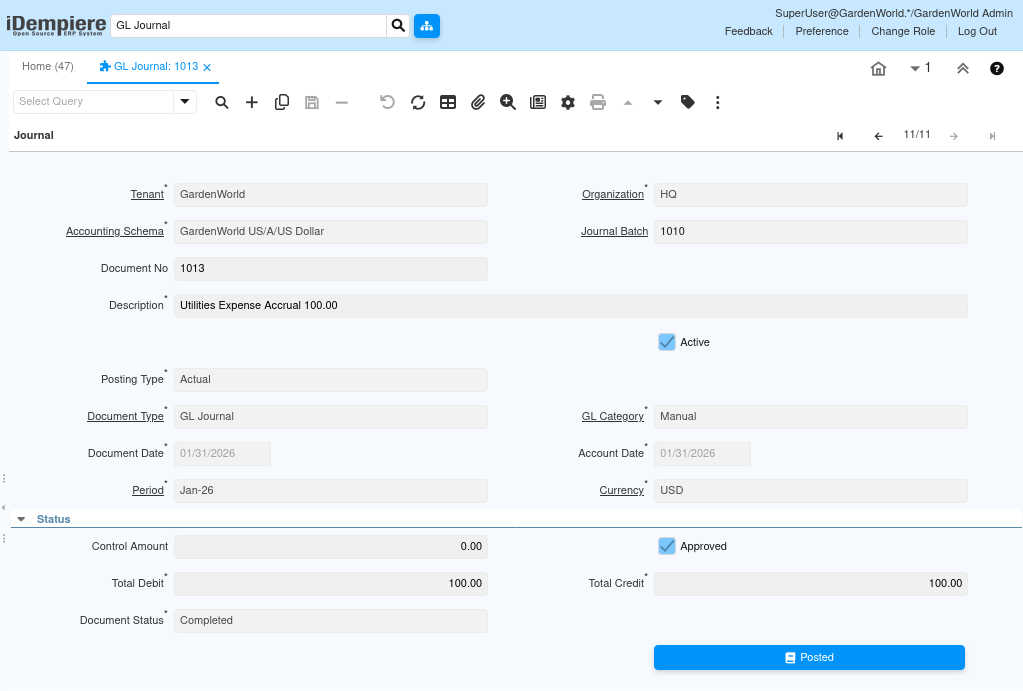
How Journal Lines Work:
Each GL journal consists of multiple lines, and each line represents either a debit or a credit to a specific account. The lines form balanced accounting entries that comply with double-entry bookkeeping rules.
Each line includes:
- Account Combination:
The selected account (and accounting dimensions like product, project, activity, campaign, sales region, etc.) determines where the amount will be posted. - Description:
Explains the nature or purpose of the individual line. - Debit Amount and Credit Amount:
These monetary fields represent the financial impact of the entry. Total debits must equal total credits before the journal can be completed. - Currency Amount, Converted Amount, and Rate:
Used when the journal involves foreign currencies; the system converts these to the ledger currency based on the journal’s conversion settings. - Business Partner, Product, Project, Campaign, and other dimensions:
Optional fields that enrich financial analysis by linking entries to operational segments.
When the journal is saved, all lines remain in draft and can be edited. Once completed, the system locks the lines and prepares them for posting.

How Posting Works
When a GL journal is marked as completed, it becomes eligible for posting. It creates fact_acct entries for each line and updates document status such as completed and posted. Locks the journal from further modifications unless reversed.
The resulting accounting facts appear in financial reports, including Trial Balance, General Ledger, Balance Sheet, and Profit & Loss.
How GL Journals Interact With the Rest of the System
GL journals are independent from operational documents but are essential for accounting corrections and end-of-period processes:
- Accruals – Recording expenses or revenues before invoices are created.
- Adjustments – Correcting errors or reallocating expenses to different accounts or cost centers.
- Provisions – Setting aside reserved amounts (e.g., for doubtful debts).
- Re-classifications – Moving balances between accounts.
- Manual accounting entries – Any financial activity not triggered by business documents.
Because journals only affect accounting not inventory, not orders, not products they are used exclusively by finance teams.