How Matched Invoices Work in iDempiere
Matched invoices ensure that vendor invoices are correctly linked to the goods received or services completed. This window provides invoice-side verification to maintain billing accuracy and financial control.
Process Flow Diagram
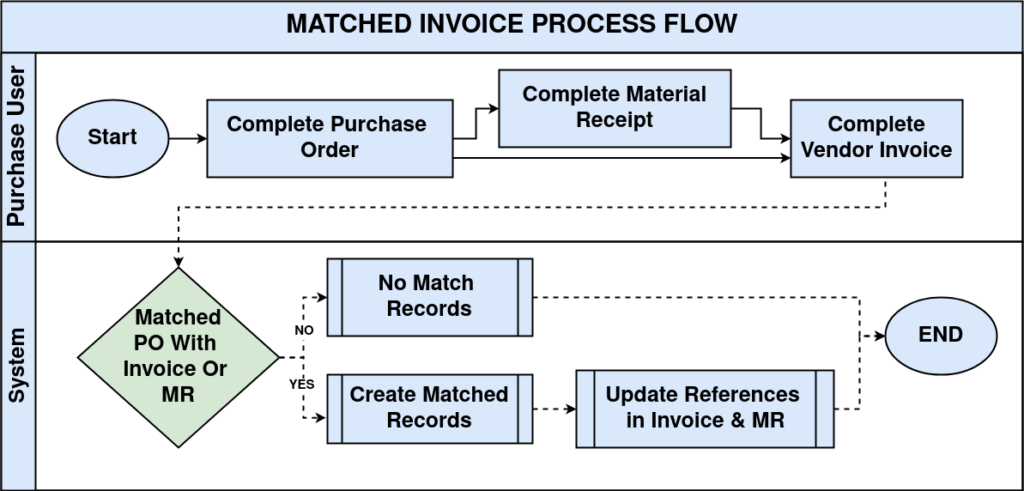
Purchase Order Creation
The process begins with a purchase order defining agreed quantities, prices, and delivery terms. This purchase order serves as the commercial reference document that suppliers use for their billing, establishing the baseline expectations for goods or services.
Material Receipt or Service Completion
Goods are physically received or services confirmed through material receipt transactions. These receipt records document exactly what was delivered, creating the physical verification layer before any financial liability is accepted.
Vendor Invoice Entry
The vendor submits their invoice referencing the purchase order or receipt, with lines specifying products/services, quantities, and prices. Invoice entry occurs manually or via EDI, matching the supplier’s billing to the original order terms.
Invoice Completion & Matching
Upon invoice completion, iDempiere automatically generates matching records linking invoice lines to corresponding purchase order lines and material receipt lines. These comprehensive match records appear in the matched invoices window for final review and approval.

Matched invoices in iDempiere provide a controlled validation layer that ensures every vendor invoice is supported by an approved purchase order and confirmed receipt before financial posting.