How Payment Allocation works in iDempiere
The Payment allocation form in iDempiere is used to link payments and receipts with invoices. It is the step where money movement is officially matched against open receivables or payables. Until allocation is done, invoices remain open even if a payment exists.
This form works purely as a settlement mechanism and does not create new payments or invoices.
Process Flow Diagram

Starting Payment Allocation
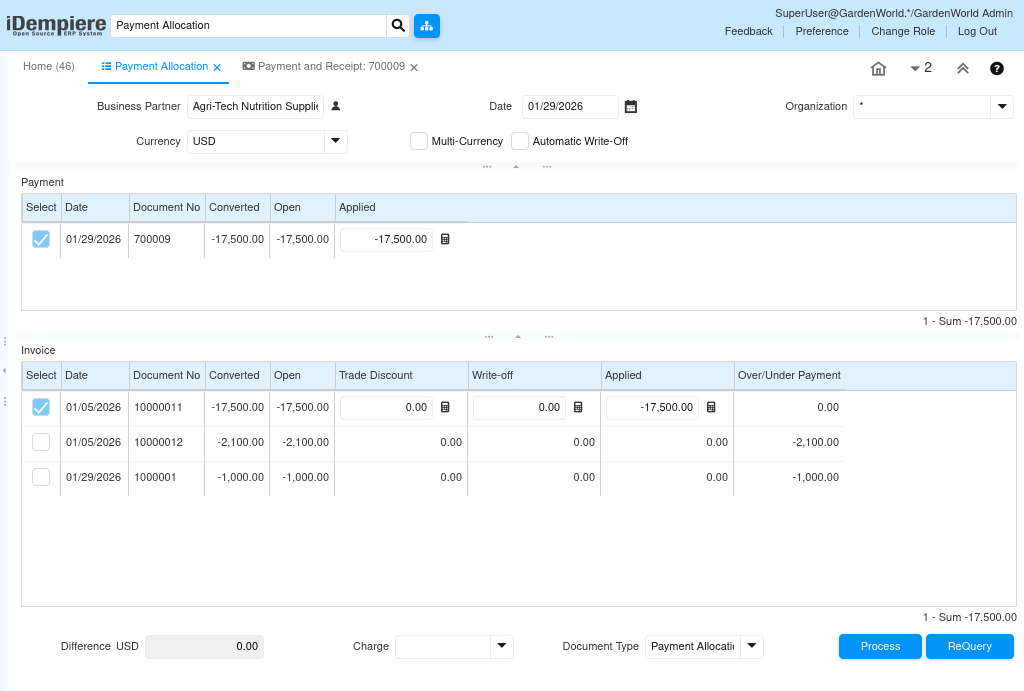
Payment allocation is opened after a payment or receipt is completed, where the user selects business partner, transaction type (receipt or payment), and optional filters such as date or document. The system then lists all open invoices and available payments for that business partner to be allocated.
Matching Invoices and Payments
Users choose which invoices to allocate against a payment, supporting full allocation (invoice completely settled), partial allocation (invoice remains partially open), or multiple invoices against one payment. iDempiere automatically calculates open amounts and validates that allocated values do not exceed the payment amount.
Completing Payment Allocation
Once the allocation is reviewed, it is processed, updating invoice open amounts, marking paid invoices as closed, and creating an allocation record for audit tracking. No changes are made to the original payment or invoice documents.
Allocation Accounting Impact
Payment allocation itself does not move cash, as cash movement occurred during payment completion. Allocation only updates accounts receivable/payable clearing and ensures balances reflect correctly—all accounting impacts appear in accounting fact details.
Handling Advance Payments
Advance and on-account payments made without selecting an invoice remain available for later use. Payment allocation applies these advances to one or more invoices without redoing the payment, which is common in construction and long-running projects.
How Control and Accuracy Are Maintained
- Allocation respects accounting periods
- Partial allocations are fully traceable
- Reversal creates a complete audit trail
The form ensures settlement accuracy without modifying source documents.
Maintaining Allocation Control
Allocation respects accounting periods, tracks partial allocations fully, creates a complete audit trail on reversal, and ensures settlement accuracy without modifying source documents.
Payment allocation ensures that payments, invoices, and balances stay synchronized, providing accurate AR/AP status and clean financial reporting.