How Cost Queue Works in iDempiere
The Cost Queue determines which inventory cost is consumed next during issues or shipments. It holds actual receipt layers waiting to be used and acts as the operational bridge between inventory quantities and costing logic, enabling FIFO and Average PO costing to work correctly.
What the Cost Queue Represents
Each Cost Queue record represents real stock received at a specific cost and date. These are not calculated estimates or forecasts. They are created only from completed and posted transactions and remain available until their quantity is fully consumed.
Because of this, the Cost Queue acts as the operational bridge between physical stock movement and financial costing logic.

Each record in the queue is a real, auditable inventory layer waiting to be consumed.
How Cost Queue Is Created
Cost Queue entries are created automatically whenever inventory value increases. Users never create or edit these records manually. The system generates them in response to inbound or value-increasing events.
Typical triggers include:
- Completion of material receipts or inbound movements
- Inventory increases
- Cost adjustments that raise stock value
- Capitalization of landed costs such as freight
Each inbound event creates a new queue row containing the received quantity, unit cost, remaining quantity, and source document reference.
Relationship Between Cost Queue and Costing Method
The Cost Queue behaves differently depending on the active costing method defined in the Accounting Schema.
- In FIFO, the queue is consumed strictly in order (oldest first)
- In Average PO, the queue still exists but is used to recalculate weighted averages
- In Standard Cost, the queue is largely informational unless variances are posted

The queue adapts automatically based on this configuration.
How Cost Queue Is Consumed
Cost Queue entries are reduced when inventory leaves the system.
This occurs when:
- A Shipment is completed
- Inventory is issued
- Goods are consumed in production
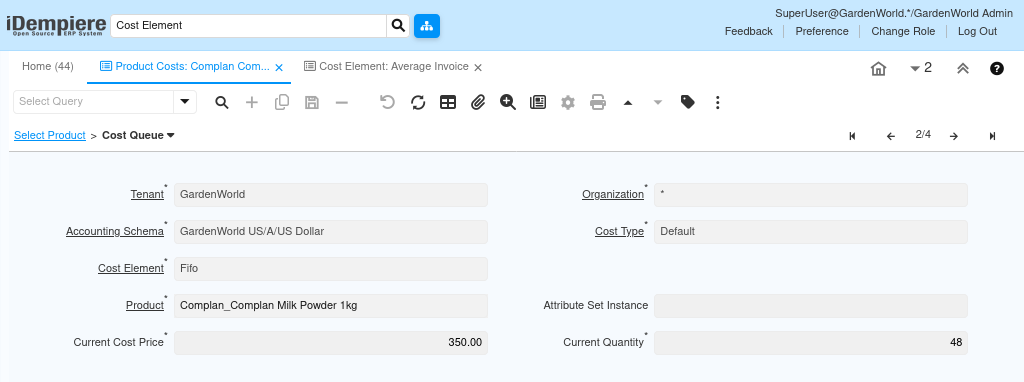
When stock is issued, iDempiere reads the Cost Queue, selects the appropriate layer, and reduces its remaining quantity. If one layer is exhausted, the system moves to the next.
This guarantees traceable, rule-based cost consumption.
Understanding Cost Queue Fields
Each row in the Cost Queue explains both where the cost came from and what remains.
Key fields include:
- Current Quantity – original inbound quantity
- Current Cost Price – unit cost for that layer
These fields allow users to trace shipment costs back to specific purchase events.
Why Cost Queue Matters for Shipments
When a shipment is posted, iDempiere does not look at:
- Sales Order price
- Invoice value
- Discounted selling amount
It looks only at the Cost Queue. This explains why shipment accounting amounts often differ from sales totals. The system is consuming inventory cost, not revenue.
Cost Queue vs Product Cost
Product Cost provides a summarized view of the current unit cost. The Cost Queue provides the detailed explanation behind that value. Both are required to fully understand inventory valuation.
Product Cost answers “What is the cost now?”
Cost Queue answers “Which exact cost is being used, and why?”
Both views are required for full costing transparency.
Business Value of Cost Queue
The Cost Queue ensures:
- Accurate cost traceability
- Audit-ready inventory valuation
- Correct FIFO and Average PO behavior
- Clear explanation for cost variances
It eliminates “black box” costing by exposing every cost layer in the system.
Outcome
After understanding Cost Queue:
- Shipment posting amounts become predictable
- Inventory consumption is fully traceable
- Cost discrepancies can be explained without assumptions
- Audits can trace costs back to original purchases
Cost Queue turns inventory costing from a calculation into a visible, logical flow.