How to Create and Use the Tax Category in iDempiere
In iDempiere, a tax category defines how tax is applied and posted for products and services. It links items to the correct tax rules, allowing the system to automatically determine applicable taxes during purchasing and sales without manual rate selection.
Where the Tax Category Fits in the Business Flow
Tax Category operates between master data configuration and financial transactions. Once configured, it ensures tax consistency across the system.
Tax category directly influences:
- Purchase Orders and Sales Orders
- Invoices and Credit Notes
- Tax calculation and rounding
- Accounting postings for tax amounts
- Compliance and reporting
Every taxable product must be linked to one tax category, making it a critical setup.
Creating a Tax Category
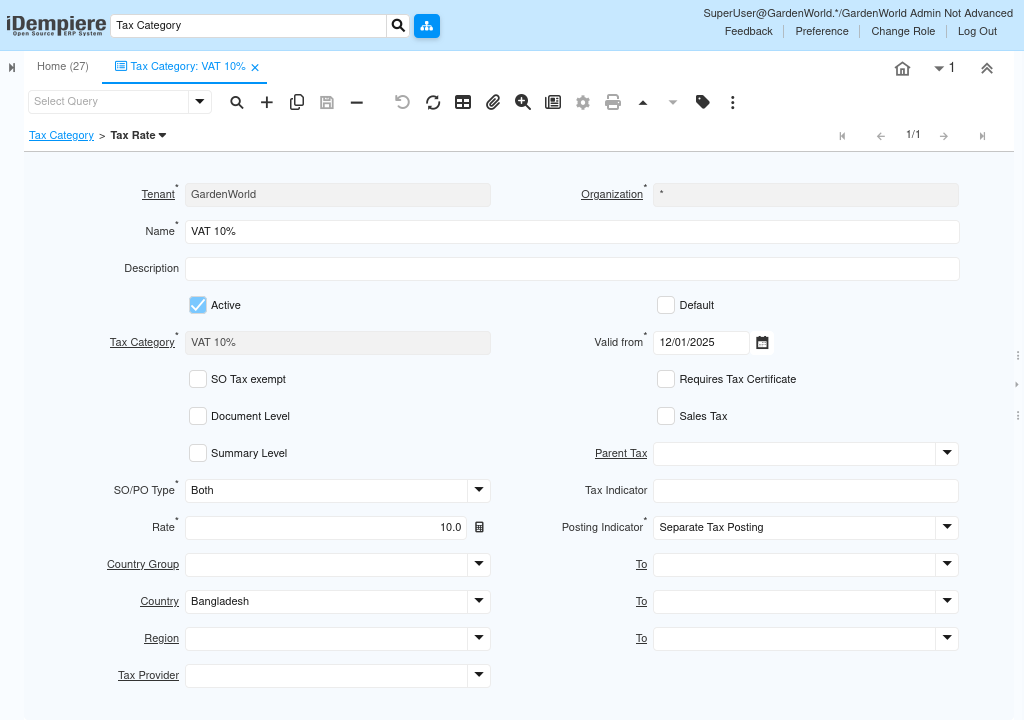
A tax category represents a logical tax group, such as Standard Tax, Zero-Rated Tax, or Exempt Tax. It does not calculate tax by itself but acts as a container for tax rates.
At this level:
- The name clearly identifies the tax behavior (e.g., Standard, VAT 0%).
- The category is marked active to allow usage.
- One category can be set as default for ease of use.
This creates the tax framework before defining actual tax percentages.

Defining Tax Rates Under the Category
Tax calculation is handled through tax rates, which are linked to the tax category. Multiple tax rates can exist under one category to support different regions, dates, or rules.
Tax rates define:
- Percentage rate (e.g., 0%, 5%, 10%)
- Validity period
- Whether the tax applies to sales, purchases, or both
- Posting behavior (separate or included tax)
This separation allows tax rules to change over time without changing products.
Assigning Tax Category to Products
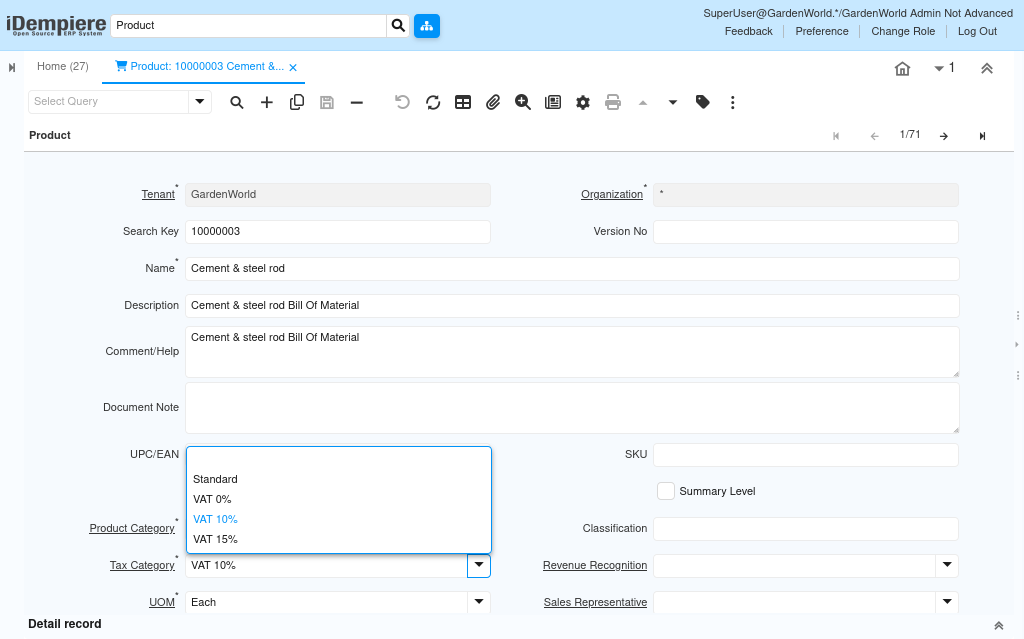
Products are linked to a tax category in the product master. From this point onward, the product automatically follows the tax rules defined by that category.
Once assigned:
- Tax is calculated automatically on transactions.
- Users do not manually choose tax during orders.
- Correct tax accounts are used during posting.
- Compliance rules are enforced consistently.
This ensures tax accuracy without user dependency.
How Tax Category Works During Transactions
The tax category becomes active during real business transactions, even though it is not directly visible to users.
During:
- Purchase Orders
- Sales Orders
- Invoices
The system:
- Identifies the product’s tax category
- Applies the correct tax rate
- Calculates tax amounts
- Posts tax to the appropriate accounts
All calculations and postings happen automatically based on master data.
Tax Posting and Accounting Impact
When transactions are completed, tax amounts are posted according to the tax category and its tax rates.
This ensures:
- Tax is posted separately or combined as configured.
- Tax liability and recovery accounts are accurate.
- Financial statements remain compliant
- Audit trails are maintained
Accounting teams do not need to adjust entries manually.
Why This Approach Matters
Using tax categories centralizes tax logic and removes dependency on manual decision-making during transactions. It allows organizations to handle complex tax structures while keeping daily operations simple.
This approach:
- Reduces tax errors
- Improves compliance
- Simplifies tax maintenance
- Scales easily across products and regions
Outcome
With tax categories properly configured, iDempiere ensures that tax is calculated, applied, and posted automatically and accurately across all transactions. Products follow consistent tax rules, accounting remains compliant, and users can complete purchases and sales confidently without manual tax intervention.