How does the Sales Flow Integrates with Shipper (Freight) in iDempiere
In iDempiere, the sales flow integrates with the shipper to control delivery and freight handling. The shipper anchors logistics across sales documents, ensuring consistent delivery rules and predictable execution without affecting pricing, inventory valuation, or costing.
Shipper Selection in the Sales Order
The integration begins when a shipper is selected on the sales order. This selection defines how the order will be delivered and which logistics rules apply throughout the sales lifecycle.
Once a shipper is chosen:
- Freight rules are automatically applied
- Packaging, label, and pickup options become available
- The delivery method is locked into the order context
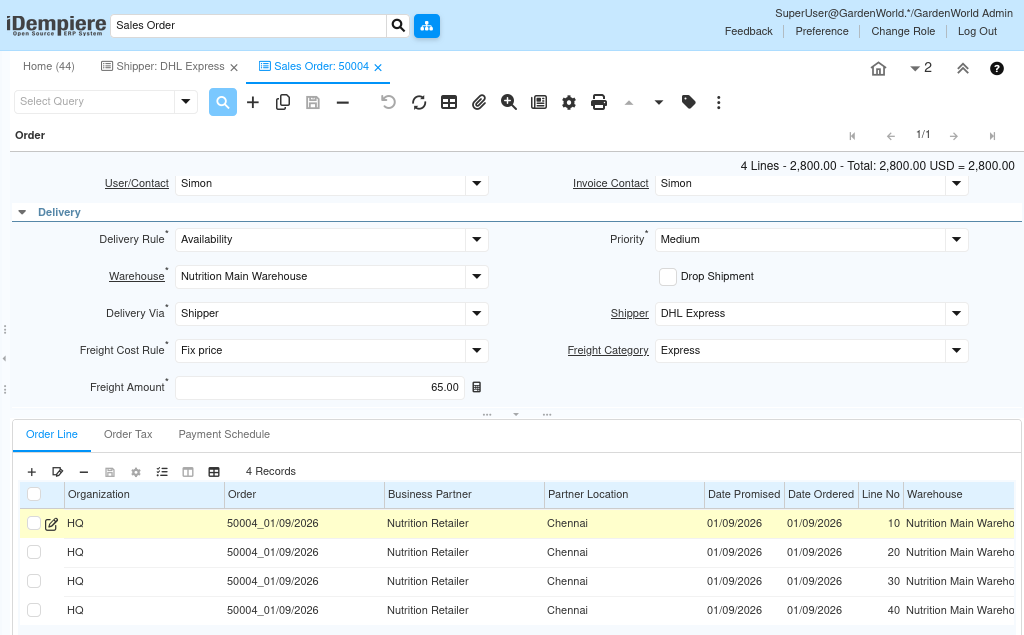
At this stage:
- Sales price comes strictly from the price list
- No inventory movement occurs
- No accounting entries are created
The sales order establishes delivery intent, not execution or cost.
Freight Rules within the Sales Flow
Freight handling in the sales flow is governed by the freight rule associated with the shipper and order.
Freight rules determine:
- Whether freight is charged to the customer
- Whether freight is absorbed by the company
- How freight appears on the invoice
Importantly, freight defined here is commercial in nature. It does not affect inventory value or product cost.
Shipment Creation and Freight Context
When a shipment is generated from the sales order, the shipper and freight context flow automatically into the shipment document.
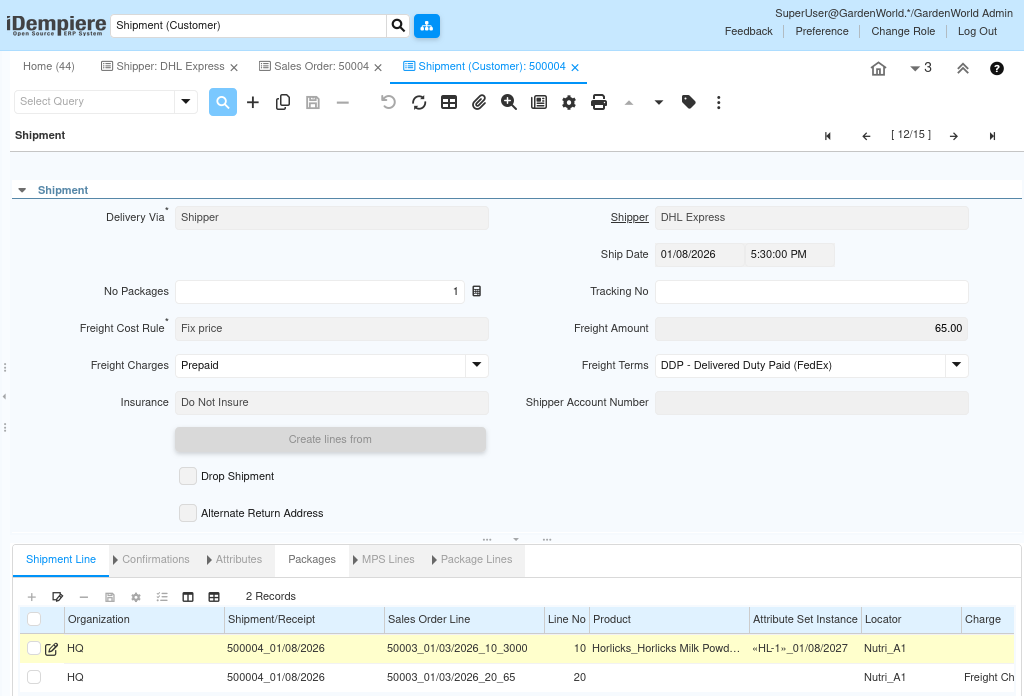
During shipment execution:
- Inventory quantities are reduced
- Product cost is consumed based on the costing method
- Freight information is retained for logistics reference
At this point:
- COGS is posted using product cost
- Freight is not capitalized
- Freight does not change inventory valuation
The shipment represents physical movement, not commercial settlement.
Freight Visibility during Shipment Execution
Freight values may be visible during shipment processing, but they remain informational unless invoiced.

This allows warehouse and logistics teams to:
- Verify delivery expectations
- Confirm carrier instructions
- Ensure correct handling without altering accounting behavior
The separation prevents accidental financial impact during operational execution.
Accounting Behavior Across the Flow
Accounting entries are generated based on document type, not shipper selection.
What is posted automatically:
- Shipment → Inventory reduction and COGS
- Invoice → Revenue and receivables
What is not posted automatically:
- Freight cost capitalization
- Logistics charges unless invoiced
This design ensures:
- Revenue reflects sales agreements
- Cost reflects actual inventory valuation
- Logistics remains operationally flexible
Purpose of Sales–Shipper Integration
The integration exists to support:
- Consistent delivery execution
- Controlled freight charging
- Clear separation of logistics and accounting
- Scalable sales operations
By keeping shipper logic operational, iDempiere allows organizations to evolve shipping strategies without disrupting financial controls.
Common Use Cases
Typical scenarios include:
- Charging freight only for certain customers
- Using different shippers for different regions
- Applying different packaging or pickup rules
- Supporting multiple delivery partners
All scenarios follow the same clean sales-to-shipment integration model.
Outcome
By integrating shippers into the sales flow, iDempiere ensures that delivery execution, freight handling, and logistics decisions are consistent and controlled, while pricing, inventory valuation, and accounting remain accurate and independent. Sales teams manage customer commitments, logistics teams execute shipments confidently, and finance teams rely on predictable postings—without conflict between operations and cost.