How Sales Region Dimension Works in iDempiere
The Sales Region Dimension links accounting entries to where sales occur geographically. It helps analyze revenue, receivables, and performance by region without separate organizations or accounts, and flows automatically during posting to ensure consistent regional visibility.
Process Flow
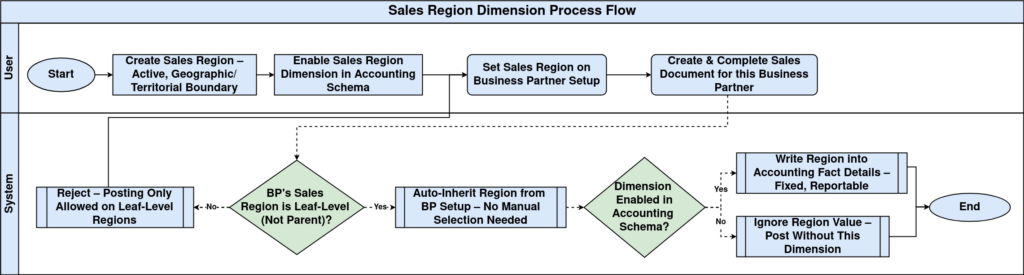
Creating Sales Region Dimension Values
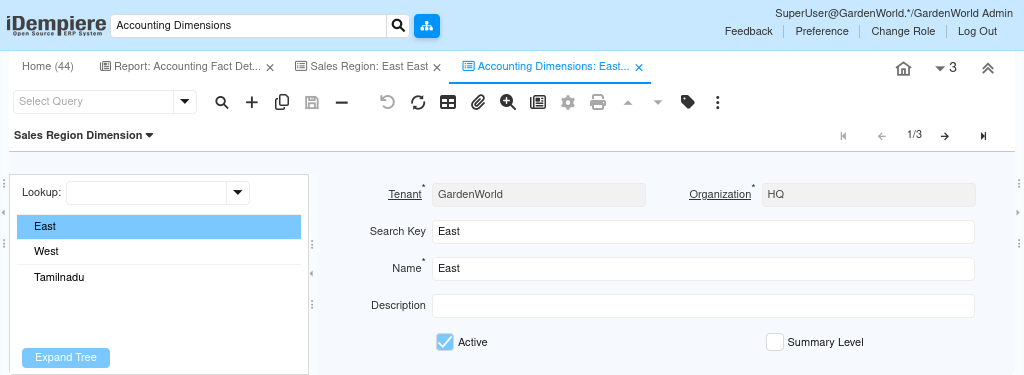
Sales Region Dimension values are created as Sales Region records in the system. Each region becomes a selectable dimension value that can be used during sales-related transactions.
When creating a sales region:
- The Sales Region must be active
- It should represent a clear geographic or territorial boundary
- It should be created before related sales transactions occur
Regions can be structured hierarchically, but postings always occur at the individual (leaf) region level.

Sales Region Hierarchy and Structure
The Sales Region Dimension supports a parent–child hierarchy.
- Parent regions group multiple territories
- Child regions represent actual sales areas
- Only leaf regions are used for posting
This structure allows reports to show performance at both regional and consolidated levels without additional configuration.
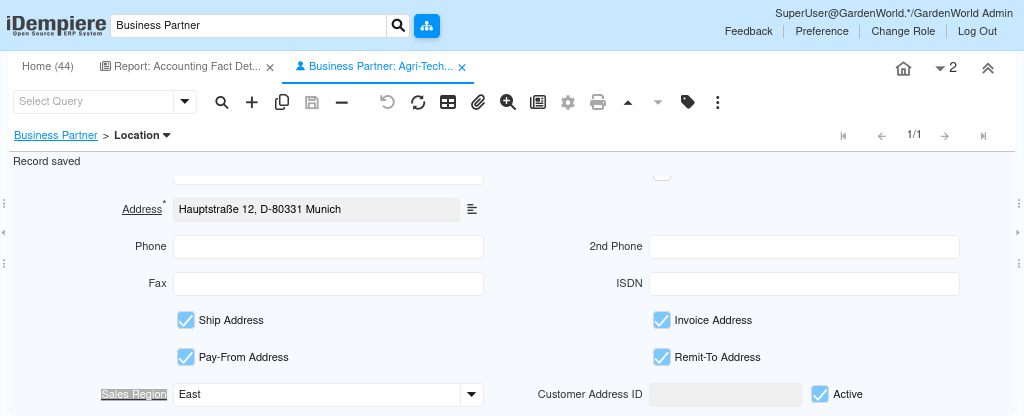
Sales Region Dimension During Transactions
The Sales Region Dimension is usually assigned automatically.
In most cases:
- The region is derived from the Business Partner setup
- Sales documents inherit the region automatically
- Users do not manually select the sales region
This automatic behavior ensures consistency and prevents incorrect regional assignments.
Sales Region Dimension in Accounting Records
Once a document is posted, the Sales Region Dimension is written into Accounting Fact Details and remains fixed.
This allows:
- Revenue analysis by region
- Receivables tracking by territory
- Regional performance comparison
- Clean audit trails for sales activity
Historical data remains accurate even if sales regions change later.
Accounting Schema and Dimension Posting (Applies to All Dimensions)
Accounting Dimensions in iDempiere only appear in accounting entries when they are enabled in the accounting schema. Creating a dimension and using it in transactions is not enough by itself. Each accounting schema has a dedicated accounting dimensions tab. This tab controls which dimensions are allowed to post values into accounting records. The schema acts as a gatekeeper between operational data and financial postings.
When a dimension is enabled in the Accounting Schema, iDempiere stores the selected dimension value during posting. The value becomes visible in accounting fact details and can be used in financial reports, analysis, and audits.
When a dimension is not enabled, transactions still work normally. Documents can be completed, and business processes continue without error. However, the dimension value is ignored during posting, and accounting entries do not contain that dimension.
This design allows organizations to control accounting complexity. Dimensions can be introduced gradually, activated only when reporting or tracking is required, without changing operational workflows.
Key points to remember:
- Dimensions must be enabled per accounting schema
- Posting behavior depends on the schema used by the document
- Existing transactions are not retroactively updated
- Different schemas may enable different dimensions
Always confirm the accounting schema configuration before validating dimension behavior in accounting or reports.
Sales Region Dimension in Reporting
Reports use the Sales Region Dimension to present regional financial views.
Common reporting examples include:
- Revenue by region
- Outstanding receivables by territory
- Regional sales comparisons
- Consolidated regional summaries
Because the dimension is hierarchical, reports automatically roll up child regions into parent regions.
Outcome
With Sales Region Dimension properly utilized, iDempiere provides clear geographic insight into sales performance. Sales activity is classified automatically, accounting remains clean, and management gains reliable regional visibility without increasing system complexity.