How to Configure and Use the Customer in iDempiere
The Customer Header defines a customer’s commercial identity, credit behavior, pricing, billing logic, and defaults. All sales documents inherit from it, making it a control layer for system behavior—misconfiguration later causes pricing, credit, or invoice issues.
Customer Identity and Classification
The top section establishes who the customer is and how the system recognizes them internally.

The Search Key is the system’s internal identifier. It must be unique and stable, as it is used in reports, integrations, and references.
The Name and Name 2 represent the legal and display names used on documents.
The Customer checkbox explicitly classifies this Business Partner as a customer (a partner can also be vendor or both).
Why this matters:
This classification controls document availability. Without the Customer flag, sales orders, invoices, and opportunities cannot be created.
Customer Status and Credit Control
This section defines whether the customer is allowed to transact financially.
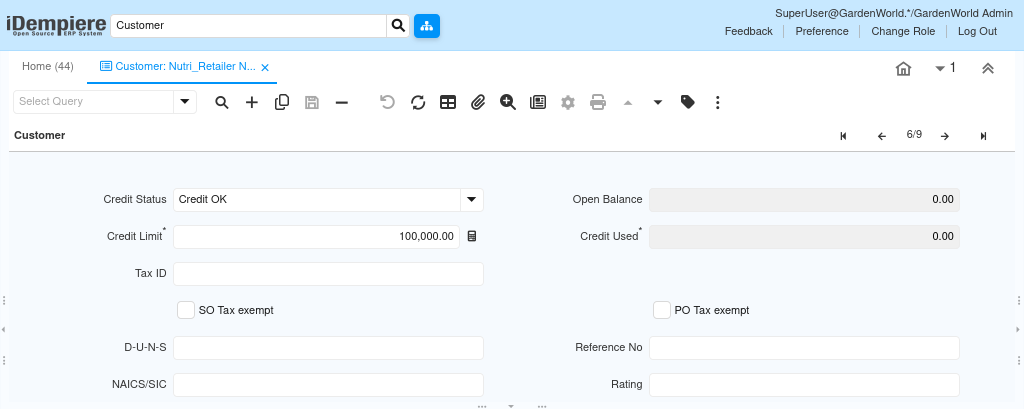
The Credit Status reflects whether the customer is allowed to place orders.
The Credit Limit defines the maximum exposure allowed before orders are blocked.
Open Balance and Credit Used are system-calculated and updated automatically from invoices and payments.
Credit is not checked at opportunity stage, but it is enforced when:
- Sales Orders are completed
- Shipments are processed
- Invoices are generated
Key behavior:
A customer with “Credit Stop” can still appear in CRM but cannot complete financial sales transactions.
Business Partner Group Assignment
The Business Partner Group is one of the most powerful hidden controls in the Customer Header.

This group:
- Assigns default accounting combinations
- Controls revenue, receivables, discounts, write-offs
- Inherits accounting schema behavior
The customer does not store accounting accounts directly.
Instead, it inherits them dynamically from the Business Partner Group.
Why this matters:
Changing the group can change accounting behavior without affecting transactions
Sales Ownership and Responsibility
The Sales Representative field defines who owns this customer commercially.
This user becomes:
- Default owner for opportunities
- Default sales representative for orders
- Responsible person in pipeline reports
- Owner for performance and commission tracking
This field ensures sales accountability and reporting clarity.
Pricing and Discount Controls
This section determines how prices are calculated when sales documents are created.

The Price List defines base prices for products.
The Discount Schema applies automatic discounts (quantity, value, customer-based).
The Flat Discount % applies a blanket reduction across all prices.
Important rule:
Pricing is evaluated only when quotations or orders are created, not at opportunity stage. This allows commercial flexibility early and price enforcement later.
Order, Invoice, and Delivery Behavior
These fields control how orders flow operationally once created.
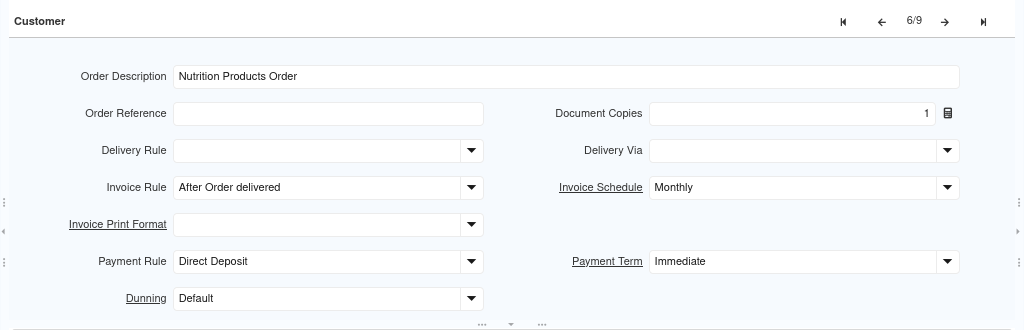
Key controls include:
- Delivery Rule – When and how goods are shipped
- Invoice Rule – When invoices are generated (e.g., after delivery)
- Invoice Schedule – Frequency for recurring invoicing
- Payment Term – Due date calculation
- Payment Rule – Expected payment method
These fields ensure that every order created for this customer behaves consistently without manual overrides.
Logistics and Document Handling
Operational preferences related to shipping and documentation are defined here.
- Delivery Via – Courier, pickup, or freight method
- Document Copies – Number of printed documents
- Invoice Print Format – Layout used for customer invoices
This ensures customers receive documents in the expected format and quantity.
Lifecycle and Analytical Fields
These fields support management insight, not transaction control.
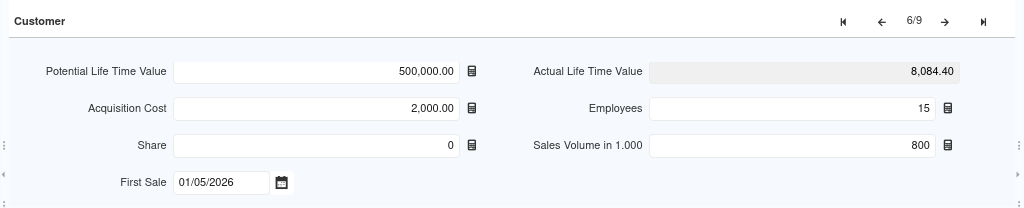
They include:
- First Sale Date
- Potential Lifetime Value
- Actual Lifetime Value
- Sales Volume
- Employees / Rating
These values help management understand customer importance and growth potential, but they do not block or allow transactions.
Relationship with Sub-Tabs
The Customer Header acts as the parent for all sub-tabs:
- Opportunities
- Contacts
- Locations
- Contract Prices
- Requests
- Orders
All these records inherit defaults from the header but maintain their own lifecycle.
This separation keeps the system:
- Flexible in CRM
- Strict in finance
- Predictable in operations
Purpose
- The Customer Header exists to centralize control while decentralizing execution.
- Business users configure rules once.
- Sales teams work freely within those rules.
- Finance and operations receive clean, predictable transactions.
Outcome
As a result, organizations experience fewer pricing errors, controlled credit exposure, faster order processing, and consistent invoicing, with clear customer ownership across teams. The Customer Header acts as the single source of truth, defining how iDempiere treats a customer throughout the entire sales and finance lifecycle.