How Credit and Accounting Controls Work for Business Partners in iDempiere
In iDempiere, Business Partner credit and accounting controls enforce credit limits, dunning rules, and financial policies on sales and purchases, helping manage receivables, limit credit risk, automate overdue follow-ups, and maintain consistent accounting.
Process Flow
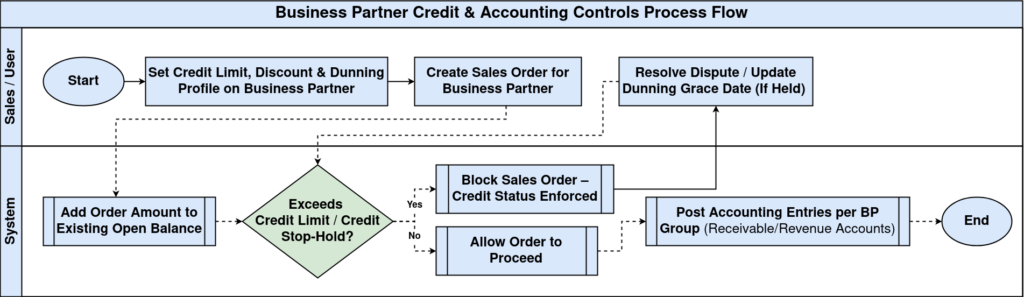
Relationship Between Credit Control and Accounting Setup
Credit and accounting controls operate together using information stored in the Business Partner record. This relationship works as follows:
- Credit Status & Credit Limit → Control whether new credit sales can be created
- Open Balance → Show current outstanding receivables
- Discount Schema & Flat Discount % → Control commercial and pricing behavior
- Dunning & Dunning Grace Date → Automate overdue reminders and receivable follow-up
Credit Status – Monitoring Financial Standing
The Credit Status field provides a snapshot of the Business Partner’s current financial condition. The status may reflect whether:
- Credit Hold
- Credit OK
- Credit Stop
- Credit Watch
- No Credit Check
iDempiere evaluates credit status during order processing to determine if new transactions can proceed.
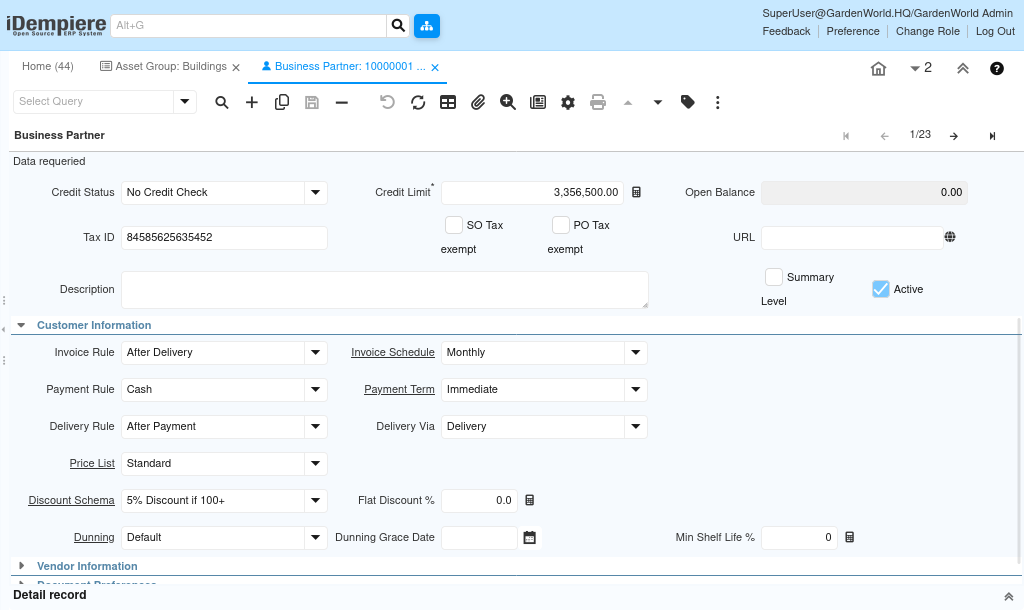
Credit Limit for Controlling Maximum Allowed Credit
The Credit Limit sets the maximum receivable amount allowed for the BP. This value is actively monitored.
When a Sales Order is processed:
- The system checks the BP’s existing Open Balance
- Adds the new order amount
- Compares against the Credit Limit
This ensures controlled exposure to credit risk.
Open Balance – Tracking Outstanding Receivables
The Open Balance represents unpaid amounts the BP owes. It includes:
- Open AR Invoices
- Unallocated receipts
- Credit memos not applied
This value is updated as transactions are created and payments are received. It is a key indicator in credit decision-making.
Discount Schema and Flat Discount % – Accounting and Pricing Impact
These settings influence commercial conditions for each Business Partner:
- Discount Schema – Structured discount logic based on price lists, quantities, or rules
- Flat Discount % – Direct discount applied to all sales documents
Dunning – Automating Overdue Follow-Up
The Dunning field links a BP to a dunning profile that defines:
- How late payments are detected
- Escalation levels.
Dunning Grace Date
This indicates a temporary period during which:
- Dunning notices are not generated
- Late reminders are delayed
This field is commonly used during disputes or special agreements.
Accounting Controls Through Business Partner Group
The Business Partner Group defines default accounting setup such as:
- Receivable account
- Payable account
- Revenue and expense allocations
When a BP is assigned to a group, all accounting entries derived from sales or purchases follow the group mapping automatically.
This ensures consistent accounting treatment for similar types of customers or vendors.