How Relation Type Works in iDempiere
A Relation type defines how two records in iDempiere are logically connected. It makes existing links visible and navigable in the UI, allowing users to move between related documents like orders and shipments without creating or modifying any data.
Process Flow

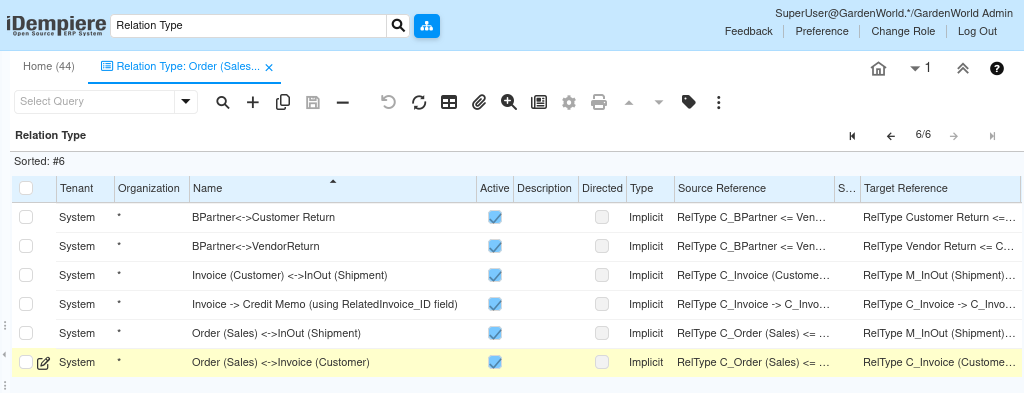
How a Relation Type Is Defined
Each relation type is defined at system level and applies across all organizations. It describes the relationship using source and target references that already exist in the data model.
When creating or reviewing a relation type, the focus is on:
- Which record is the source
- Which record is the target
- How the system should interpret that connection
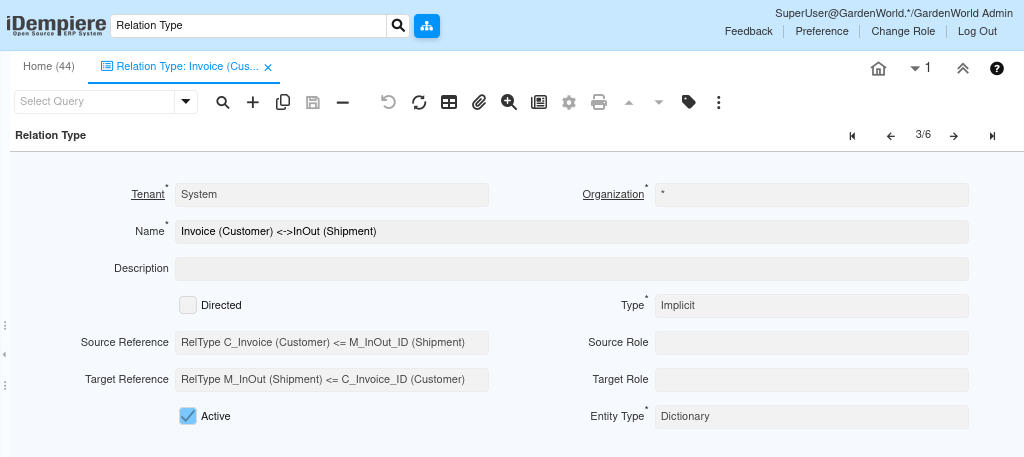
Key elements you see in the Relation Type window:
- Name – Describes the relationship in readable form
- Type – Usually Implicit, meaning the link already exists
- Source Reference – The table and field where the relationship starts
- Target Reference – The table and field where the relationship points
- Entity Type – Normally Dictionary, meaning system-defined
How Implicit Relations Work in Daily Use
Most relation types in iDempiere are implicit. This means the relationship is not manually created by users but is derived from existing reference columns like IDs.
For example:
- A Shipment already stores the Order ID
- An Invoice already stores the Shipment or Order ID
- A Credit Memo already references the original invoice
The relation type tells iDempiere: “These two records are connected. Show that connection to the user.”
This allows the system to automatically show related records in:
- Document links
- Zoom-across navigation
- Related records panels
Common Relation Types You Will See
iDempiere comes with many predefined relation types that reflect standard business flows.
Typical examples include:
- Order (Sales) ↔ Shipment
- Order (Sales) ↔ Invoice
- Invoice ↔ Credit Memo
- Business Partner ↔ Customer Return
- Business Partner ↔ Vendor Return
Each of these uses existing reference fields such as:
C_Order_IDC_Invoice_IDM_InOut_IDC_BPartner_ID
Users never need to configure these links manually during transactions. The relation type ensures the system understands and displays them correctly.
How Users Experience Relation Types
End users usually do not interact with the relation type window directly. Instead, they experience its effect while working with documents.
When a relation type is correctly defined:
- Users can jump from an Order to its Shipment
- From a Shipment to its Invoice
- From an Invoice to its Credit Memo
- From a Business Partner to related returns or documents
All of this happens automatically through:
- Toolbar navigation
- Right-click related records
- Zoom and drill-down actions
What Happens If a Relation Type Is Missing or Incorrect?
If a relation type is not defined or incorrectly mapped:
- Related records may not appear
- Navigation between documents may be broken
- Users may need to manually search for linked records
This does not affect data integrity, but it reduces usability and traceability across business documents.
For this reason, relation types are usually:
- Delivered by default
- Maintained by system administrators
- Rarely changed unless extending the data model
When You Would Create or Adjust a Relation Type
You typically work with relation types only when:
- Adding custom tables or documents
- Extending standard flows
- Creating new document relationships
- Improving navigation for custom processes
In standard implementations, existing relation types already cover:
- Sales flow
- Purchase flow
- Logistics flow
- Returns and credit processes