How to create and use the Product Category in iDempiere
A product category defines common inventory, costing, accounting, and reporting behavior for a group of products in iDempiere. Rules are set once at the category level and applied automatically to all assigned products, ensuring consistency, simplicity, and reduced configuration errors.
Process Flow
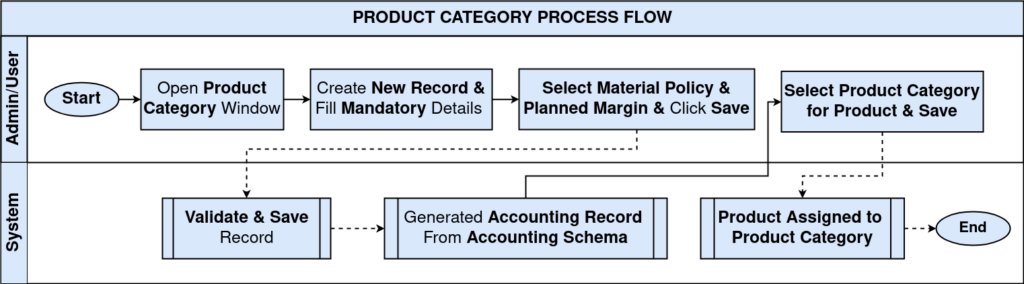
Role of Product Category in the Workflow
Product category sits between product creation and daily transactions. It is created early during system setup and remains stable while products are purchased, received, issued, or sold.
In the overall flow:
- Products inherit behavior from product categories.
- Transactions inherit behavior from products.
- Accounting follows the rules defined in product categories.
Because of this design, users can focus on operations without worrying about costing or accounting rules.
Defining the Product Category
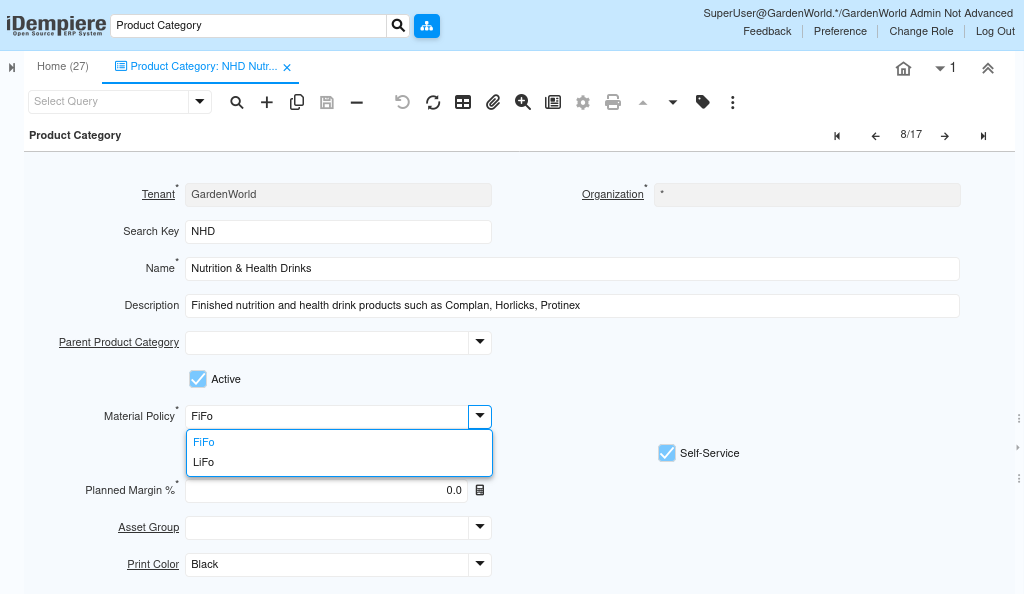
A product category starts as a master record that clearly describes a group of similar products. It is identified using a short internal code and a readable name that users can easily understand while creating products.
Categories may optionally be grouped under a parent category for better organization and reporting. This hierarchy helps users navigate data but does not change how transactions are posted.

Controlling Inventory Cost Behavior
Each product category defines how inventory cost is consumed using a material policy. This rule decides how costs are picked when products are issued or sold.
Depending on the selected policy:
- Older stock can be consumed first.
- Costs can be averaged across receipts.
- Recent stock can be consumed first.
This choice directly affects:
- Project costing
- Cost of goods sold
- Inventory value in accounting
Once defined, this behavior applies automatically to all products under the category.
Defining Accounting Behavior
Accounting rules are configured at the product category level so that financial postings happen automatically during transactions.
Once accounting is set:
- Inventory receipts post to asset accounts
- Issues and sales post to expense or COGS accounts
- Variances are tracked automatically
Users do not need to manually create journal entries. The system posts everything based on the product category configuration.

Using Product Category During Product Creation
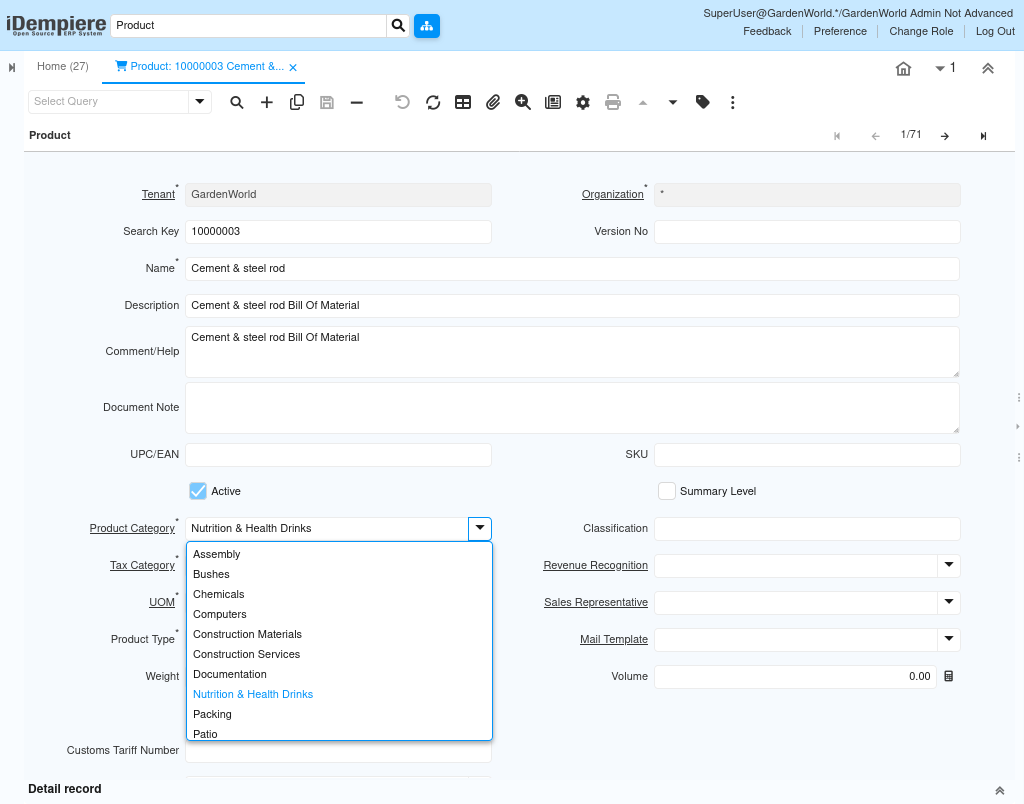
Product category is applied when a product is created or updated.
When creating a product:
- The product category is selected in the product header.
- The product immediately inherits inventory, costing, and accounting rules.
There is no need to repeat configuration inside the product. The product category remains the single point of control.
Impact on Daily Transactions
Once products are linked to a Product Category, daily work becomes smooth and consistent.
This includes:
- Purchase orders and material receipts
- Inventory movements and adjustments
- Issues to projects or production
- Cost posting and reporting
All system behavior follows the rules defined in the Product Category, without additional user effort.
Reporting and Control
Because product categories are used consistently, they provide a strong base for reporting and control. Inventory, cost, and margin reports can be analyzed by category without extra configuration.
This helps organizations:
- Track costs by product group
- Maintain clean and auditable accounting
- Scale the system as products increase
Outcome
By using product categories correctly, iDempiere centralizes inventory and accounting behavior into a single reusable control. Products automatically follow predefined rules, transactions post correctly without manual intervention, and reports remain accurate and reliable. This makes the system easy to use for new users while maintaining strong control for experienced teams.