How Shipping Processor Configuration Works in iDempiere
In iDempiere, the Shipping Processor defines how freight charges, shipping rules, and delivery logic are applied during shipment transactions. It acts as a logic engine between setup and execution, enabling consistent freight calculation and automated shipment behavior without manual intervention.
Understanding the Role of a Shipping Processor
The shipping processor controls how shipping rules are interpreted and executed during transactions. It determines whether freight is calculated from tables, external services, or fixed rules, and how that freight flows into documents.
Once a shipping processor is configured:
- Freight charges can be calculated automatically.
- Shipping rules become enforceable during shipment creation.
- Transactions follow a consistent delivery logic.
- Users no longer need to calculate or apply freight manually.
This ensures shipping behavior is predictable, repeatable, and aligned with business policy.
Creating a Shipping Processor Configuration
The purpose of creating a shipping processor is to define one clear shipping logic that the system can reuse across transactions.
When creating a shipping processor configuration, users focus on making it transaction-ready, not over-engineering it.
Key fields and why they exist
Name
This identifies the shipping logic being used (for example, Freight Table Shipment Processor). Users and administrators rely on this name when linking shipping behavior to shippers and freight rules.
Organization
Shipping rules are organization-specific. This field ensures freight calculation and shipment behavior apply only within the correct legal and operational boundary.
Shipping Processor Class
This defines how the system calculates shipping.
For example, MFreightShipmentProcessor tells iDempiere to calculate freight using the Freight Table instead of an external carrier API.
Active
Only active processors are available in transactions. An inactive processor will be ignored even if other setup exists.
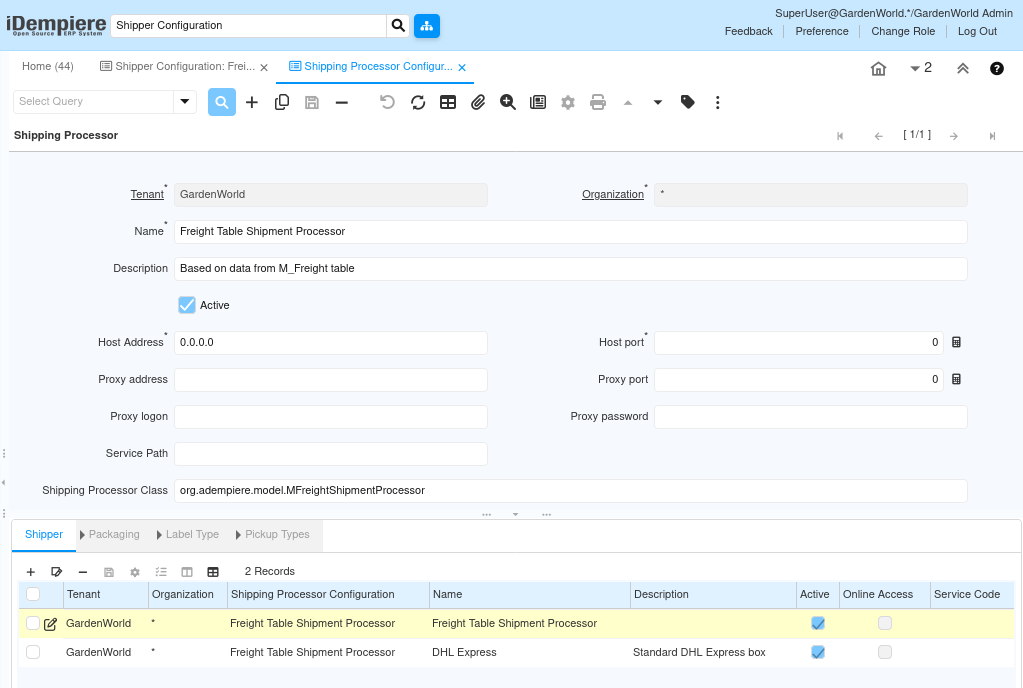
At this stage, the processor is defined but not yet used. It becomes effective only when linked to shippers and transactions.
Linking the Processor to Shipping Behavior
A shipping processor becomes operational when it is connected to shippers and freight rules.
This linkage ensures that when a transaction requires shipping logic, the system knows which processor to call.
What happens after linking?
- The processor is invoked during shipment creation.
- Freight rules are evaluated automatically.
- Shipping costs are calculated without user input.
- Delivery logic follows predefined rules.

This separation keeps configuration clean:
Processors define logic; shippers define delivery identity.
Shipping Processor Works During Transactions
Once configured, the shipping processor operates silently during daily operations. Users do not interact with it directly; they experience its effects through transaction behavior.
During Sales Orders
When a sales order is created:
- The system identifies the shipper.
- The linked shipping processor is selected.
- Freight calculation rules are prepared for later execution
No freight is posted yet, but the shipping logic is locked in.
During Shipment Creation
When a shipment is generated:
- The shipping processor evaluates shipment details.
- Freight rules (weight, volume, destination, priority) are applied.
- Shipping cost is calculated automatically.
The user completes the shipment without manually calculating freight.
During Invoicing
When the shipment is invoiced:
- Calculated freight is transferred to the invoice.
- Charges are posted correctly to accounting.
- The customer sees accurate shipping costs.
This ensures financial accuracy without duplicate data entry.
Why Each Field Matters in Real Usage
Every field in the shipping processor exists to prevent errors during transactions:
- Processor Class ensures correct calculation logic.
- Organization prevents cross-entity shipping errors.
- Active flag controls transaction availability.
- Shipper linkage ensures correct execution timing.
Incorrect setup usually leads to:
- Missing freight on invoices
- Shipment completion errors
- Manual overrides by users
- Inconsistent shipping costs
A correct setup eliminates these issues completely.
Purpose and Use Cases
From a business perspective, the shipping processor enforces shipping policy at the system level, not the user level.
Common use cases include:
- Freight calculated based on destination zones
- Standardized shipping charges across customers
- Separation of logistics logic from order entry
- Scalability when adding new shipping methods
It allows businesses to grow shipping complexity without increasing user workload.
Key Benefits
- Automated freight calculation
- Consistent shipping behavior
- Reduced manual errors
- Clean accounting integration
- Reusable shipping logic across transactions
Users focus on completing documents, while the system enforces shipping rules.
Outcome
By configuring a shipping processor correctly, iDempiere ensures that shipping logic is centralized, automated, and enforced consistently across sales, shipments, and invoicing. Transactions flow smoothly, freight is calculated accurately, and both operational and financial teams can rely on the system without manual intervention.
This setup transforms shipping from a manual task into a controlled, system-driven process that scales with the business.