How Campaign Dimension Works in iDempiere
The Campaign Dimension links accounting entries to marketing or promotional activities. It tracks campaign-specific costs and revenue without changing the chart of accounts. Once assigned, the campaign flows automatically into accounting records, giving clear visibility into spending and performance.
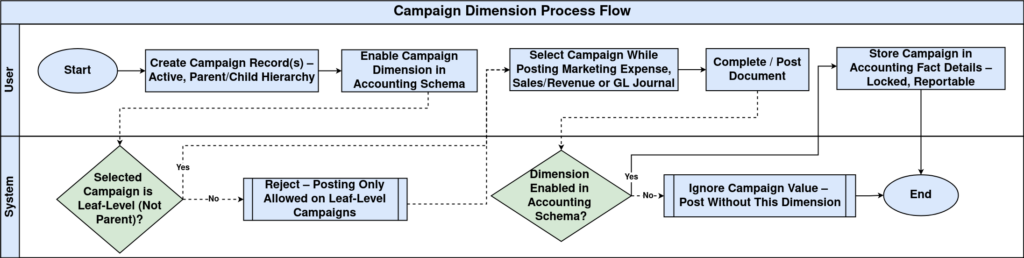
Process Flow
Creating Campaign Dimension Values
Campaign dimension values are created as campaign records in the system. Each campaign becomes an individual dimension value that can be selected during transactions.
When setting up a campaign:
- The campaign must be active.
- It should represent a real promotional or marketing initiative.
- It should be created before related transactions are entered.
Campaigns can be organized under parent campaigns for reporting, but postings are always done at the individual campaign level.

Campaign Hierarchy and Structure
The Campaign Dimension supports a hierarchical structure.
- Parent campaigns are used for grouping and analysis.
- Child campaigns represent actual promotional activities.
- Accounting postings occur only on leaf-level campaigns.
This structure allows reports to show both individual campaign results and consolidated views across multiple campaigns.

Campaign Dimension During Transactions
The Campaign Dimension is usually selected manually when recording campaign-related activity.
Users assign a campaign when:
- Posting marketing or advertising expenses.
- Recording campaign-related sales or revenue.
- Entering GL journals for campaign adjustments.
Once selected and the document is posted, the campaign reference becomes part of the accounting entry and cannot be changed.
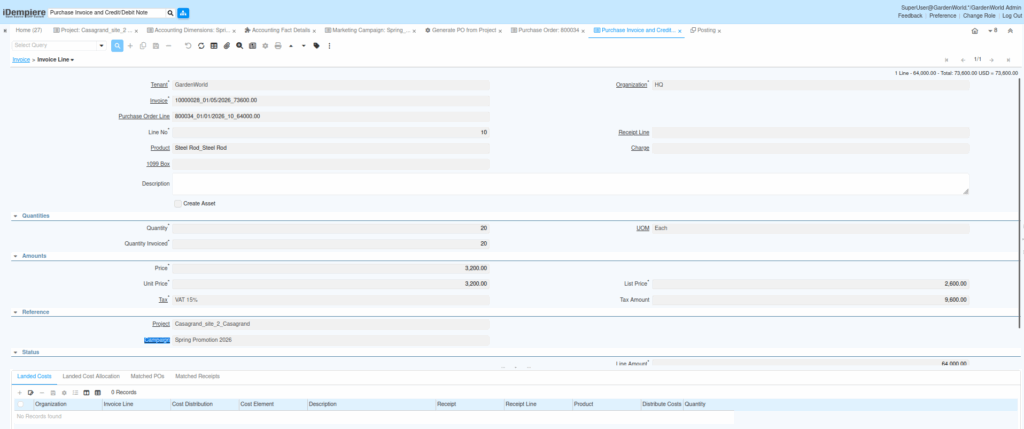
Campaign Dimension in Accounting Records
After posting, the Campaign Dimension appears in Accounting Fact Details along with other dimensions.
This allows:
- Tracking total spend per campaign.
- Comparing revenue generated by campaigns.
- Reviewing campaign effectiveness over time.
Even after a campaign is closed or made inactive, historical accounting entries remain available for reporting.

Accounting Schema and Dimension Posting (Applies to All Dimensions)
Accounting dimensions in iDempiere only appear in accounting entries when they are enabled in the Accounting Schema. Creating a dimension and using it in transactions is not sufficient by itself. Each Accounting Schema has a dedicated Accounting Dimensions tab. This tab controls which dimensions are allowed to post values into accounting records. The schema acts as a gatekeeper between operational data and financial postings.
When a dimension is enabled in the Accounting Schema, iDempiere stores the selected dimension value during posting. The value becomes visible in Accounting Fact Details and can be used in financial reports, analysis, and audits.
When a dimension is not enabled, transactions still work normally. Documents can be completed, and business processes continue without error. However, the dimension value is ignored during posting, and accounting entries do not contain that dimension.
This design allows organizations to control accounting complexity. Dimensions can be introduced gradually, activated only when reporting or tracking is required, without changing operational workflows.
Key points to remember:
- Dimensions must be enabled per Accounting Schema
- Posting behavior depends on the schema used by the document
- Existing transactions are not retroactively updated
- Different schemas may enable different dimensions
Always confirm the Accounting Schema configuration before validating dimension behavior in accounting or reports.
Campaign Dimension in Reporting
Reports use the Campaign Dimension to present financial data focused on marketing and promotions.
Common reporting views include:
- Campaign-wise expense summaries
- Revenue attributed to campaigns
- Cost versus outcome comparisons
Because the dimension supports hierarchy, reports can roll up multiple campaigns into a single summary view.
Outcome
With Campaign Dimension correctly utilized, iDempiere provides clear visibility into promotional spending and results. Users assign campaigns where relevant, while accounting and reporting gain accurate, structured insights into campaign performance without complicating financial setup.