How Product Transaction Value Works in iDempiere
The Product Transaction Value report in iDempiere is a standard system report that shows the value of product inventory movements using current vendor prices. This means it lists transactions where products moved into or out of inventory and assigns a monetary value based on the current price information available from vendors or pricing data in the system. The report helps you track and assess the financial impact of inventory transactions such as receipts, shipments, and internal movements by showing not just the quantity but also the value of those movements.
Movement Value Importance
- Helps you evaluate the financial value of stock movements
- Useful for analyzing inventory costs and movement trends
- Supports reconciliation of physical movements to monetary impact
- Aids in monitoring inventory activity for finance and operations teams
- Useful for auditing and reporting movement value over time
By combining movement data with pricing, this report bridges the movement ledger with financial context.
Report Parameters
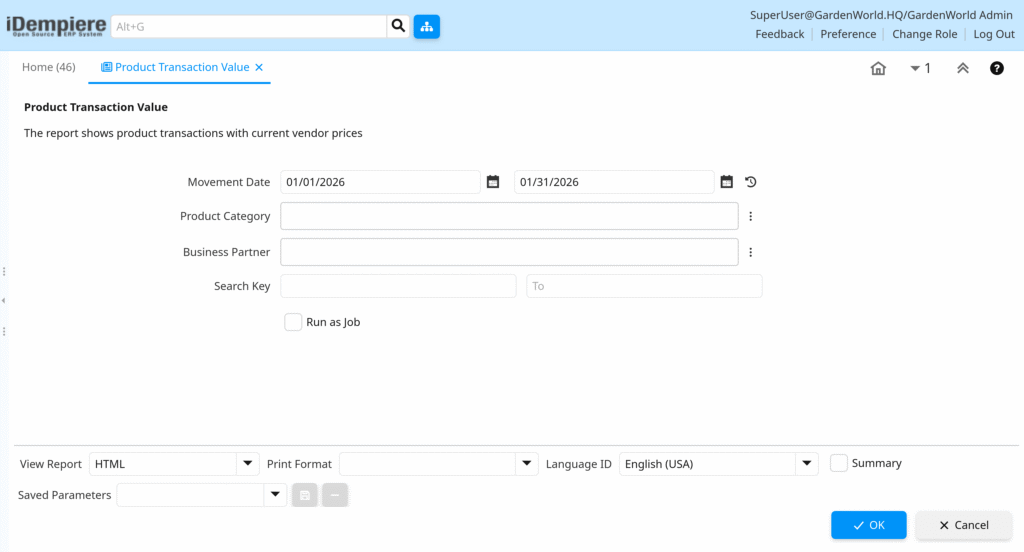
When you run the report, you set filters such as:
- Movement Date: The date (or date range) for which product movements are included — such as receipts, shipments, or inventory transfers.
- Product Category: The group of products to include (or leave blank to include all).
- Business Partner: Optionally limit results to transactions involving specific partners (e.g., a vendor or customer).
- Search Key: A search filter to focus the report on specific records or transaction identifiers.
These filters help tailor the report to your specific business needs.
Calculate Transactions
iDempiere looks at inventory transaction records of movements in and out of stock that have occurred within the given date range.
For each movement, the report:
- Identifies the product involved
- Reads the transaction’s quantity
- Fetches the current vendor price or pricing reference
- Calculates the monetary value of the transaction
- Adds the record to the report output
Because it uses vendor pricing values, the report helps you understand value impact using realistic cost indications.
Report Output Display
The report results are typically presented as a table showing, for each entry:
- Movement Date – When the product moved
- Product – Which item was moved
- Quantity – How much product moved
- Current Vendor Price – Cost or price used for valuation
- Calculated Value – Total value for the quantity moved
- Business Partner (if filtered) — Who was involved in the movement
This lets you quickly see what moved and what it was worth.
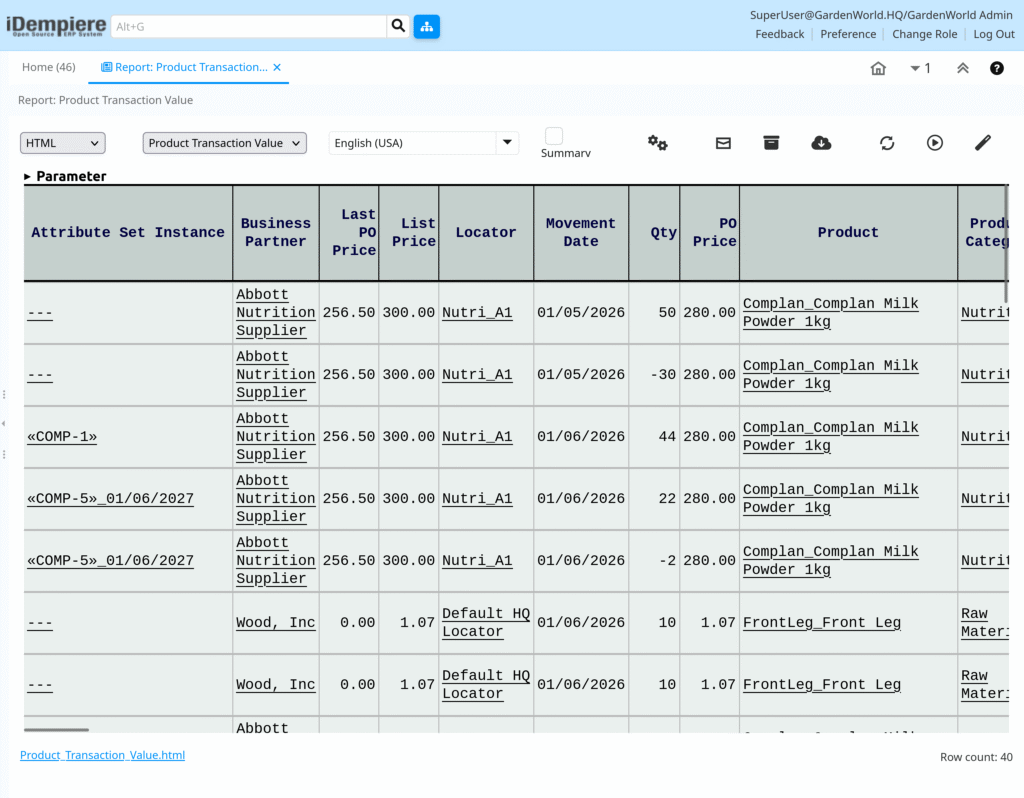
The Product Transaction Value report in iDempiere shows inventory movements alongside their monetary value based on current vendor prices. It provides a clear picture of how product movements affect inventory value, helping both finance and supply chain teams understand the value impact of inventory activity — not just the quantity.