How Customer Locations and Contract Prices Work in iDempiere
This guide explains how Customer Locations and Contract Prices work together in iDempiere to control delivery, billing, and customer-specific pricing. Though configured separately, both apply automatically during sales orders, shipments, and invoices without manual intervention.
Customer Locations
Customer Locations represent all valid addresses associated with a customer. Each location can serve a different purpose in the sales lifecycle, such as delivery, invoicing, or payment settlement. A single customer can have multiple locations, and each location can be activated or deactivated independently.
When a Sales Order is created, iDempiere selects the appropriate customer location based on its address roles. These roles determine where goods are shipped, where invoices are sent, and which address is used for financial settlement.
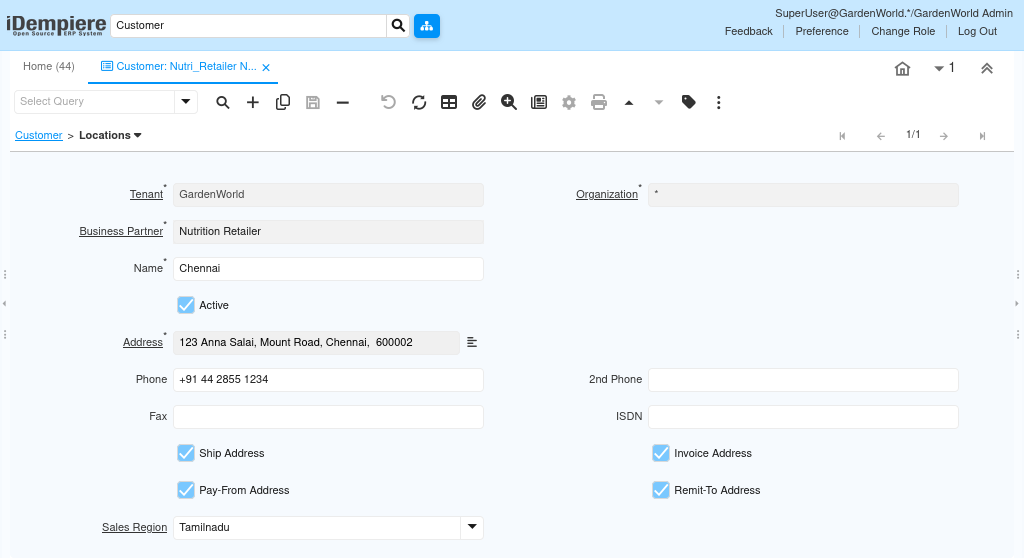
Each location is tied directly to the Business Partner and becomes selectable in Sales Orders, Shipments, and Invoices.
Key Location Configuration
- Name
Logical name for the address (e.g., Chennai, Bangalore Warehouse) - Address
Full postal address used on documents and logistics - Ship Address
Used for Shipment and Delivery documents - Invoice Address
Used for Invoice generation - Pay-From Address
Used when customer makes payments - Remit-To Address
Used for accounting settlement references - Sales Region
Used for regional reporting and sales analysis - Active
Controls whether the address is selectable in transactions
A customer location marked as Ship Address will automatically appear in the Sales Order shipping section. If multiple locations exist, users can choose the appropriate one for per order.
Contract Prices
Contract Prices define customer-specific pricing agreements for products. These prices override the standard price list when a Sales Order is created for the customer. Contract Prices are optional but critical when pricing differs by customer, volume, or agreement.
Contract Prices are evaluated after the Price List and before manual price overrides, ensuring consistent pricing enforcement.

Each Contract Price is linked to a specific Customer + Product combination and can be time-bound.
Key Contract Price Configuration
- Product
The product for which the special price applies - Valid From / Valid To
Controls the effective period of the contract price - Price Override Type
Determines how pricing is applied (fixed price or discount) - Break Value
Quantity threshold for volume-based pricing - Active
Controls whether the contract price is applied
Once saved, the Contract Price requires no manual selection. iDempiere automatically applies it during Sales Order line entry if conditions match.
How These Two Work Together in Sales Flow
When a Sales Order is created, iDempiere first resolves the Customer Location to determine logistics and billing addresses. Immediately after, it evaluates Contract Prices to determine the correct product pricing. If a matching Contract Price exists for the selected product and date range, the system replaces the standard price list value automatically. The user does not need to select or confirm the contract price manually.
This ensures that delivery, billing, and pricing rules are consistently enforced across all downstream documents such as Shipment, Invoice, and Payment.
Purpose and Use Cases
Customer Locations allow businesses to manage customers with multiple branches, warehouses, or billing offices without duplicating customer records. Contract Prices enable sales teams to honor negotiated pricing while maintaining centralized price control.
Common use cases include:
- Supplying goods to different branch locations under one customer
- Offering special prices to key customers or distributors
- Managing regional delivery and billing requirements
- Preventing pricing errors during order entry
Outcome
Once Customer Locations and Contract Prices are correctly configured:
- Sales Orders automatically use the correct delivery and invoice address
- Product prices are applied accurately without manual overrides
- Shipments and invoices remain consistent and audit-ready
- Sales teams work faster with zero pricing ambiguity
- Accounting and logistics operate on clean, structured master data
This setup ensures that customer-specific logistics and pricing are enforced by the system, not dependent on user judgement.