How Move Confirmation Works in iDempiere
Move Confirmation is the process of verifying and validating inventory movements — especially transfers that are set up as “In Transit” — before the system finalizes them and updates warehouse stock levels. This ensures that what was expected to move has actually moved in the right quantities and conditions.
When a movement document uses a document type that requires confirmation, iDempiere automatically creates a Move Confirmation record that must be completed before inventory is updated.
Move Confirmation Importance
- Provides control and verification of internal stock movements
- Ensures accurate inventory counts and reduces discrepancies
- Supports quality and audit checks on warehouse transfers
- Helps maintain integrity in multi-location logistics
Before the inventory is updated, the system waits for confirmation that the destination actually received the correct quantity.
Inventory Movement Creation
A user creates an Inventory Movement document to move stock from one location to another (e.g., between warehouses or zones). If the document type is set to In Transit, the system knows it requires confirmation once the goods arrive.
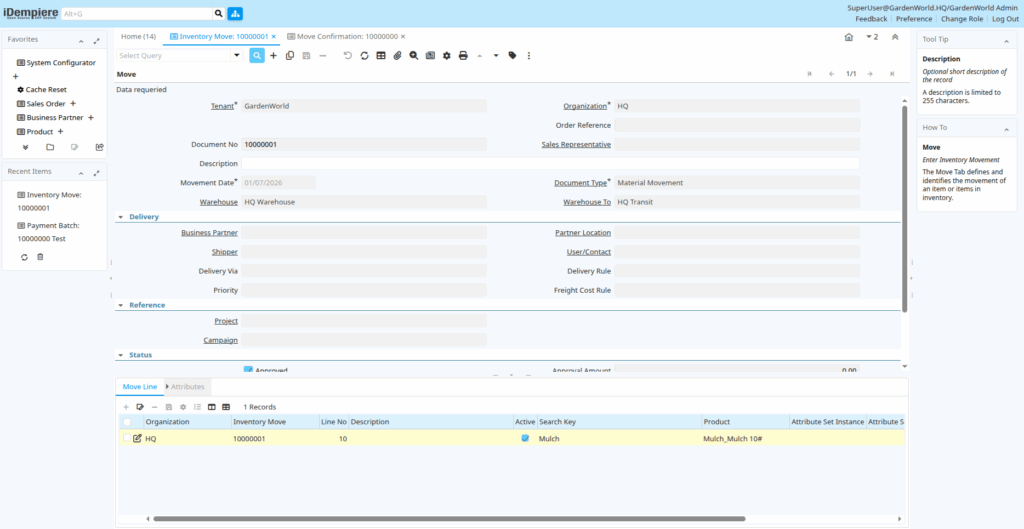
Generate Move Confirmation
Once the movement document is completed, iDempiere automatically generates a corresponding Move Confirmation document. This document captures the intended movement and becomes the record to confirm actual receipt.
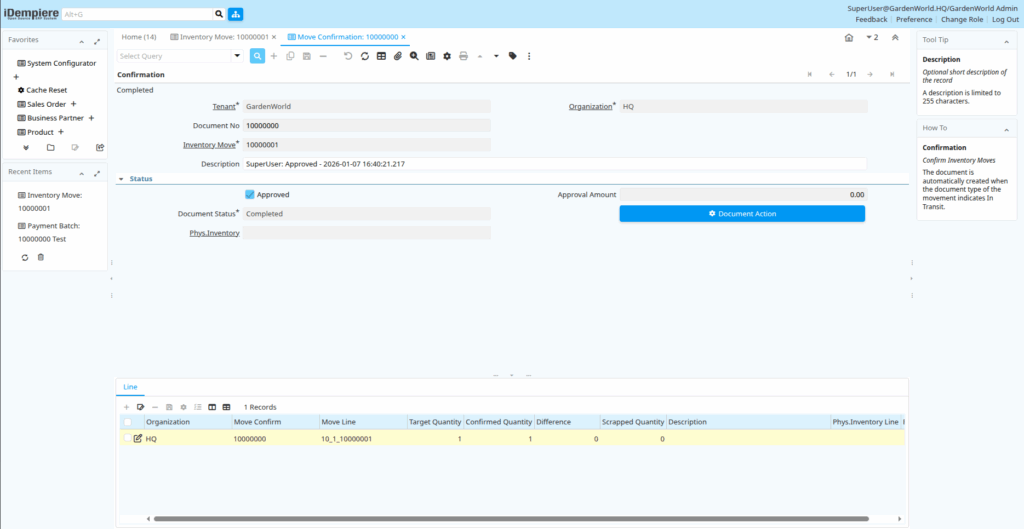
Verify Confirmation Quantities
In the Move Confirmation window, users will see the movement lines with:
- Target Quantity – Expected quantity to move
- Confirmed Quantity – Quantity actually received
- Difference Quantity – Any discrepancy between expected and actual
- Scrapped Quantity – Quantity scrapped due to damage or quality issues

Process Confirmation
Once the confirmed quantities are entered:
- You complete (or process) the Move Confirmation
- iDempiere updates the inventory counts accordingly
If there are differences, additional actions such as Physical Inventory adjustments may be created automatically to reconcile stock.
The Move Confirmation in iDempiere is a vital control step in the inventory lifecycle. It ensures that the system only updates stock levels after physical receipt is verified, helping you maintain accurate inventory, reduce discrepancies, and support quality and audit practices.