How Open Requisition Works in iDempiere
Open Requisition shows approved purchase demands that are not yet converted into Purchase Orders. It provides a live, filtered view of pending material needs across products, warehouses, users, and dates, helping procurement teams prioritize actions and execute purchasing efficiently.
Functional Position in the Procurement Flow
Once a requisition is completed and approved, it becomes eligible to appear in Open Requisitions if it is not fully ordered. At this stage, the system treats the requisition as an actionable demand rather than a document. Open Requisition does not create or modify data by itself; it exposes existing requisition lines in a structured, filterable, and report-driven way so that downstream actions (like PO creation) can be initiated efficiently.
Entry Point and Screen Behavior
The Open requisition feature is accessed as a report-style process rather than a transaction window. When opened, the screen initially shows parameter fields instead of data, allowing users to define exactly what kind of open demand they want to analyze.
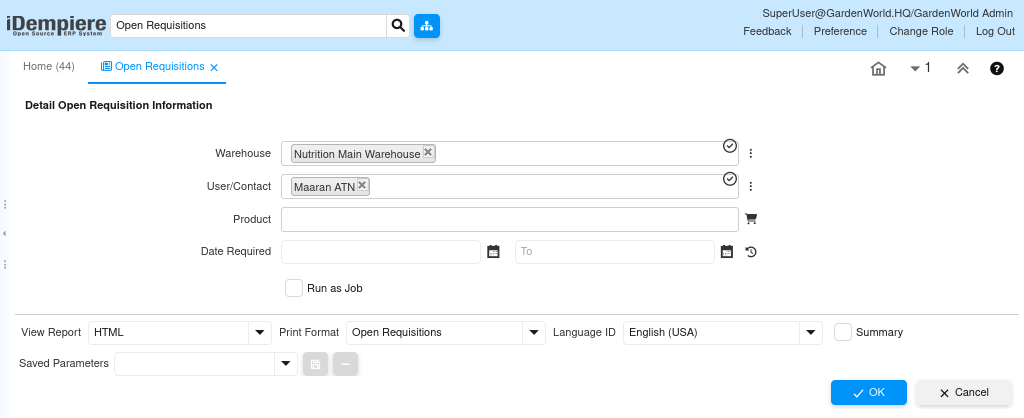
The parameters narrow down requisitions based on operational responsibility and urgency. After execution, the system generates a detailed result set showing only requisition lines that still require procurement action.
Parameter-Level Control (Operational Filtering)
Open requisition works by filtering requisition lines, not headers. Each parameter directly influences which pending demand lines appear in the output.
- Warehouse filters demand by storage location, aligning procurement with inventory planning
- User/Contact restricts results to requisitions created or owned by a specific requester
- Product isolates demand for a specific item across multiple requisitions
- Date Required (From–To) highlights urgency and scheduling pressure
- Run as Job allows background execution for heavy datasets
These filters ensure the output remains operationally relevant rather than informational noise.
Report Execution and Output
After parameters are set and the process is executed, the system generates the open requisitions report. This output is line-driven and reflects the real procurement backlog at that moment in time.

Each row represents a single requisition line that is still open for ordering. Fully ordered or closed requisition lines are automatically excluded.
Data Shown in the Result
The report consolidates both document-level and line-level information so procurement users can decide next actions without navigating away.
- Requisition number and line number
- Product and description
- Required quantity and unit price
- Total line amount
- Priority and approval status
- Warehouse and requesting user
- Processed and ordered quantity indicators
This combination makes it immediately clear what to buy, how much, for whom, and by when.
Relationship with Purchase Orders
Open requisition is tightly linked to the purchase order creation lifecycle. Once a purchase order is created against a requisition line (fully or partially), the corresponding ordered quantity is updated. When the full quantity is ordered, that line disappears from open requisition automatically. No manual closure is required.
This ensures open requisition always reflects the true remaining procurement gap.
Operational Use Cases
Open requisition is typically used in day-to-day procurement operations where visibility and prioritization matter more than document editing.
- Daily procurement planning by warehouse
- Identifying urgent or overdue material requirements
- Consolidating multiple requisitions into supplier POs
- Reviewing workload per requester or department
- Auditing why certain requisitions are still pending
Key Behavioral Rules
- Only approved and completed requisitions are considered
- Only not-yet-ordered quantities are shown
- The report is read-only; actions happen in downstream processes
- Results change dynamically as POs are created or updated
Outcome
Open requisition transforms requisitions from static documents into actionable procurement intelligence. It reduces missed orders, improves response time to urgent needs, and gives procurement teams a clean, real-time view of what still needs to be purchased—without manual tracking or spreadsheet dependency.
In short, it is the bridge between demand approval and purchase execution in iDempiere.