How Organization Dimension Works in iDempiere
The Organization Dimension defines which business unit a transaction belongs to, such as head office, branch, store, or department. Every accounting entry must have an organization, ensuring financial data is correctly separated. It works automatically while users create documents.
Creating Organization Dimension Values
Organization values are created as part of a hierarchical structure that mirrors the real business setup.
When creating an organization value, the user defines:
- A Search Key for internal identification
- A clear Name that represents the business unit
- Whether the value is Active
- Whether it is a Summary Level (used only for grouping)
Only non-summary (leaf) organizations can receive postings. Summary organizations exist only to organize data for reporting. Once saved, the organization value becomes immediately available for use in documents and accounting.
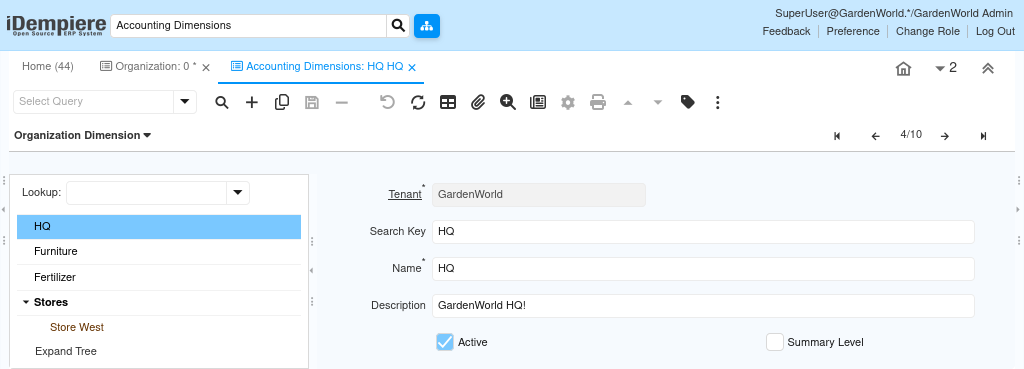
Organization Hierarchy in Practice
Organization dimensions are maintained as a tree. Parent nodes represent higher-level structure, while child nodes represent actual posting units.
This hierarchy allows:
- Posting only at the correct operational level
- Automatic roll-up of values in reports
- Clean consolidation without manual effort
Users never post to parent organizations; they post only to the lowest level.
Organization Assignment During Transactions
The organization is typically:
- Derived from the user’s role
- Inherited from the document context
- Controlled by access rules
Once a document is completed and posted, the organization value is locked in the accounting entry and cannot be changed.

Accounting Schema and Dimension Posting (Applies to All Dimensions)
Accounting dimensions in iDempiere only appear in accounting entries when they are enabled in the Accounting Schema. Creating a dimension and using it in transactions is not sufficient by itself. Each Accounting Schema has a dedicated Accounting Dimensions tab. This tab controls which dimensions are allowed to post values into accounting records. The schema acts as a gatekeeper between operational data and financial postings.
When a dimension is enabled in the Accounting Schema, iDempiere stores the selected dimension value during posting. The value becomes visible in Accounting Fact Details and can be used in financial reports, analysis, and audits.When a dimension is not enabled, transactions still work normally. Documents can be completed, and business processes continue without error. However, the dimension value is ignored during posting, and accounting entries do not contain that dimension.
This design allows organizations to control accounting complexity. Dimensions can be introduced gradually, activated only when reporting or tracking is required, without changing operational workflows.
Key points to remember:
- Dimensions must be enabled per Accounting Schema
- Posting behavior depends on the schema used by the document
- Existing transactions are not retroactively updated
- Different schemas may enable different dimensions
Always confirm the Accounting Schema configuration before validating dimension behavior in accounting or reports.
Activity Dimension in Reporting
Reports use the Activity Dimension to present operational views of financial data.
Common reporting scenarios include:
- Administrative costs by activity
- Maintenance or logistics expense analysis
- Internal function cost summaries
Because the dimension supports hierarchy, reports can roll up multiple activities into a single summary view.
Outcome
With Activity Dimension correctly used, iDempiere provides clear visibility into internal operational costs. Users classify transactions intentionally, accounting remains structured, and reports reflect how the organization actually operates internally.