How the Performance Color Schema is Used in iDempiere
In iDempiere, the Performance Color Schema is used in the Goal functionality to visually represent how well a goal is performing against its defined targets. It provides a visual evaluation layer for goal measurements.
A Performance Color Schema defines a set of thresholds and colors that indicate whether a goal’s performance is good, acceptable, or poor. These colors help users quickly understand goal status without analyzing numeric values.
How to Create a Performance Color Schema in iDempiere
- Navigate to the Performance Color Schema window
- Create a new record
- Enter basic details
- Enter a meaningful Name for the schema (for example: Goal Performance Status).
- Add a Description if needed.
- Ensure the schema is marked as Active.
- Set the Mark percent for each mark.
- Set the Color for the mark.
(For example: Mark 0–80 = Red, Mark 81–95 = Yellow, Mark 96–100 = Green).
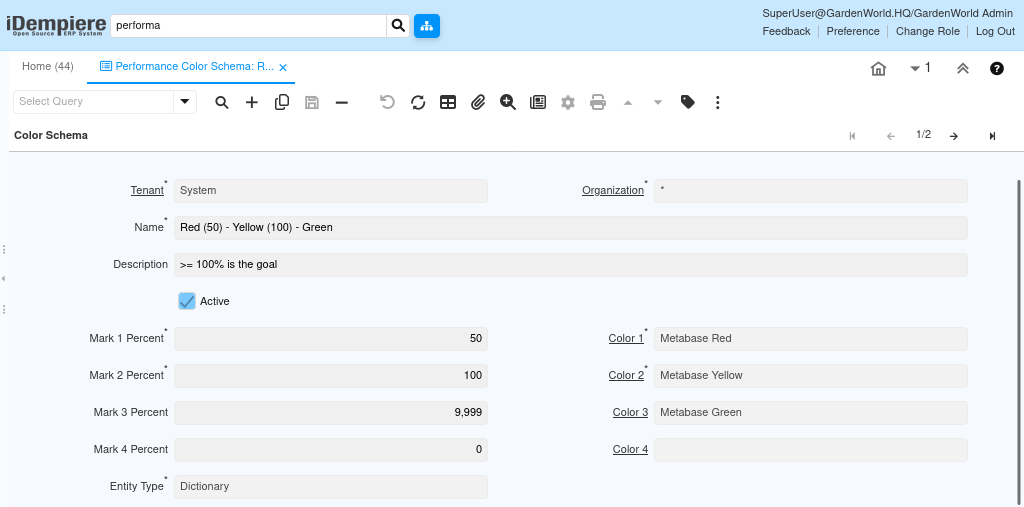
How Performance Color Schema works with Goals
When a Goal is configured, it includes measurable criteria such as actual values, target values, or ratios. As the system calculates the goal’s performance, the result is compared against the ranges defined in the Performance Color Schema.
Based on where the calculated value falls
- The corresponding color from the schema is applied
- The goal is visually marked to reflect its performance level
For example, a goal that meets or exceeds its target may appear green, one that is close to the target may appear yellow, and one that significantly misses the target may appear red.
By mapping Performance Color Schemas to goals, iDempiere transforms numerical performance data into intuitive visual indicators. This improves goal monitoring, supports faster decision-making, and enhances management visibility without affecting transactional or accounting processes.