How to apply Cash Rounding in Odoo POS
Cash rounding is a useful feature in Odoo POS that simplifies cash transactions by adjusting the total bill to a convenient amount. This makes handling small change easier and speeds up checkout for both the cashier and the customer.
Enabling Cash Rounding in Odoo POS
To begin, open the Point of Sale module and click the Configuration and select Settings. In the Point of Sale section, select the appropriate terminal from the drop down and make sure the POS terminal is closed before applying this setting.
Under the Payment section, enable Cash Rounding, assign the appropriate cash rounding method.
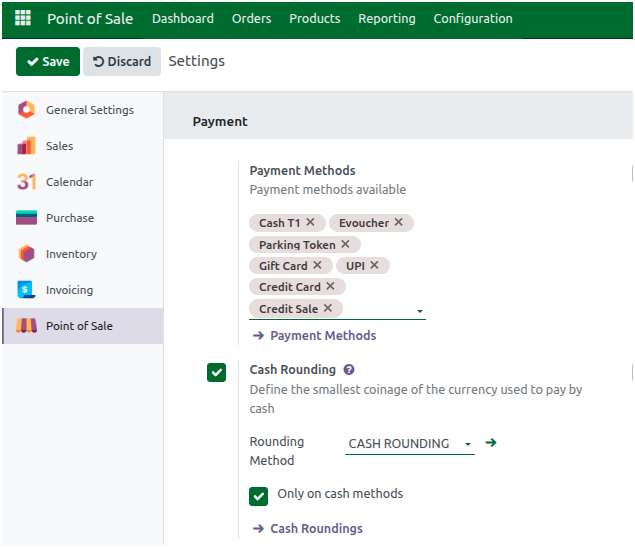
The selected cash rounding method should be configured with the following settings:
- Rounding Precision: Set as 1
- Rounding Strategy: Choose the Add a rounding line (this will add a separate line to the bill for the rounding adjustment).
- Rounding Method: Select the HALF-UP method.

Then Enable the checkbox Only on cash methods so that rounding is applied only to cash payments. This ensures the total amount is automatically adjusted to a convenient number, making cash transactions faster and easier.
Processing an Order in Odoo POS
To begin, open the POS and add products to the POS Cart. There are three convenient ways to do this: by entering the product code manually, scanning a lot barcode or scanning any associated multi-barcode. Once the products are added, you can update the quantities as needed and assign the appropriate customer to the order.
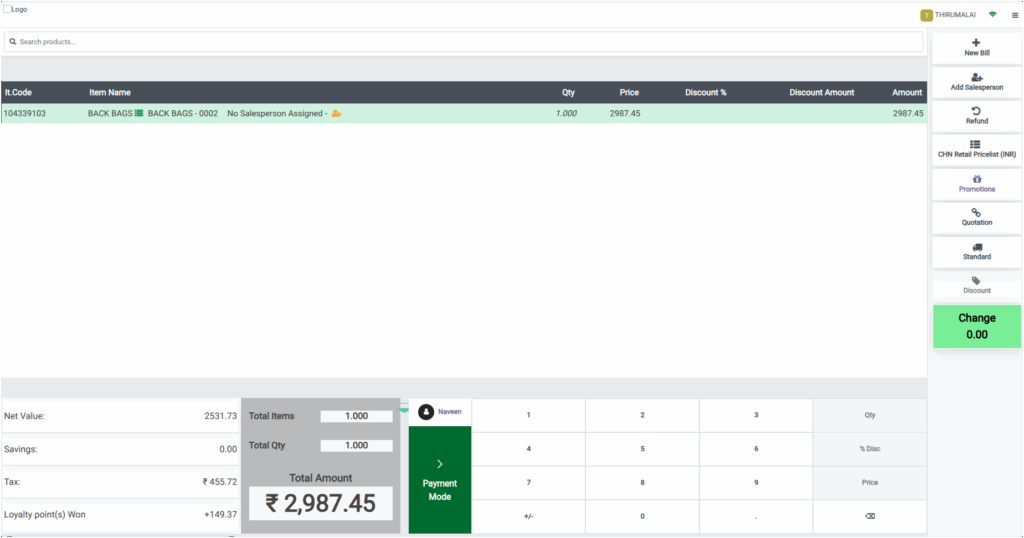
Processing Cash Payment in Odoo POS
After reviewing the cart, click Payment Mode to go to the payment screen and select Cash as the payment method. With cash rounding enabled and it is applied only for cash payment method, so total amount will be automatically adjusted to a convenient number. The rounding depends on the decimal values in the Total Amount, while the rounding method remains the same.
Here are two scenarios to show how cash rounding works:
Scenario 1: Rounding Up
- Total Amount: ₹1,523.56
- After the selection of cash payment method, the system rounds the amount up by ₹0.44
- Round Off: ₹0.44
- Total Amount = 1523.56 + 0.44
- Total Amount is displayed as ₹1,524
Scenario 2: Rounding Down
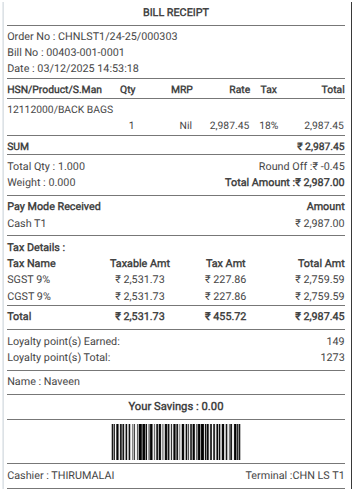
- Total Amount: ₹2987.45
- After the selection of cash payment method, the system rounds the amount down by ₹0.45
- Round Off: ₹-0.45
- Total Amount = 2987.45 – 0.45
- Total Amount is displayed as ₹2987

Once the cash payment method is selected and rounding is applied, click Validate to complete the order. This will generate the bill receipt, where the applied rounding will be displayed in the field Round Off, giving a clear view of the final adjusted Total Amount.
Cash rounding ensures that the final amount is convenient for cash handling, reduces the need for coins, and speeds up the checkout process.
