How to Process Credit Customer Payment in POS in Odoo
Credit customer payments help track money received from customers who have purchased goods or services on credit. These payments reduce the amount the customer owes to the company and ensure accurate recording in the company’s financial system, supporting proper cash-flow management and accurate balance sheets.
They also help ensure timely collection of payments, fostering trust and maintaining strong customer relationships.
Steps to Access Customer Payments
- Open the Invoicing module from the Dashboard.
- Click on the Customers menu.
- Select Payments to open the customer payments screen.
- Click the +New button.
- This screen allows you to settle the due amounts for credit customers.
Selecting a Customer for the Payment Process
In the Customer field, either select a customer from the dropdown list or click the search icon to view all customers in the system. You can search for customers by their name, email, mobile number, salesperson, or related company. After selecting the customer, the system will automatically display their
due amount.

Entering the Amount for Customer Payment
- In the Amount field, enter the payment amount the customer is making.
- This amount can be equal to or less than the Due Amount based on the payment the customer is making (e.g., partial or full payment).
Verify Customer Payment Details
- The Payment Type field is automatically set to Receive, indicating you are receiving payment from the customer.
- The Date field is pre-filled with the current date for accurate recording.
- Ensure that the Journal is set to Bank, as this is where the payment will be recorded.
- Set the Payment Method to Manual as the payment is processed outside
Finalizing the Customer Payment Process
- Click Confirm to finalize the payment. Open the Customer Screen to view the customer who has completed the payment.
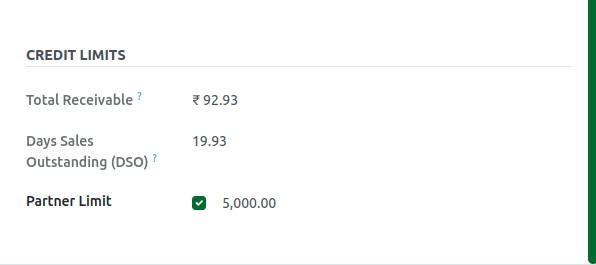
After the payment is made: The Due Amount is reduced based on the payment amount, reflected in the Total Receivable field. The Credit Limit is updated to show the new available balance in the Partner’s Limit field.

Example of Customer Payment Process:
    • Customer: MEENA
    • Credit Limit: ₹10,000
    • Amount Used: ₹5,000 (₹5,000 remaining)
    • Amount Paid: ₹2,000
    • After Payment:
    • Total Receivable(Due) Amount: ₹3,000(₹5,000 - ₹2,000)
    • Updated Partner’s Limit: ₹7,000 (₹5,000 + ₹2,000)