How to Verify Denomination Values After Updating Payments in Odoo POS
Verifying denomination values ensures that all payment updates have been properly captured in the POS system. This step helps confirm that the total cash amount matches the actual physical cash in the register before closing the session. It also helps prevent mismatches between system records and real payments, ensuring accurate reconciliation and smooth financial reporting.
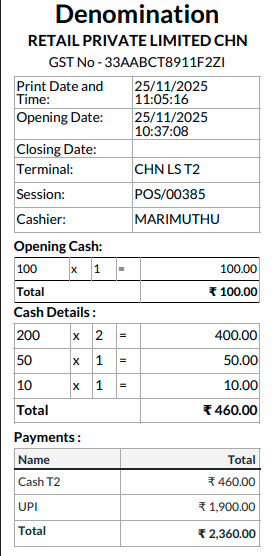
Before Payment Update
At the time of session closure, the cashier enters the denomination values based on the cash available. These amounts are displayed exactly as input and form the basis for the day’s closing total. Before any payment method modifications are made, the system relies entirely on these cashier-entered values for accurate session balancing.
After Payment Update
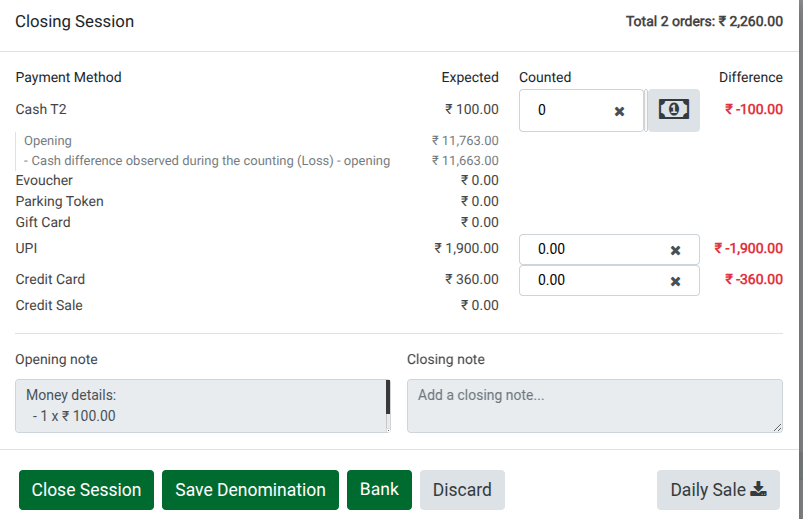
When payment methods such as Cash or UPI are updated after transactions are recorded, Odoo recalculates the Actual Amount and Remaining Amount accordingly. These updated values are instantly reflected in the system. Since this changes the distribution of payments, it becomes essential to re-check the denomination values to maintain consistency.

Session Closing
To verify the updated payments, open the POS session and click Close Session. The system will automatically calculate any difference amount created by the updated payment values. If discrepancies are found, they are displayed in red, making it easy to identify mismatches in the final session totals that need adjustment.

Finalizing Session Closing
Enter the correct denomination amount based on the updated payment details. Carefully review all entries, ensuring that the payment methods and amounts accurately reflect the corrected information. Once everything aligns, click Close Session to finalize the session. This action locks in the correct totals and prevents further modifications.
Verifying the Daily Sales Report
After successfully closing the session, print the Daily Sales Report to review the final sales and updated payment details. Verify that all amounts and payment methods reflect the corrected data. This final review ensures that daily sales summaries, reports, and accounting entries remain accurate and reliable.