How the Pay-Only Terminal Works in Odoo POS
The Pay-Only Terminal in Odoo POS is designed to handle payments without creating or editing orders. It speeds up the payment process, prevents payments before billing is completed, and ensures delivery staff receive clear and accurate order details
Accessing and Viewing Orders
Cashiers log in through the Point of Sale module and start a new session in the Pay-Only Terminal. The system displays all pending orders that are ready for payment. From here, the cashier can select any order to process or choose multiple orders when needed.

Handling Orders, Customers, and Salespersons
Orders from the Bill-Only Terminal automatically flow into the Pay-Only Terminal. Cashiers can process a single order or merge multiple orders belonging to the same customer. Orders from different customers cannot be merged. Salesperson details from each order are carried forward, and orders linked to different salespersons should not be merged to maintain accurate reporting.
Pack Numbers and Payment Process
When processing a single order, the same pack number from the bill must be used. For multiple orders, all pack and order numbers appear on the payment bill for easy delivery matching. Payments are completed by selecting the customer, choosing the payment method, and validating the transaction. A receipt is generated with updated bill details.
Workflow:
- After a bill is generated in the Bill Only terminal, the order is automatically transferred to the Pay Only terminal for payment processing.
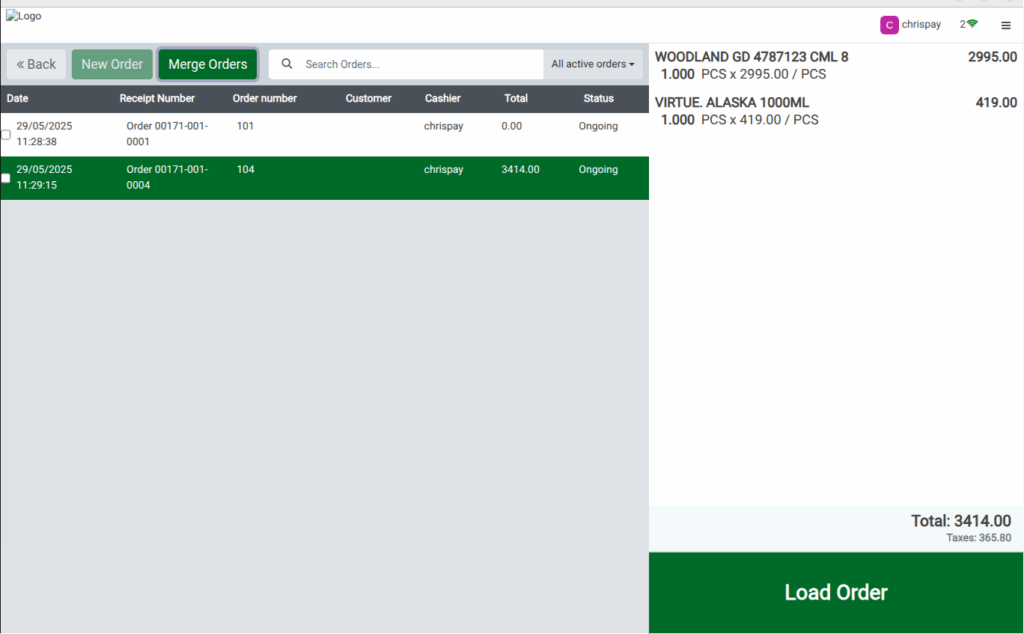
- In the Pay Only terminal, locate the order screen and click the checkbox for the order you wish to process. Then, click the Merge Order button to combine it with the payment.
- After merging, click Load Order to retrieve the details of the bill in the payment screen.
- In the payment screen, you are allowed to select the customer. Once selected, you can proceed to complete the payment for the order.
Closing the Session
Session closing is similar to other POS terminals. The cashier enters payment denominations, provides bank details, and reviews the daily sales report. The head cashier then verifies the entries and closes the session.
