How does Commission Run Details Works in iDempiere
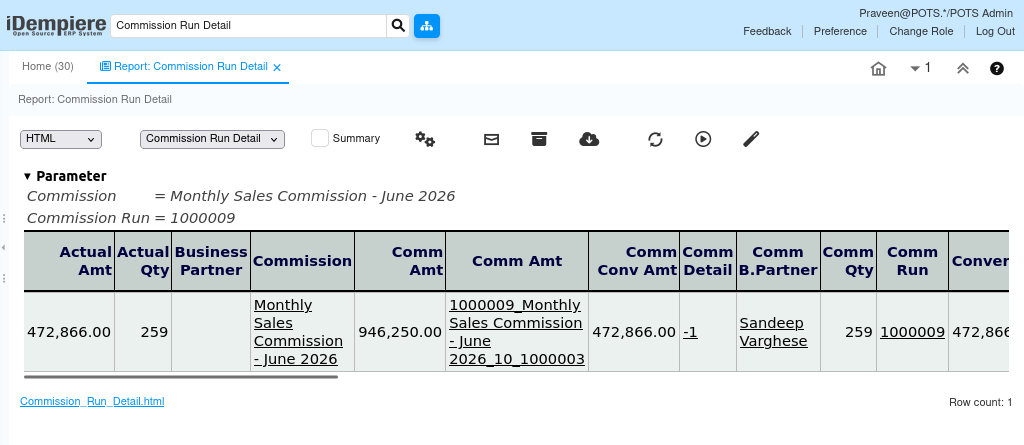
The Commission Run Detail report provides detailed information about commission calculations generated during a commission run in iDempiere. It displays the transactions that contribute to commission amounts, including related orders, invoices, products, and business partners.
The report is mainly used by Sales Managers, Finance, and Management teams to review commission calculations, verify commission transactions, and analyze the source of earned commissions.
Business Rules
- The report retrieves data from the RV_CommissionRunDetail report view.
- The report combines commission run, commission amount, order, invoice, product, and business partner information into a single report.
- Each record represents a single commission transaction included in a commission run.
- Commission details are linked to the corresponding sales order line or invoice line.
- The report displays commission amounts, transaction amounts, quantities, products, orders, invoices, and related business partners.
- The report is read-only and does not create or update commission data.
- Based on the available implementation, the report retrieves data directly from the RV_CommissionRunDetail report view without using a custom Java process.
Report Parameters
Commission Run Detail – Parameter Window
The Commission Run Detail parameter window allows users to filter commission transactions before generating the report. Users can select Commission, Commission Run, Commissioned Business Partner, Business Partner, and Product to display only the commission records that match the selected criteria.

| Parameter | Purpose | Filtering Behavior |
| Commission | Selects a commission definition. | Displays transactions for the selected commission. |
| Commission Run | Selects a completed commission run. | Displays transactions from the selected commission run. |
| Commissioned Business Partner | Selects the business partner receiving the commission. | Displays commission records for the selected commission recipient. |
| Business Partner | Selects the customer or vendor related to the transaction. | Displays transactions for the selected business partner. |
| Product | Selects the Product. | Displays commission transactions for the selected product. |
| New Parameter | Selects the value to filter by. | Displays records matching the selected value. |
Report Output
- The Commission Run Detail report displays detailed information about each transaction included in a commission run. Each row represents a single commission detail record linked to an order line or invoice line.
The report includes commission information, commission amounts, transaction date, business partner, product, order number, invoice number, quantity, transaction amount, and other related details. It helps users verify commission calculations and understand how each commission amount was derived.