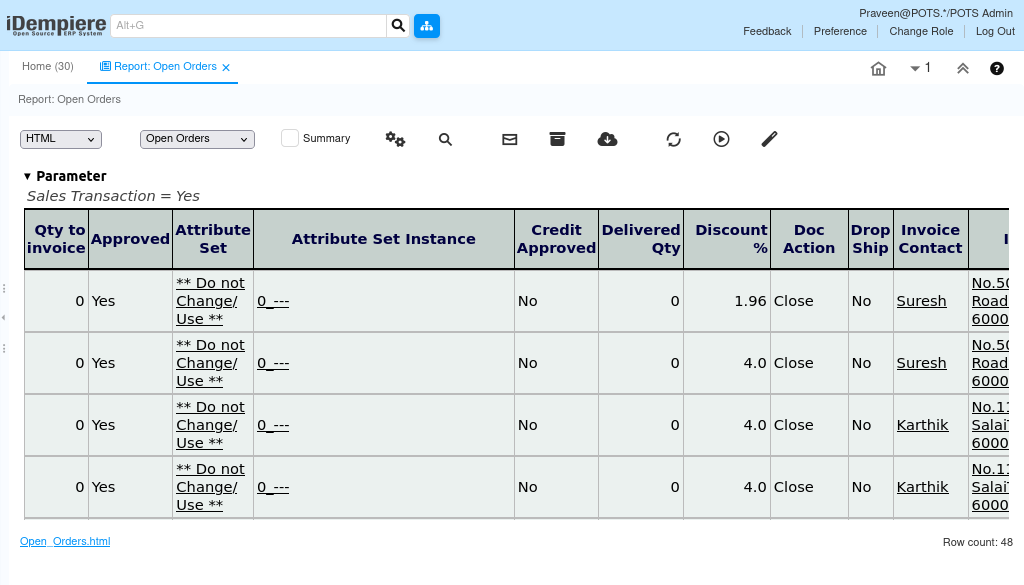
How does Open Orders Report works in iDempiere
The Open Orders Report provides a consolidated view of sales or purchase orders that are not yet fully completed. It helps users monitor pending order fulfillment, identify outstanding commitments, and track open transactions within a selected business period.
The report is primarily used by Sales Executives, Purchase Teams, Warehouse Personnel, and Managers to monitor order status and support operational planning.
Business Rules
- The report retrieves order information from the RV_OrderDetail database view.
- Each record in the report represents a single order line, not the complete order.
- Sales and Purchase Orders are included based on the IsSOTrx transaction type.
- The report calculates Quantity to Deliver as Ordered Quantity − Delivered Quantity.
- The report calculates Quantity to Invoice as Ordered Quantity − Invoiced Quantity.
- An order line is displayed only if there is a remaining quantity to deliver or invoice.
- Order lines with both QtyToDeliver = 0 and QtyToInvoice = 0 are excluded from the report.
- Orders with Document Status = Voided (VO) are not included in the report.
- Orders with Document Status = Closed (CL) are not included in the report.
- The report displays only open order lines that satisfy the report parameters and SQL filtering conditions.
Report Parameters
Open Orders Report – Parameter Window
The Open Orders Report parameter window allows users to filter open order records before generating the report. Users can retrieve pending sales or purchase order lines by specifying a Business Partner, Product, and transaction type.

| Parameter | Purpose | Filtering Behavior |
| Business Partner | Selects a customer or vendor. | Shows orders for the selected Business Partner. |
| Product | Selects a product. | Shows orders for the selected product. |
| Sales Transaction | Selects Sales or Purchase Orders. | Checked shows Sales Orders; unchecked shows Purchase Orders. |
| Run as Job | Runs the report in the background. | Generates the report as a background job. |
The report is executed using the selected parameter values to retrieve matching open order records.
Report Output
- Displays open order lines pending delivery or invoicing.
- Shows order, promised date, document type, status, business partner, product, warehouse and sales representative.
- Displays ordered, delivered, invoiced, Qty To Deliver and Qty To Invoice.
- Includes pricing information and business dimensions when available.
- Only active open order lines satisfying SQL filter are displayed.