How to view Outstanding Redeem Points Report in Adempiere Retail
An Outstanding Redeem Points Report is a report that shows the total loyalty or reward points earned by customers that are still un redeemed (unused) as of a particular date.
User Access
Who Can Access
- Admin
- Back Office
- Purchase Manager
- Manager
What User Can Do
- Track Customer Loyalty Balances
- Manage Financial Liabilities
- Export and Share the Report
Pre-Requisite Activities
- Enable Loyalty Program
- Integrate Points Tracking into Billing System
- Update Points in Real-Time
- User Access and Roles
Business Rules
- Point Earning
- Point Redemption
- Point Validity
- Reporting
User Interface
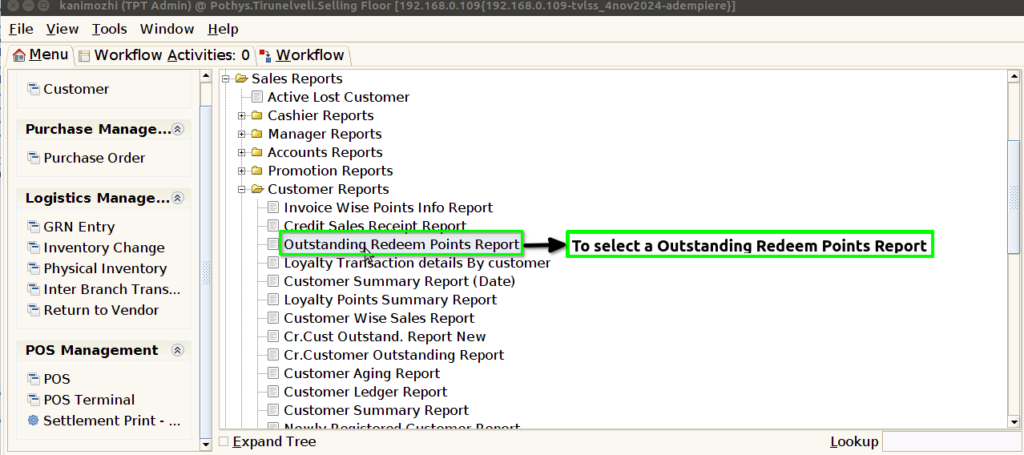
STEP 1: To select a Outstanding Redeem Points Reports.
STEP 2: To click the start check box to run the process.

STEP 3: Once to run the process to show the report based on the given data.
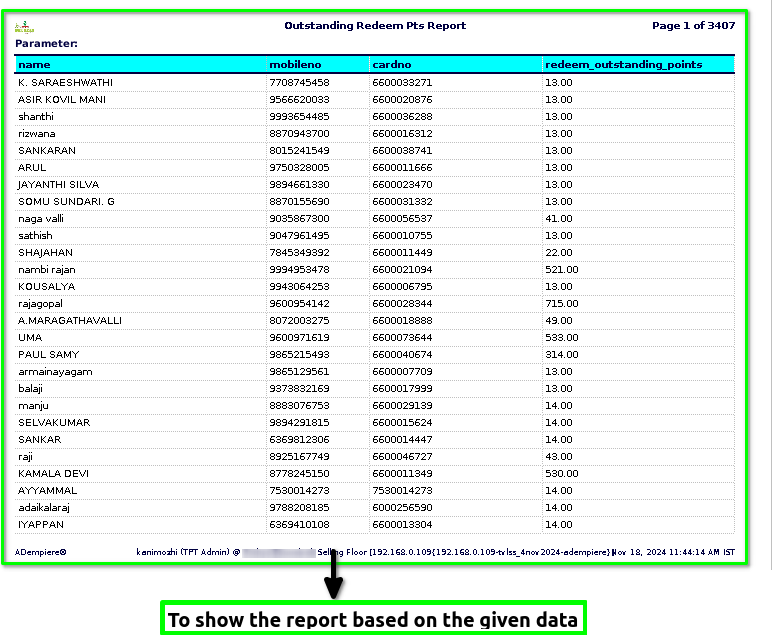
STEP 4: Customer name– typically refers to the name of a person or organization that purchases goods or services from a business.
Customer mobile number – refers to the phone number assigned to a customer’s mobile device, typically used for communication between the business and the customer.
Customer card number– is a unique identifier assigned to a customer by a business or organization, typically for use in tracking purchases, managing loyalty programs, or accessing specific services. It’s usually a string of numbers (sometimes including letters) linked to a customer’s account and can be found on physical loyalty cards, membership cards, or virtual accounts in apps or websites.
Redeeming outstanding points – refers to using or cashing in the points a customer has accumulated through a loyalty program, rewards system, or promotional offer.