How to Preview an Invoice in ADempiere Retail
Viewing how the invoice will look when printed before actually printing it.
User Access
Who Can Access
- Back Office
- Admin
- Manager
- Cashier
What User Can Do
- View Invoice Layout
- Check Invoice Details
- Make Corrections Before Printing
- Print or Export
Pre-Requisite Activities
- Invoice Created or Selected
- User Logged In with Print Permissions
- Invoice Data Complete
Business Rules
- Access Control
- Invoice Status Check
- Real-Time Data Display
- Confirmation Before Printing
User Interface
Step 1: Select ‘Invoice (Customer)’ in Menu -> Sales Management -> Invoice (Customer) or Search Invoice (Customer) in Lookup.

Step 2: Choose the document from the list below that is in “Completed” status for preview, as shown in the image below.
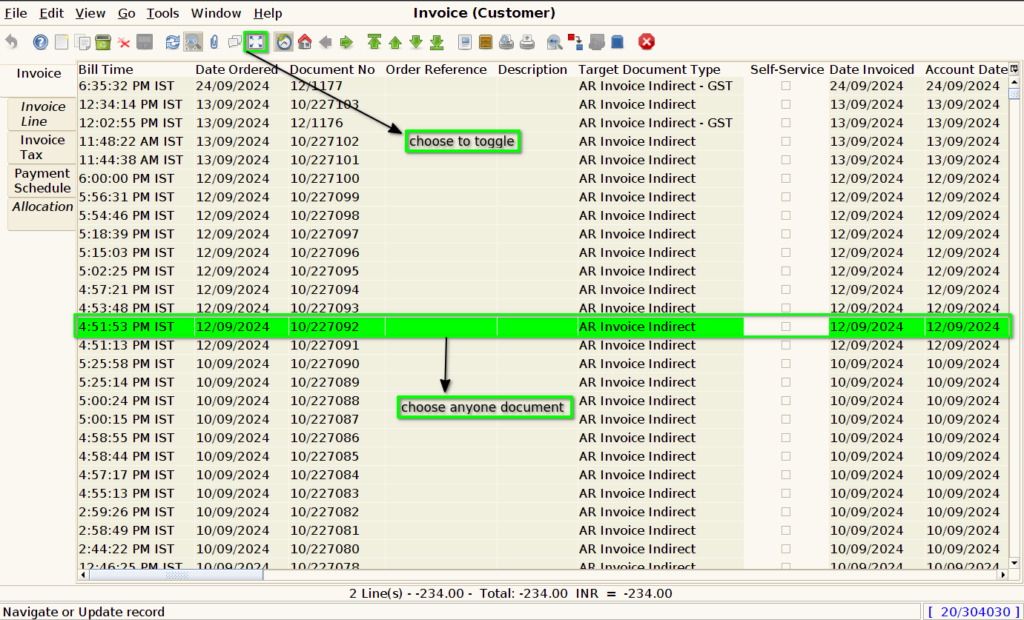
Step 3: After choosing the document, there is a Print Preview button at the top of the screen, as shown in the image below.
Confirmation Before Printing
The Print Preview resembles the layout shown in the image below.
