How to view Summary of Sales Report in Adempiere Retail
A Summary of Sale Report provides a quick overview of total sales over a specific period.Shows total sales amount without detailed transaction data.
User Access
Who Can Access
- Admin
- Cashier
- Sales Manager
- Manager
What User Can Do
- Quickly see total sales
- Compare sales performance
- Identify sales trends
Prerequisite Activities
- Ensure all sales transactions
- Maintain consistent date and time entries
- Regularly update and clean sales data
- Schedule periodic data
Business Rules
- Include all valid sales transactions
- Exclude canceled or returned sales
- Use consistent time zones and date formats
- Ensure data is updated and synchronized
- Allow report generation only by authorized users.
- Reports should be generated in real-time or near real-time
User Interface
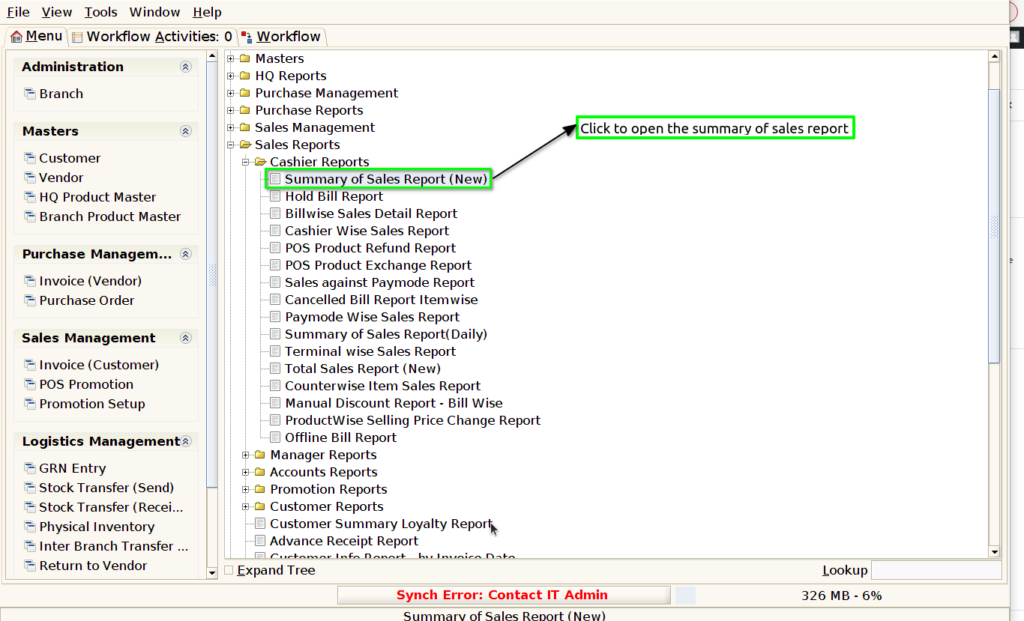
Step 1 : Select ‘Summary of sales report(new)’ in Menu -> Sales reports > Cashier report > Summary of sales report(new) or Search Summary of sales report(new) in Lookup.
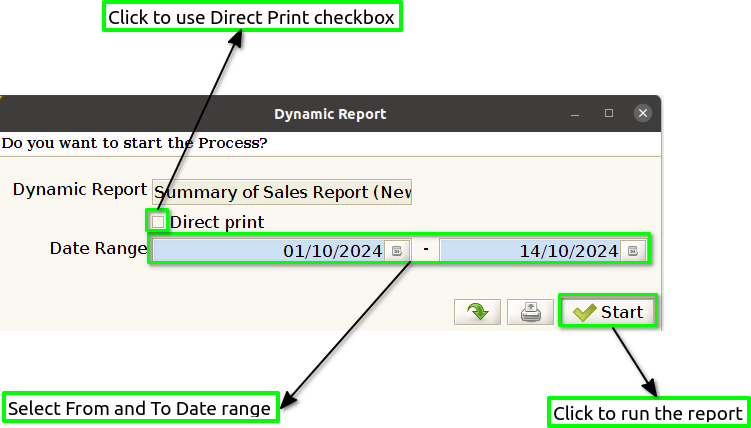
Step 2 : Select the date range and open the summary of the sales report(new).
Step 3 : To view a preview of the summary of the sales report(new).
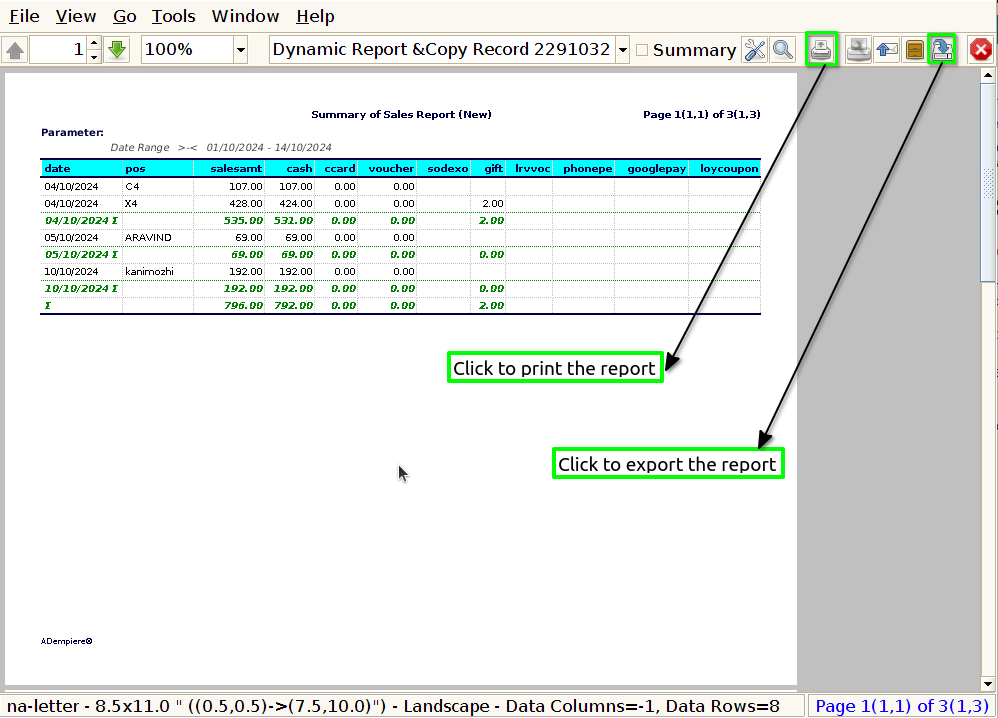
Date : Specify the time period covered by the report (e.g., “Sales data from January 1, 2024, to September 30, 2024”).
POS : In a summary of a sales report, including details about the Point of Sale (POS) system used can be helpful.
Sales Amount : When summarizing the sales amount in a sales report, you can present it clearly and effectively.
Cash : Clearly state the total cash sales amount for the reporting period
Voucher : Clearly state the total Voucher sales amount for the reporting period
Gift Voucher : Clearly state the total amount of gift vouchers sold during the reporting period
E-Voucher : Clearly state the total amount of E-vouchers sold during the reporting period
Loyalty Voucher : Clearly indicate the total value of loyalty vouchers redeemed during the same period.
UPI : State the total value of sales made through UPI during the reporting period.
Card : Clearly state the total amount of sales made via card payments during the reporting period,Provide a breakdown of sales by card type, if applicable (e.g., Credit card, Debit cards).
Bill discount : Clearly state the total value of discounts provided during the reporting period
Advance paid : Clearly state the total amount of advances paid during the reporting period
Parking Token : Clearly state the total value of parking tokens sold during the reporting period.
Credit sales : Clearly state the total amount of credit sales during the reporting period.
Bills : State the total number of bills processed by all cashiers during the reporting period.