How to view Customer Summary Report in Adempiere Retail
A Customer Summary Report provides a quick overview of each customer’s sales activity over a specific period, including total purchases, total payments, outstanding balance, and number of transactions.
User Access
Who Can Access
- Admin
- Back Office
- Purchase Manager
- Manager
What User Can Do
- Identify High-Value Customers
- Analyze Customer Transactions
- Monitor Outstanding Balances
- Export and Share
Pre-Requisite Activities
- Maintain Accurate Customer Master Data
- Record Sales and Payment Transactions
- Reporting Period
- Update Payment Status Regularly
Business Rules
- Include Only Valid Transactions
- Use Unique Customer IDs
- User Authorization
- Accurate Calculation of Outstanding
User Interface
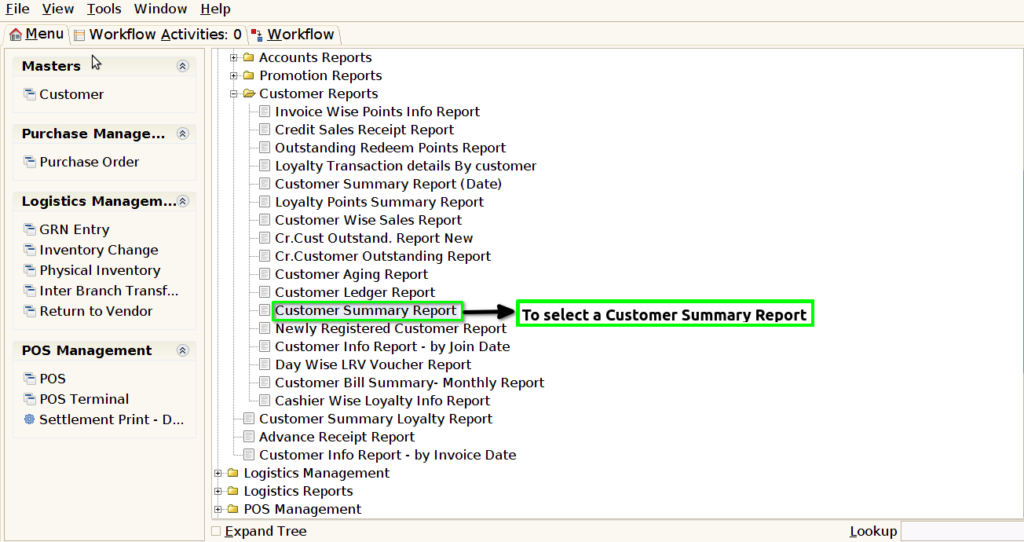
STEP 1: To select a Customer Summary Report.
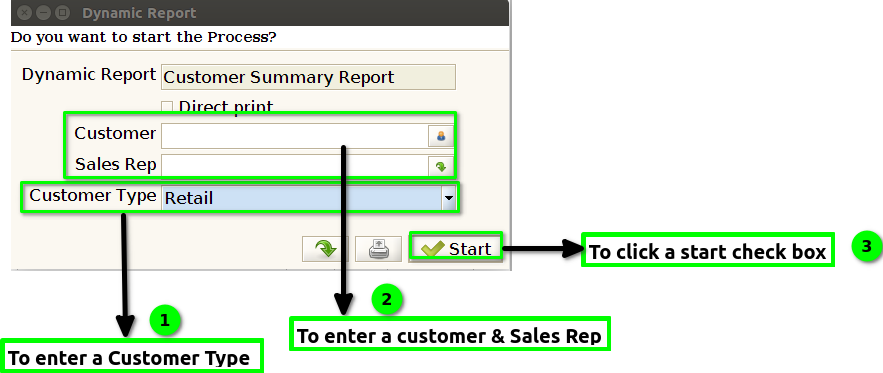
STEP 2: To enter a Customer Type in this field is mandatory and to enter a Customer & Sales Rep.Then to click the start check box to run the process .
STEP 3: Once to complete the process to show the report based on the given data.
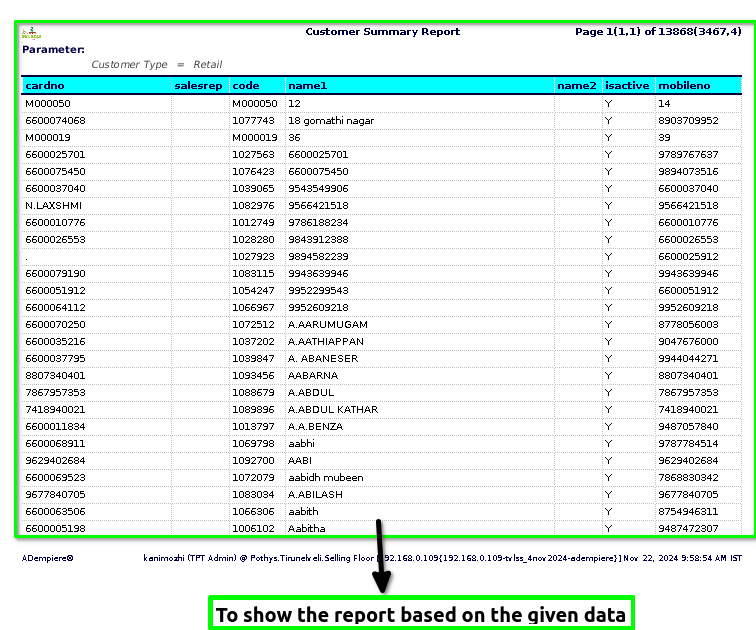
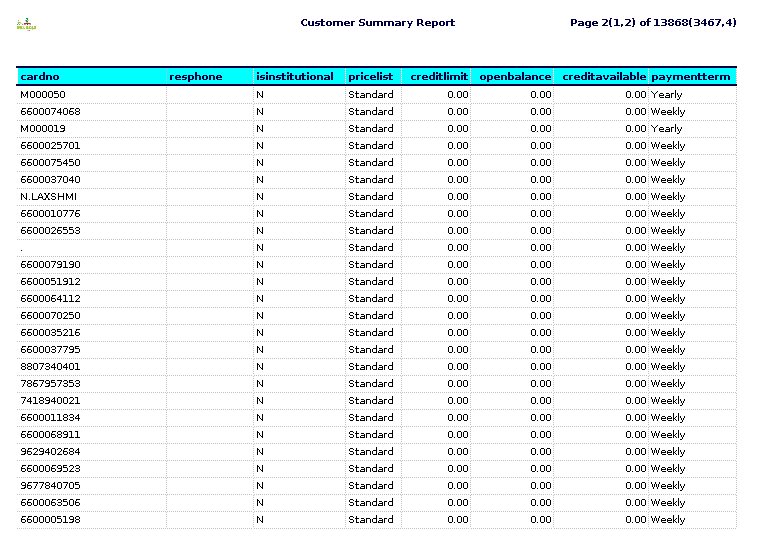
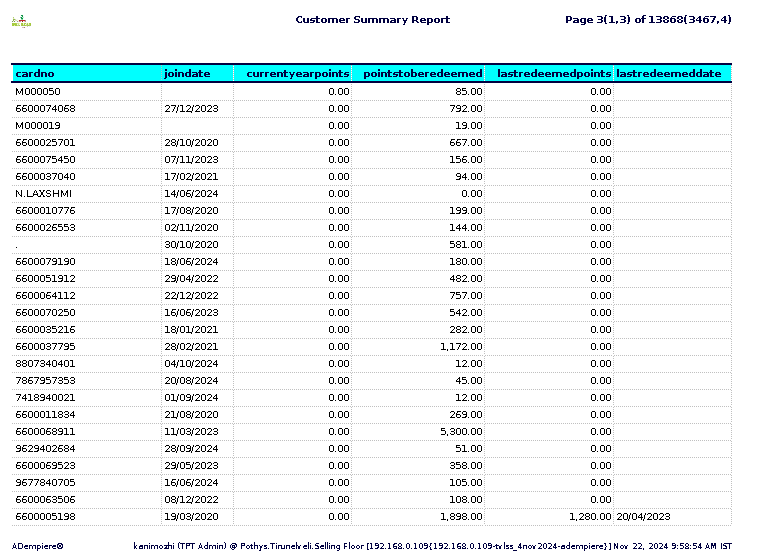
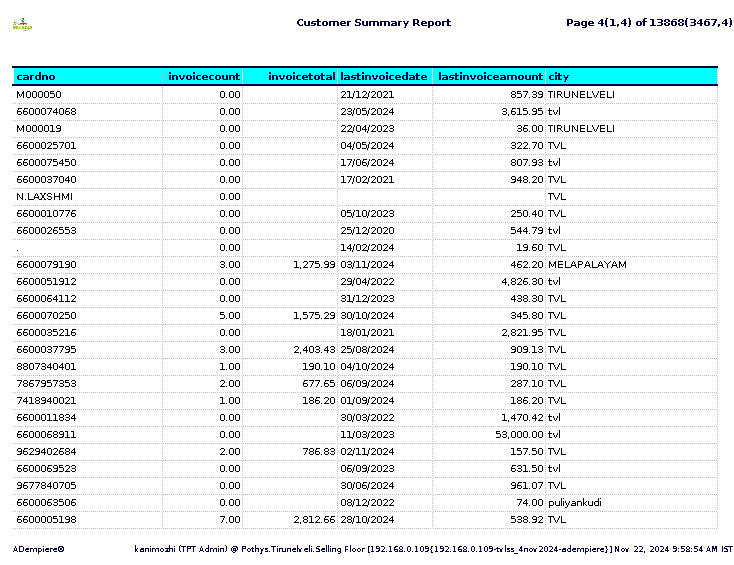
STEP 4: Card number – typically refers to the unique identifier assigned to a card, often used in financial transactions.
Sales rep (sales representative) refers to the person or employee responsible for managing the relationship with the customer and handling the sales transactions.
Code-This is a unique identifier assigned to each customer in the database. It helps in distinguishing one customer from another, particularly in reports where multiple customers are involved.
Name1,Name2– typically refers to the customer’s name that is being tracked or reported. It is the primary identifier for each customer in the report, which helps distinguish between different clients or accounts.
IsActive– typically refers to a status indicator that shows whether a customer account is currently active or inactive.
Mobile number – typically refers to the contact number associated with a customer, specifically their mobile or cellular phone number.
Res phone – is likely shorthand or a reference to a “residential phone” number. It typically refers to a home phone number or landline that is associated with a customer’s residence.
Is Institutional – field is a Boolean indicator (True/False) that helps to quickly identify the type of customer and may influence the way company treats or interacts with that customer.
Price list – is a document or record that provides the prices of goods or services offered by a business. It is typically organized in a structured format, displaying each product or service along with its corresponding price.
Credit limit – is the maximum amount of credit that a lender, such as a bank or credit card issuer, is willing to extend to a borrower or cardholder. It represents the highest balance a person can carry on their credit account (e.g., a credit card, personal loan, or line of credit) at any given time.
Open balance – refers to the amount of money that is currently owed on an account, such as a credit card or loan, that has not yet been paid off.The total amount you owe on the card after any payments.
Credit available – refers to the amount of credit that is accessible to a borrower or user through a credit account, such as a credit card or a line of credit.
Payment term – refers to the conditions or agreements between a buyer and a seller regarding how and when a payment for goods or services will be made.
Join Date – typically refers to the date when a customer first became a part of a company’s system or signed up for a service.
Points to be redeemed – typically refers to the number of loyalty or reward points that a customer has accumulated and is eligible to redeem for a reward, discount, or other benefits.
Last Redeemed Points – typically refers to the most recent instance in which a customer redeemed or used their accumulated points from a loyalty program or rewards system.
Last redeemed date– typically refers to the most recent date when a customer redeemed a reward, coupon, gift card, or loyalty points.
Invoice count – refers to the total number of invoices issued during a specific period or for a particular customer.
Invoice total – refers to the final amount due for payment on an invoice, which is the sum of all items, charges, and applicable taxes or fees listed in the invoice.
Last invoice date – refers to the date on which the most recent invoice was issued or generated by a business or seller.
Last invoice amount – refers to the most recent invoice issued to a particular customer, detailing the amount charged for the most recent goods or services provided.
City – is a large, permanent human settlement that typically has a complex structure, a high population density, and a range of services and facilities. It is usually recognized as a legal or administrative entity, often governed by a local government with authority over matters like infrastructure, services, and regulations.