How to use Inter Branch Transfer ACK in Adempiere Retail
IBT Send ACK means Acknowledgment of the Inter Branch Transfer Send.It is a confirmation message that the system sends back after a branch successfully completes the IBT Send process.
User Access
Who Can Access
- Admin
- Cashier
- Manager
- Back office
What User Can Do
- View the Acknowledgment Details
- Verify the Stock Movement
- Confirm That the Send Was Successful
- Share or Communicate the IBT Number
- Track the Transfer Status
Pre-Requisite Activities
- IBT Send Must Be Successfully Completed
- Valid IBT Document Must Be Created
- Sending & Receiving Branches Must Be Active
- Stock Must Be Deducted From Sending Branch
- System Connectivity Must Be Stable
- Master Data Must Be Complete
Business Rules
- IBT Send Must Be Successfully Submitted
- Stock Must Move to In-Transit
- Document Number Must Be Valid
- Sending & Receiving Branch Mapping Must Exist
- All Items Must Be Successfully Validated
- Quantity Validation Rules
User Interface
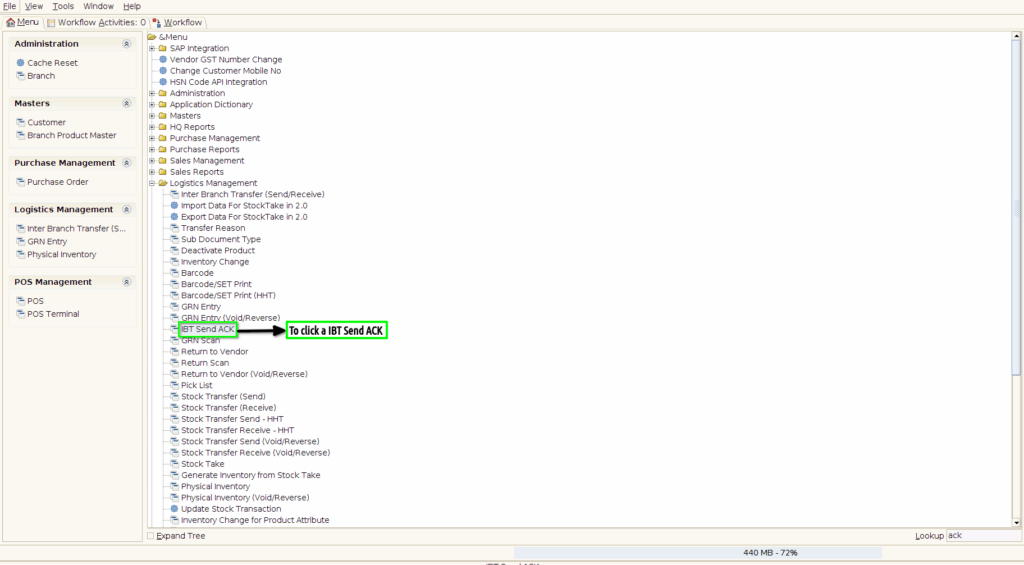
Step 1 : To click a IBT Send ACK in Menu.
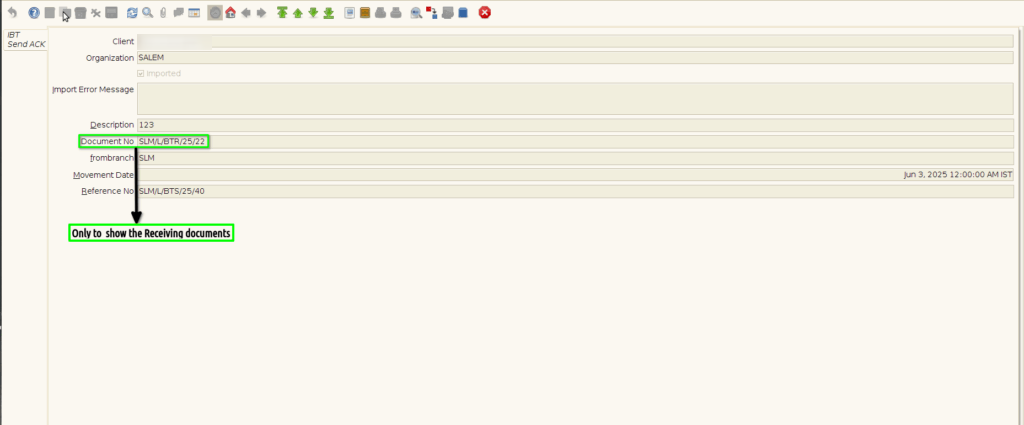
Step 2 :Once to open the IBT Send ACK screen to open the documents in Inter Branch Transfer receiving documents only to sync. IBT Send ACK screen only to show the documents. Couldn’t Create,Edit,update the documents.