How to create Purchase Return Reason in Adempiere Retail
Purchase Return Reason refers to the explanation or cause for returning goods that were previously received from a vendor. It helps track why items were rejected or sent back.
User Access
Who Can Access
- Back Office
- Cashier
- Purchase Manager
- Admin
What User Can Do
- Create/Update Reason
- Active/In Active
Pre-Requisite Activities
- Set up a master list of return reasons in the system
- Define return policies with vendors
- Ensure return process is enabled in GRN or Purchase Return modules
Business Rules
- Every return entry must have a valid reason selected
- Return reason should be auditable and not editable after posting
- Return quantities must not exceed received quantities
User Interface
Step 1 : To Select a Branch in Menu.Then to click a Purchase Return reason.

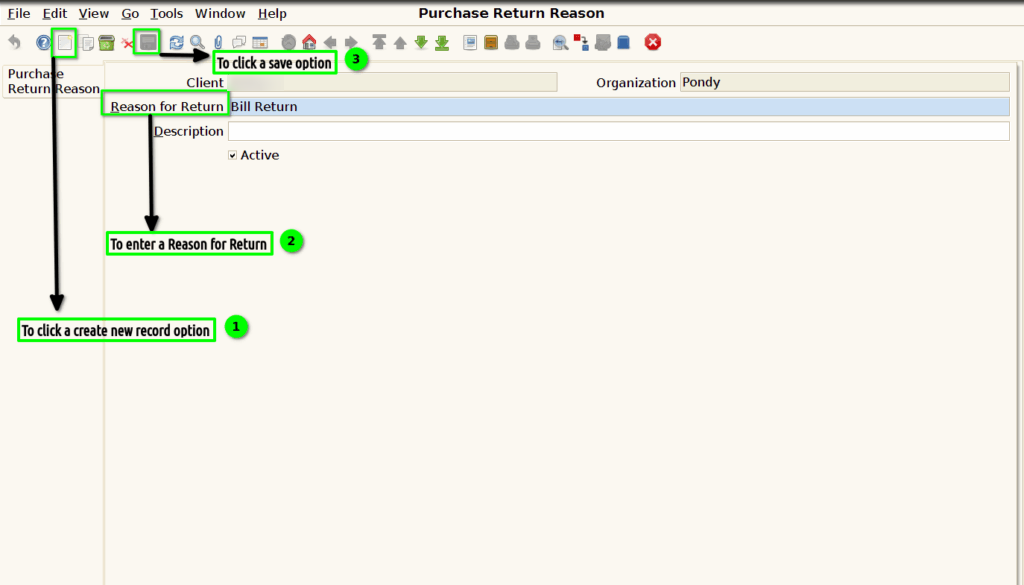
Step 2 :To click a create new record option and to enter the value for Reason for Return and then to save the record.