How to view Dept Wise Sales Report in Adempiere Retail
A Department-Wise Sales Report is a report that shows the sales amount generated by each department in a store or business.
User Access
Who Can Access
- Admin
- Back Office
- Purchase Manager
- Manager
What User Can Do
- View Department Sales Summary
- Apply Filters
- Drill Down Details
- Export or Print the Report
- Use Report for Decision-Making
Pre-Requisite Activities
- Departments Must Be Configured
- Sales Data Should Be Updated
- POS / Billing Systems Must Be Synced
- User Should Have Required Access
- Master Data Should Be Correct
Business Rules
- Sales must be calculated only for completed and posted bills
- Voided or cancelled bills must not be included
- Returns must be shown as negative sales
- Data should be shown only for the selected date range
- Tax, discount, and net sales should be calculated as per business logic
User Interface
STEP 1: To click a Dept Wise Sales Report in Menu.

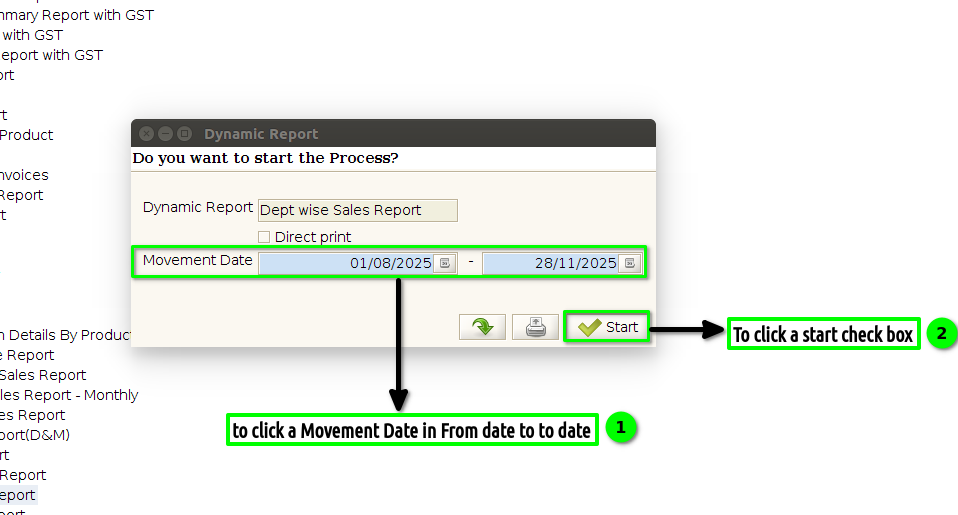
STEP 2: To select a Movement date for From date to To date.And then to click a start check box.
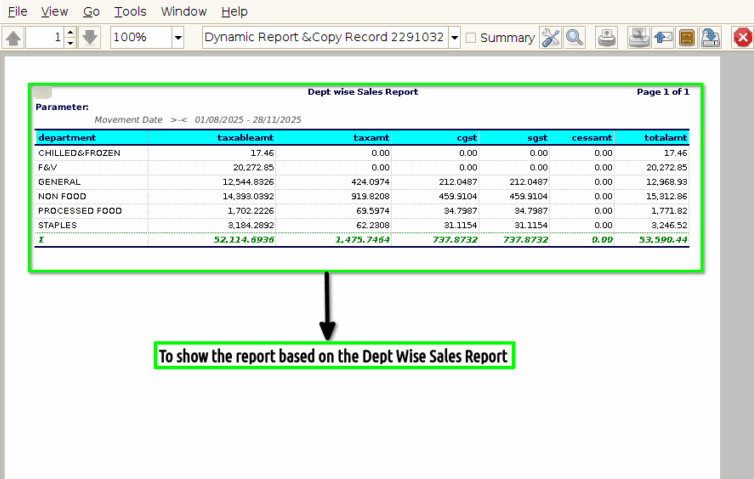
STEP 3: Once to complete the process to show the report based on the given parameter.