How to view Customer Wise Sales Monthly Report in Adempiere Retail
A Customer Wise Sales Monthly Report is a report that shows,How much each customer bought from your business in a specific month.
User Access
Who Can Access
- Admin
- Head cashier
- Sales Manager
- Manager
What User Can Do
- Analyze Customer-Wise Sales Performance
- Compare Monthly Sales by Customer
- Identify Key or High-Value Customers
- Plan Marketing or Sales Offers
Prerequisite Activities
- Maintain Accurate Customer Records
- Record Every Sale with Customer Details
- Reporting Period
- Validate Data Accuracy
Business Rules
- Include Only Completed and Finalized Sales
- Reporting Period (Monthly)
- Total Sales Amount per Customer
- Handle Returns and Credit Notes Appropriately
User Interface
Step 1 : Select ‘Customer Wise Sales – Monthly Report’ in Menu -> Sales reports > Manager report > Customer Wise Sales – Monthly Report or Search Customer Wise Sales – Monthly Report.

Step 2 : Select the date range to open the Customer Wise Sales – Monthly Report.
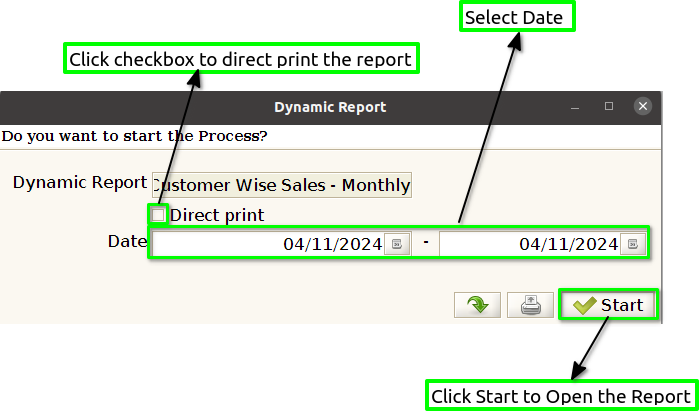
Step 3 : To view a preview of the Customer Wise Sales – Monthly Report.

Year : By adding the year in your Customer Wise Sales – Monthly Report, you provide clear context about the time period the data represents, which is crucial for analyzing annual sales trends, tracking customer behavior, and comparing performance across years.
Month : By adding the month to your Customer Wise Sales – Monthly Report, you help provide clear, time-sensitive insights into customer behavior for a specific month. It allows businesses to track and analyze customer purchasing trends, manage sales strategies effectively, and improve their understanding of seasonal sales fluctuations.
Customer Name : To show the customer name in the Customer Wise Sales – Monthly Report, it’s essential to ensure that each transaction is associated with a unique customer, and the report displays the corresponding customer name for each sale or group of sales.
Sales Amount : To show the sales amount in the Customer Wise Sales – Monthly Report, it is essential to track the total sales value for each customer during the reporting period (monthly). The sales amount typically refers to the total monetary value of purchases made by each customer, including the sum of all transactions within that month.
Running Total : To show a running total in the Customer Wise Sales – Monthly Report, you will need to include a column that aggregates the sales values progressively for each customer, summing up their total sales over the course of the month as the report data is presented.